
If you’re looking to enhance your child’s creativity and learning, coding block toy systems could be the perfect solution. These kits not only entertain but also introduce essential STEM concepts. With options for various age groups, you’ll find toys that encourage problem-solving and logical thinking. Curious about which systems stand out? Let’s explore the top ten that can make a meaningful impact on your child’s development.
Makeblock mBot Robot Kit for Kids (Aged 8-12)

The Makeblock mBot Robot Kit is an ideal choice for kids aged 8-12 who are enthusiastic to plunge into the world of coding and robotics. This kit simplifies coding with engaging, game-based tutorials and four exciting projects, like line-following and obstacle avoidance. You’ll appreciate the clear visual instructions and coding tips that make troubleshooting a breeze. Assembly takes just 15 minutes, ensuring your child enjoys the building process. As they progress from block-based coding to Arduino, they’ll develop valuable problem-solving and logical thinking skills. It’s a fantastic gift that inspires creativity, innovation, and a love for STEM learning.
Best For: Kids aged 8-12 who are eager to explore coding and robotics in a fun and engaging way.
Pros:
- Engaging game-based tutorials that make learning coding enjoyable.
- Quick assembly time of approximately 15 minutes, keeping kids engaged.
- Encourages development of problem-solving and logical thinking skills through hands-on projects.
Cons:
- Limited to specific projects, which may not appeal to all interests.
- Requires a computer or tablet for coding, which could be a barrier for some users.
- May require adult supervision for younger kids during assembly and setup.
Makeblock Cyberpi Project-Based Kit for Kids (Ages 8-12)
For kids aged 8-12, the Makeblock Cyberpi Project-Based Kit stands out as an ideal choice for introducing programming concepts. This programmable microcomputer supports both Scratch and Python, making it perfect for gradual learning. With built-in WiFi and Bluetooth, your child can connect to various projects easily. The kit includes sensors like light detectors and microphones, encouraging exploration in data science and AI. Plus, the expansion board allows for exciting projects, from video games to voice-controlled applications. With 37 thorough lessons, it’s designed for both self-learners and classrooms, ensuring an engaging educational experience.
Best For: Kids aged 8-12 who are interested in learning programming concepts through hands-on projects and activities.
Pros:
- Supports both Scratch and Python programming, allowing for gradual learning.
- Equipped with various built-in sensors and connectivity options, fostering creativity and exploration in projects.
- Includes a comprehensive curriculum with 37 lessons suitable for both classroom and individual learning.
Cons:
- May require adult supervision for younger children, especially with advanced projects.
- The complexity of some projects might be challenging for complete beginners without prior experience.
- Limited to the features provided in the kit, which may restrict more advanced users looking for extensive customization.
Learning Resources Botley the Coding Robot

Engaging and educational, Botley the Coding Robot is perfect for young learners aged 5 and up who are enthusiastic to plunge into the world of programming. This screen-free coding toy introduces your child to programming fundamentals through fun play. With 80-step programming capabilities, loops, and advanced obstacle detection, Botley adapts to your child’s growing skills. It’s ready to use right out of the box, and the simple remote coding system makes it easy to master. Plus, with detachable arms, coding cards, and accessories, your child can create endless obstacle courses while fostering critical thinking and problem-solving skills.
Best For: Botley the Coding Robot is best for children aged 5 and up who are eager to learn programming through interactive play.
Pros:
- Engages children with screen-free coding activities, promoting STEM skills.
- Offers 80-step programming capabilities, allowing for progressive learning.
- Includes various accessories for creative play and problem-solving challenges.
Cons:
- Requires 5 AAA batteries that are not included in the package.
- May have a learning curve for some children unfamiliar with coding concepts.
- Limited to the physical components provided, which may restrict imaginative play for some users.
5-in-1 STEM Robot Building Kit for Kids (603 PCS)

Designed for kids aged 8 to 16, the 5-in-1 STEM Robot Building Kit offers an exciting way to immerse yourself in robotics and engineering. With 603 pieces, you’ll build five unique models that spark creativity and innovative thinking. This kit promotes STEM learning through hands-on play, enhancing problem-solving skills as you think like an engineer. Plus, you’ll enjoy dual remote control modes and various functions, allowing your creations to move in all directions and perform 360° rotations. Easy-to-follow instructions make assembly simple, and with parental involvement, it’s a fantastic bonding experience while learning together. Enjoy the adventure!
Best For: Kids aged 8-16 who are interested in robotics, engineering, and creative problem-solving.
Pros:
- Promotes hands-on STEM learning while fostering creativity and innovative thinking.
- Offers dual remote control modes and multiple functions for engaging play.
- Easy assembly with clear instructions enhances the building experience and can be a bonding activity with parents.
Cons:
- Some pieces may be small, posing a choking hazard for younger siblings.
- Requires parental supervision for younger users, which may not appeal to all families.
- The complexity of certain models may be challenging for beginners without assistance.
Makeblock mBot Robot Kit for Kids Ages 8-12

The Makeblock mBot Robot Kit stands out as an ideal choice for kids ages 8-12 who are enthusiastic to plunge into the world of coding and robotics. This entry-level coding robot promotes STEM education, teaching programming through engaging software. Kids can assemble the mBot in just 15 minutes, transforming it into a remote control car with line-following and obstacle avoidance features. With coding cards and access to free apps, project creation is a breeze. Plus, it’s compatible with over 100 electronic modules. This kit makes a perfect gift for any occasion, inspiring creativity and learning in young minds.
Best For: Kids ages 8-12 who are interested in learning coding, robotics, and electronics through hands-on experience.
Pros:
- Promotes STEM education and critical thinking skills through interactive learning.
- Easy assembly in just 15 minutes, making it accessible for kids.
- Compatible with a wide range of electronic modules and parts, enhancing creative possibilities.
Cons:
- Batteries are not included, requiring additional purchases.
- May require adult supervision for younger children during assembly and programming.
- Limited advanced programming options for older children or more experienced users.
Teach Tech Mech 5, Mechanical Coding Robot
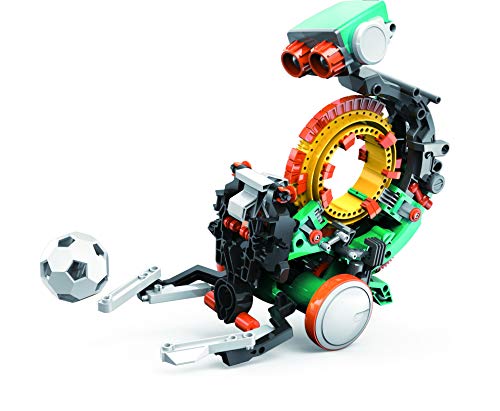
For budding engineers aged 10 and up, the Teach Tech Mech 5 Mechanical Coding Robot stands out as an ideal choice in the domain of coding block toy systems. This mission-based robot introduces you to mechanical engineering principles and basic coding skills, making it perfect for STEM education. You can engage creatively by building, coding, and watching your robot perform actions like throwing, lifting, and drawing. Simply snap the Coding buttons onto the Coding wheel to see it in action. Mech-5 emphasizes experiential learning, ensuring a fun and interactive way for you to explore engineering and innovation.
Best For: Future engineers aged 10 and above who are interested in hands-on learning and coding.
Pros:
- Encourages creativity and innovation through interactive building and coding.
- Teaches mechanical engineering principles and basic coding skills in a fun way.
- Offers a variety of actions (throwing, lifting, drawing) to engage users.
Cons:
- May require adult supervision for younger users when building or coding.
- Limited to basic coding skills, which may not challenge more advanced learners.
- The complexity of assembly may be frustrating for some users without prior experience.
Makeblock mBot2 Rover Emo Robot Programming Kit for Kids

If you’re looking for an engaging way to introduce kids aged 8-12 to coding and robotics, the Makeblock mBot2 Rover Emo Robot Programming Kit is an excellent choice. This interactive kit combines remote control coding with outdoor play, inspiring creativity and problem-solving. Kids start by assembling the mBot2, then progress to the Rover, enhancing their building experience. Rover’s fun features include dancing, music, and customizable expressions, making it a playful companion. With 13 online coding cases and a free mBlock app, kids can easily shift from Scratch to Python, making learning coding enjoyable and accessible.
Best For: Kids aged 8-12 who are interested in coding and robotics and enjoy outdoor play.
Pros:
- Engages children in STEM education through hands-on building and coding experiences.
- Offers interactive features like dancing and customizable expressions, enhancing playtime.
- Provides a smooth transition from beginner coding (Scratch) to more advanced coding (Python) through the mBlock app.
Cons:
- May require adult supervision during assembly and initial coding to ensure safety and understanding.
- Some users may find the outdoor capabilities limited by weather conditions or terrain restrictions.
- The complexity of coding projects may be challenging for younger children without prior experience.
PlayShifu Plugo Coding Kit – Interactive Coding Games for Kids Ages 4-10

Looking for an engaging way to introduce your child to coding? The PlayShifu Plugo Coding Kit is perfect for kids ages 4-10, combining fun and learning. With 33 coding tiles and a gamepad, your child will explore coding fundamentals through interactive games. The kit features three games with over 200 levels, promoting critical skills like problem-solving and creativity. Simply download the Plugo app on compatible devices, and watch as your child sets off on an exciting coding journey. This STEM toy not only entertains but also equips young minds with essential skills for the future. It’s an ideal educational gift!
Best For: The PlayShifu Plugo Coding Kit is best for children ages 4-10 who are eager to learn coding in a fun and interactive way.
Pros:
- Engaging and interactive learning experience with over 200 levels and three different games.
- Develops essential skills such as problem-solving, creativity, and logical thinking.
- Compatible with a wide range of iOS and Android devices, making it accessible for many families.
Cons:
- Not compatible with Amazon Fire devices, limiting some users.
- Requires a compatible device and app download, which may be a barrier for some.
- Customer ratings indicate mixed feedback, with an average rating of 3.9 out of 5 stars.
Makeblock mBot Ultimate 10 in 1 Robot Building Toys

The Makeblock mBot Ultimate 10 in 1 Robot Building Toys stands out as an exceptional choice for aspiring engineers and coders aged 12 and up. This hands-on kit lets you build 10 unique models, including a robotic arm and a remote-controlled tank. With the user-friendly mBlock software, you’ll enjoy a fun coding experience, starting with drag-and-drop blocks before moving to text-based coding using Arduino IDE or Python. Constructed from durable aluminum alloy, it’s lightweight and safe, promoting long-term use. This STEM toy not only sparks creativity but also makes an ideal gift for birthdays, holidays, or educational activities.
Best For: Aspiring engineers and coders aged 12 and up who are interested in hands-on robotics and coding experiences.
Pros:
- Versatile Build Options: Allows users to create 10 different models, enhancing creativity and problem-solving skills.
- User-Friendly Software: Offers a gradual learning curve with drag-and-drop coding for beginners and text-based coding for advanced users.
- Durable and Safe Design: Made from industrial-grade aluminum alloy, ensuring longevity and safety during use.
Cons:
- Age Limitation: Primarily targeted at ages 12 and up, which may not suit younger children or complete beginners without adult assistance.
- Complexity for Some Models: Certain builds may require more advanced skills, potentially posing a challenge for beginners.
- Software Dependency: Users must rely on software for coding, which may not appeal to those preferring offline or non-digital methods.
Sphero Bolt Coding & AI Learning Robot Ball

Sphero Bolt stands out as an exceptional choice for children aged 8 and up, combining play with powerful learning opportunities. This durable, waterproof robot ball measures 2.87 inches and weighs 1.1 pounds, making it perfect for young explorers. With coding methods like Draw, Blocks, and text-based languages, you can help your child grasp logic and problem-solving skills. The dynamic LED matrix displays real-time data, enhancing their understanding of coding inputs and outputs. Plus, with over 4 hours of playtime and advanced sensors, Sphero Bolt encourages creativity while fostering critical thinking and responsible AI usage. It’s a fun, educational experience!
Best For: Sphero Bolt is best for children aged 8 and up who are interested in coding and AI learning through interactive play.
Pros:
- Encourages creativity and critical thinking through hands-on coding projects.
- Durable and waterproof design allows for outdoor play and exploration.
- Offers multiple coding methods (Draw, Blocks, Python, JavaScript) to cater to different learning styles.
Cons:
- Requires a smartphone or tablet for full functionality, which may not be accessible to all users.
- Limited playtime of 4+ hours may require frequent recharging during extended use.
- Some advanced features may be challenging for younger users or beginners without prior coding experience.
Factors to Consider When Choosing Coding Block Toy Systems
When choosing a coding block toy system, you’ll want to take into account factors like age appropriateness and learning objectives. Think about the complexity level that matches your child’s skills and the interactivity features that will keep them engaged. Don’t forget to check compatibility options to guarantee the system works with any existing tools you may have.
Age Appropriateness
Choosing the right coding block toy system is essential for ensuring your child engages with the material at their developmental level. Age appropriateness plays a significant role in this selection process. For younger kids aged 4 to 7, look for toys that focus on foundational programming concepts through visual, tactile play without screens. As your child grows, around ages 8 to 12, opt for kits that introduce more complex languages like Scratch and Python, enhancing their understanding of coding logic. For teens aged 12 and up, consider advanced kits that offer Arduino compatibility and project-based learning, allowing them to explore real-world applications. Choosing age-appropriate toys keeps challenges suitable, boosting engagement while preventing frustration.
Learning Objectives
While selecting a coding block toy system, it is important to evaluate the learning objectives that align with your child’s interests and abilities. Look for options that cater to their age and skill level, ensuring they face suitable challenges without feeling overwhelmed. Effective coding toys should promote STEM learning by combining programming concepts with hands-on activities, allowing kids to apply their knowledge in real-world situations. Clear instructions and progressive learning paths are vital for building their confidence as they advance from simple coding to more complex languages. Additionally, diverse projects and challenges can enhance problem-solving skills and creativity. Finally, interactive features like sensors and connectivity can spark a deeper interest in technology and robotics, fostering a passion for STEM fields.
Complexity Level
Selecting the right coding block toy system requires careful consideration of complexity levels that match your child’s developmental stage and interests. Start by identifying age-appropriate toys, as they’re designed for specific groups, like 4-10 or 8-12 years old. Look for progressive learning paths that begin with simple visual coding and gradually introduce more complex text-based programming. This approach keeps your child engaged as their skills grow. Evaluate the number of coding commands the toy supports; some might offer around 80 steps, while others provide hundreds. Built-in tutorials can guide your child through coding concepts in a structured way. Finally, choose toys that balance fun and educational value to maintain motivation and encourage exploration of coding principles.
Interactivity Features
How do interactivity features influence your child’s coding experience? They play a significant role in boosting engagement. When your child manipulates physical blocks that trigger digital actions, it makes coding tangible and fun. Immediate feedback, like lights and sounds, reinforces their learning by providing real-time responses to their inputs. Advanced options, such as sensors and connectivity, allow projects to react to environmental changes, fostering creativity. Additionally, coding systems with various play modes—like obstacle courses or mission challenges—encourage exploration and experimentation. You’ll also find game-based tutorials and step-by-step guidance that help your child feel accomplished as they master more complex coding concepts. All these features together make learning to code an interactive and rewarding experience!
Compatibility Options
Interactivity features enhance your child’s coding journey, but compatibility options are just as important when choosing the right coding block toy system. Start by considering the system’s compatibility with programming languages like Scratch and Python, which can ease your child’s learning process. Look for cross-platform support, allowing use on various operating systems such as Windows, Mac, and mobile devices for broader accessibility. Check if the toy integrates with other educational tools, enhancing the learning experience and enabling more complex projects. Verify the kit has expansion capabilities, like additional sensors, to inspire creativity. Finally, assess the availability of online resources, tutorials, and community support to maximize your child’s learning and troubleshooting experience.