
When it comes to fostering a love for STEM in kids, coding robot kits can be a game changer. These kits not only make learning enjoyable but also enhance critical thinking and problem-solving skills. With a variety of options available, from simple to more complex, there’s something for every age group. Curious about which ones stand out as the best? Let’s explore the top ten coding robot kits that can transform learning into an engaging adventure.
Coding Robot Kit for Kids (200+ in 1 APP Control Dinosaur Robot Toy)

If you’re looking for an engaging gift for kids ages 6 and up, the Coding Robot Kit for Kids (200+ in 1 APP Control Dinosaur Robot Toy) is an excellent choice. This STEM toy allows kids to build over 200 different robots, including dinosaurs and cars, sparking creativity and logical thinking. With 47 video courses and a user-friendly drag-and-drop coding interface, they’ll learn programming while having fun. The kit includes 600 blocks, sensors, and motors for endless possibilities. Just grab a compatible iOS or Android device to control their creations, and watch as they plunge into an exciting world of coding!
Best For: Kids ages 6 and up who are interested in STEM learning and robotics.
Pros:
- Engages children’s creativity and logical thinking through hands-on building and coding.
- Offers over 200 robot-building possibilities, keeping kids entertained and challenged.
- Includes a user-friendly app with drag-and-drop programming, making coding accessible and fun.
Cons:
- Requires a compatible iOS or Android device for remote control and programming, which is not included.
- Batteries (2x AA) are needed but not provided in the kit.
- Some parents may find the initial setup and programming challenging for younger children without assistance.
Makeblock mBot Robot Kit for Kids (Aged 8-12)

The Makeblock mBot Robot Kit is an excellent choice for kids aged 8-12, offering a hands-on introduction to coding and robotics. With engaging game-based tutorials and four exciting projects like line-following and obstacle avoidance, your child will learn coding through fun challenges. Assembly takes just 15 minutes, encouraging creativity and hands-on learning. As they shift from block-based coding to Arduino programming, they’ll enhance their problem-solving skills. Rated 4.6 out of 5 stars, parents praise its ease of use and educational benefits. This kit is an ideal gift, sparking innovation and excitement for STEM learning in any child.
Best For: Kids aged 8-12 who are interested in learning coding and robotics through engaging projects.
Pros:
- Encourages hands-on learning and creativity with simple assembly and fun projects.
- Provides a structured learning experience with game-based tutorials and instant feedback.
- Highly rated by parents for its educational benefits and ease of use.
Cons:
- Limited to a specific age range, which may not suit older children or adults.
- Requires some parental assistance, particularly for younger children during assembly.
- May need additional components for more advanced projects beyond the initial four provided.
ELEGOO UNO R3 Smart Robot Car Kit V4 for Arduino Robotics

For aspiring young engineers aged 8 to 16, the ELEGOO UNO R3 Smart Robot Car Kit V4 stands out as an excellent choice in coding robot kits. This STEM kit offers hands-on experience with programming and electronics, featuring 24 modules like obstacle avoidance and line tracing. You can easily control it via Android and iOS devices. Assembly is simple, making it perfect for beginners, though some basic electronic knowledge helps. With a customer rating of 4.6 stars, this kit promotes problem-solving and engineering skills while providing a fun learning experience. Immerse yourself in robotics and unleash your creativity!
Best For: The ELEGOO UNO R3 Smart Robot Car Kit V4 is best for aspiring young engineers aged 8 to 16 who are interested in coding and robotics.
Pros:
- Encourages hands-on learning in programming and electronics assembly.
- Includes a variety of modules for diverse robotic functions like obstacle avoidance and line tracing.
- Simple assembly process designed for beginners, making it accessible for kids.
Cons:
- Basic electronic knowledge is recommended, which may deter complete beginners.
- Some users may require additional guidance during assembly and programming.
- Limited to the functionalities provided by the included modules, which may restrict advanced projects.
Makeblock mBot Robot Kit for Kids Ages 8-12

Designed specifically for kids aged 8-12, the Makeblock mBot Robot Kit stands out as an engaging gateway into the world of coding, robotics, and electronics. This entry-level kit simplifies learning through interactive software and step-by-step programming lessons. You’ll love how easy it is to assemble—just 15 minutes with clear instructions! The mBot functions as a remote control car, featuring line-following and obstacle avoidance capabilities. Plus, it’s compatible with over 100 electronic modules, allowing for endless creativity. Packaged well and made from durable metal, it’s the perfect gift for birthdays or summer camps, making learning fun and exciting!
Best For: Kids ages 8-12 who are interested in learning coding, robotics, and electronics in a fun and interactive way.
Pros:
- Easy assembly in just 15 minutes with clear instructions.
- Engaging features like line-following and obstacle avoidance for interactive play.
- Compatible with over 100 electronic modules for expanded creativity and learning.
Cons:
- May require parental assistance for younger or less experienced children.
- Limited advanced features for older or more experienced users.
- Some additional electronic modules and parts may need to be purchased separately for more complex projects.
WhalesBot C3 Pro 12-in-1 Coding Robot Kit for Kids 4

Introducing the WhalesBot C3 Pro 12-in-1 Coding Robot Kit, perfect for young explorers aged 4-7 enthusiastic to plunge into the world of coding and robotics. This interactive STEM toy combines hands-on building with coding lessons through cheerful illustrations and colorful coding cards. With 12 guided models and plenty of open-ended building opportunities, your child will develop creativity and problem-solving skills. The kit includes 4 storybooks, an activity map, and electronic components, all designed with safety in mind. Plus, the Bluetooth-enabled controller and indicator lights help kids spot coding mistakes, making learning fun and engaging!
Best For: Young explorers aged 4-7 who are enthusiastic about coding and robotics.
Pros:
- Encourages creativity and problem-solving skills through interactive building and coding activities.
- Includes a variety of components, such as storybooks and coding cards, for an engaging learning experience.
- Designed with safety in mind, featuring smooth-edged blocks and clear safety warnings.
Cons:
- May require adult supervision for younger children during assembly and coding tasks.
- The learning curve for coding concepts might be challenging for some kids without prior exposure.
- Limited to children aged 4-7, which may not appeal to older kids looking for more advanced robotics.
Makeblock mBot2 Coding Robot for Kids
The Makeblock mBot2 Coding Robot is an excellent choice for kids aged 8-12 enthusiastic to plunge into the world of coding and robotics. This 100% programmable robot features over 8 modes, including Drive and Voice Control, making learning fun. With 10+ advanced sensors, it can follow lines, avoid obstacles, and identify colors. You can control it via Bluetooth, USB, or WIFI. The kit includes 4 project cards and supports Scratch and Python, perfect for beginners. Plus, assembly takes just 30 minutes! It’s an engaging gift that promotes STEM learning and encourages hands-on exploration, ideal for family activities or classrooms.
Best For: Kids aged 8-12 who are interested in learning coding and robotics in a fun and interactive way.
Pros:
- Engaging and fun modes such as Drive, Voice Control, and Musician to enhance learning.
- Includes comprehensive coding guides and supports popular programming languages like Scratch and Python.
- Easy assembly in approximately 30 minutes, making it suitable for family activities or classroom use.
Cons:
- Limited to kids within the 8-12 age range, potentially excluding older learners.
- May require adult supervision for assembly and initial setup for younger users.
- Advanced features may be overwhelming for complete beginners without guidance.
Thames & Kosmos My Robotic Pet: Coding Chameleon STEM Kit

For kids aged 8 and up, the Thames & Kosmos My Robotic Pet: Coding Chameleon STEM Kit offers an exciting way to explore coding and robotics without screens. You’ll build a 15-inch chameleon that moves realistically, with articulated eyes and limbs. This kit promotes unplugged learning through its color sensor, infrared sensor, and RGB LEDs, allowing you to use physical action cards to program movements. With three play modes—Coding, Wild, and Pet—you’ll engage in hands-on fun while learning engineering concepts. The thorough 48-page manual guides you through assembly and exploration, making it perfect for collaborative projects with family or friends.
Best For: Kids aged 8 and up who are interested in coding and robotics through hands-on, screen-free learning experiences.
Pros:
- Encourages unplugged learning and creativity through physical programming.
- Realistic design with articulated joints for engaging play and exploration.
- Comprehensive manual supports collaborative assembly and educational exploration.
Cons:
- Requires adult assistance for assembly, which may limit independent play for younger users.
- Some components may be complex, potentially leading to frustration during assembly.
- Limited to specific play modes, which might reduce long-term engagement.
Makeblock mBot Ranger 3 in 1 Robotics for Kids (STEM Science Kit)

Designed specifically for kids ages 8-12, the Makeblock mBot Ranger 3 in 1 Robotics Kit offers an engaging way to explore the world of STEM learning. With three robot shapes—Land Raider, Nervous Bird, and Dashing Raptor—your child can build diverse projects. The kit includes 16 coding tasks that enhance creativity, logical thinking, and problem-solving skills. Assembly is easy with clear instructions, and the mBlock5 Programming App supports progression from beginner to expert. Built with sturdy materials, the mBot Ranger thrives on various terrains, making it perfect for indoor and outdoor fun. It’s a fantastic gift for birthdays or educational activities!
Best For: Kids ages 8-12 who are interested in learning about robotics, coding, and engineering through hands-on projects.
Pros:
- Engaging 3 in 1 design allows for multiple robot configurations, enhancing creativity and learning.
- Easy assembly with clear instructions promotes family collaboration and teamwork.
- Durable construction and versatile capabilities enable play on various terrains, suitable for both indoor and outdoor environments.
Cons:
- Requires 6 AA or lithium batteries, which are not included in the kit.
- May require adult supervision for younger children during assembly and programming.
- Some advanced programming concepts may be challenging for beginners without prior experience.
Teach Tech Mech 5, Mechanical Coding Robot
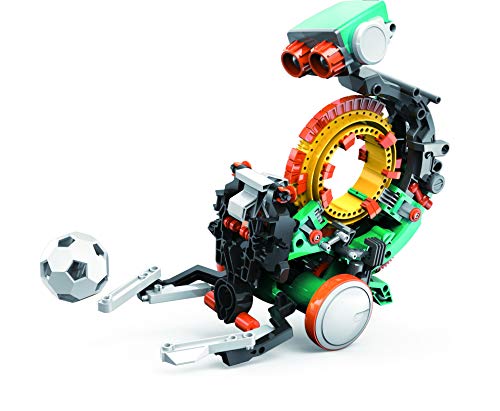
If you’re looking to inspire a budding engineer aged 10 and above, the Teach Tech Mech 5 Mechanical Coding Robot is an excellent choice. This entry-level robot introduces mechanical engineering and coding basics through hands-on learning. You can activate its various functions—like throwing, lifting, kicking, and drawing—simply by snapping Coding buttons onto the Coding wheel. As you build and code, you’ll observe the robot’s movements, reinforcing your understanding of engineering concepts. Mech-5 encourages experiential learning, making it perfect for young learners enthusiastic to explore the fascinating world of technology and mechanics. Get ready to ignite creativity and curiosity!
Best For: Young learners aged 10 and above who are interested in exploring mechanical engineering and coding.
Pros:
- Encourages hands-on learning and experiential engagement with engineering concepts.
- Versatile functionality allows for various actions like throwing, lifting, kicking, and drawing.
- Designed for young engineers, making it an engaging introduction to STEM fields.
Cons:
- May require adult supervision for younger users to ensure safe assembly and operation.
- Limited to basic coding and mechanical principles, which might not satisfy advanced learners.
- Components may be small and could pose a choking hazard if not used carefully.
Sillbird Robot Building Kit with Remote Control for Kids
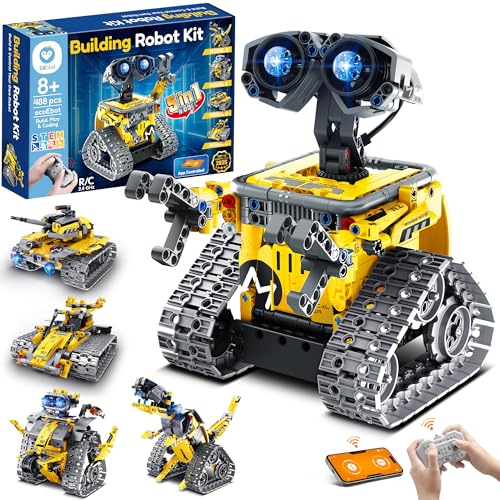
The Sillbird Robot Building Kit with Remote Control is perfect for boys aged 8 to 13 who are enthusiastic to plunge into the world of robotics and coding. With 488 pieces, you can create five different models, including robots and dinosaurs. The kit offers clear instructions, making it easy to build independently or with family. You’ll enjoy controlling your creations via Bluetooth or remote, and the basic programming features add an interactive twist. Plus, it promotes STEM learning while encouraging creativity. Ideal for birthdays or holidays, this engaging kit combines fun with educational value to celebrate achievements.
Best For: The Sillbird Robot Building Kit is best for boys aged 8 to 13 who are interested in robotics and coding.
Pros:
- Encourages STEM learning and creativity through hands-on building and programming.
- Includes clear instructions for both independent and family assembly.
- Offers multiple control options (Bluetooth app and remote control) for interactive play.
Cons:
- Requires a D battery which may need replacement over time.
- Some models may be more complex, potentially requiring adult assistance for younger builders.
- Limited to five models, which may reduce long-term engagement after initial builds.
Factors to Consider When Choosing Coding Robot Kits for Kids
When you’re choosing a coding robot kit for kids, there are a few key factors to keep in mind. Consider the age appropriateness, educational content, and how complex the assembly is. You’ll also want to think about the programming interface and whether the kit offers versatility and expansion options for future learning.
Age Appropriateness
Choosing the right coding robot kit for your child involves understanding age appropriateness, as these kits are designed with specific age ranges in mind. Typically, kits cater to groups like 4-7 years, 8-12 years, or 10 years and older, ensuring tasks match children’s cognitive abilities. Younger kids thrive with simpler, interactive kits that focus on foundational STEM concepts through play, while older kids can tackle more complex programming and engineering challenges. Each kit includes age-appropriate components and instructions tailored to developmental stages, creating a safe learning environment. Additionally, consider your child’s prior experience and interest in technology, as these factors can greatly affect their engagement and ability to benefit from the kit.
Educational Content
Selecting a coding robot kit that offers rich educational content can greatly enhance your child’s learning experience. Look for kits that introduce various programming languages like Scratch or Python, catering to different learning stages and boosting coding skills. Engaging tutorials and hands-on projects encourage problem-solving and logical thinking, making learning interactive. Educational content should also cover robotics, electronics, and mechanics, helping your child grasp essential technology principles. Extensive instructional materials, such as manuals or video courses, support independent exploration. Additionally, choose kits that allow for multiple projects or models, fostering creativity and keeping your child engaged in STEM learning for longer periods. This way, your child can enjoy a well-rounded and enriching coding experience.
Assembly Complexity
Understanding the assembly complexity of coding robot kits is key to ensuring a smooth and enjoyable experience for both you and your child. Some kits can be assembled in just 15 minutes, while others may take longer due to more parts and intricate designs. Look for kits that provide clear, step-by-step instructions to simplify the process. If you have younger children, opt for kits with fewer components for a straightforward assembly. For older kids or those with experience, more complex kits can offer deeper learning opportunities. Modular parts often make assembly easier and allow for modifications, enhancing hands-on learning. Choosing the right complexity can greatly impact the overall educational experience and your child’s engagement.
Programming Interface
While exploring coding robot kits for kids, the programming interface plays an essential role in determining how effectively your child can engage with the technology. Some kits feature a drag-and-drop system that simplifies coding for younger children, while others offer text-based programming for advanced learners. Many also provide mobile app support, enabling kids to code and control their robots using their iOS or Android devices. Look for interfaces that include interactive tutorials and instant feedback, helping your child see the results of their coding immediately. A well-designed interface promotes creativity and problem-solving skills, letting kids program robots to perform tasks, avoid obstacles, or react to their surroundings. Kits supporting multiple programming languages can enhance their learning experience.
Versatility and Expansion
When considering coding robot kits for kids, versatility and expansion options are essential for fostering long-term interest and skill development. Look for kits that support multiple programming languages, allowing your child to progress from block-based coding to more advanced languages like Python. Choose kits that enable the construction of various models, like vehicles or animals, to spark creativity. Compatibility with popular building block brands can enhance your child’s experience, letting them integrate additional components. Expansion options, such as add-on packs, offer opportunities to tackle more complex projects. Finally, interactive features like remote control and app connectivity make playtime varied and engaging, enriching your child’s learning adventure in robotics and programming.
Safety Features
Choosing a coding robot kit for your child involves more than just fun and learning; safety should be a top priority. Look for kits with smooth-edged components and no sharp parts to prevent injuries during play. For younger children, opt for kits made from non-toxic materials, making certain they’re free from harmful substances. Always check the instructional materials for clear safety warnings and guidelines, so you and your child understand the proper usage and potential hazards. Additionally, child-friendly designs, like rounded corners and secure battery compartments, can enhance safety during assembly and operation. Finally, verify the kit complies with safety standards, such as ASTM or EN71, to guarantee that it meets essential regulatory requirements for toys.
Durability and Materials
Safety is just one of the many factors to keep in mind as you explore coding robot kits for kids. Durability is vital, so pay attention to the materials used. ABS plastic is a popular choice for its toughness and safety, as it’s free of harmful substances. Look for kits that incorporate metal components, which can withstand rough handling and extend the kit’s lifespan. Weight matters too; lighter models may not endure drops as well as heavier, sturdier options. Confirm the kit has rounded edges and non-toxic materials to keep your child safe. Finally, consider how easy the kit is to assemble. Kits designed with reliable connections are less likely to break, enhancing overall durability and playability.
Interactive Elements
As you immerse yourself in the world of coding robot kits for kids, interactive elements play an essential role in enhancing both engagement and learning. Look for kits that feature remote control, obstacle avoidance, and line-following capabilities, as these keep kids excited and involved. Many kits use app interfaces with drag-and-drop coding, making it easier for children to grasp coding concepts visually. Physical components like coding cards or blocks add a tactile element, allowing for hands-on manipulation and immediate feedback. Game-based tutorials and projects encourage problem-solving and logical thinking through fun challenges. Plus, real-time interaction via sensors and motors helps kids see the practical applications of coding, deepening their understanding of robotics and programming.