
Computer vision robot kits are a smart way to explore AI, robotics, and coding in one hands-on project. Whether you want a vision-driven rover, a walking robot, or a robotic arm, the right kit can make learning feel practical and fun.
This roundup focuses on 10 standout options for 2026, with an eye toward setup, expandability, programming support, and the kind of real-world vision tasks each kit is built to handle.
Best 10 Computer Vision Robot Kits Picks for 2026
AI-Enabled Learning Robot
SunFounder Raspberry Pi Vision Bot

- ChatGPT-4o voice and visual interaction
- Camera, mic, ultrasonic, touch, and gyroscope
- 12 servos for 32 robot actions
Best For: Beginners who want an interactive Raspberry Pi vision robot
Open-Source Vision Rover

- Raspberry Pi 5 robot with smoother camera performance
- Multimodal AI vision and voice interaction
- Mecanum wheels for 360° movement
Best For: Pi 5 builders who want an AI vision robot car
Six-Leg Vision Walker

- Face recognition and ultrasonic ranging
- Six-legged walking design with camera head
- Python code plus detailed assembly guide
Best For: Makers who want a walking robot with camera features
AI Vision Patrol Car
Yahboom Raspbot V2 ROS2 Edition
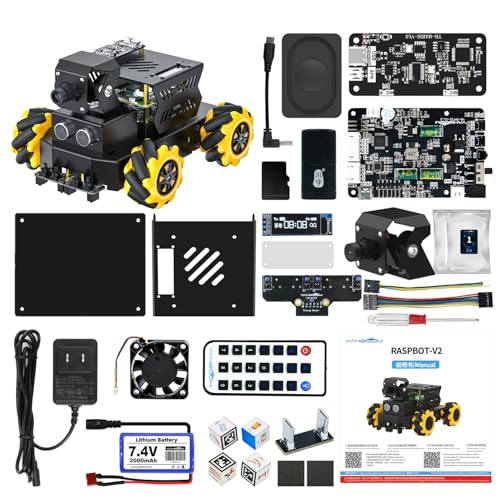
- AI vision, tracking, and voice interaction
- Mecanum wheels with patrol and ultrasonic sensors
- APP, PC, remote, handle, and FPV control
Best For: Learners who want a ROS2-focused AI vision robot car
Open-Source Learning Pick
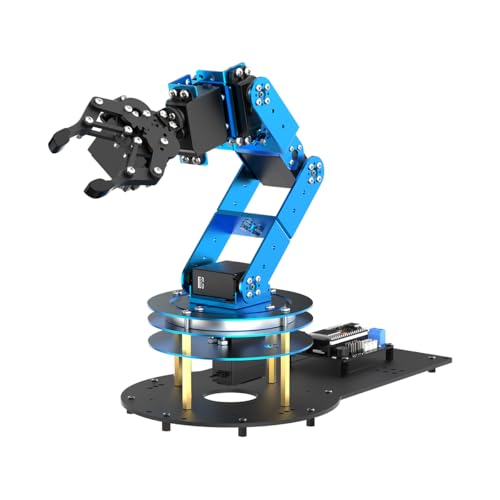
- ESP32 and Arduino compatible
- Supports AI vision sensor expansion
- Comes with 200+ tutorials
Best For: students, engineers, and makers building expandable STEM projects
AI Spider Platform
SunFounder PiCrawler Robot Kit

- Works with multiple LLMs and Raspberry Pi
- Includes camera, mic, speaker, STT, and TTS
- Supports vision tasks like face and color recognition
Best For: Raspberry Pi learners exploring AI, voice control, and computer vision
Vision Car Choice
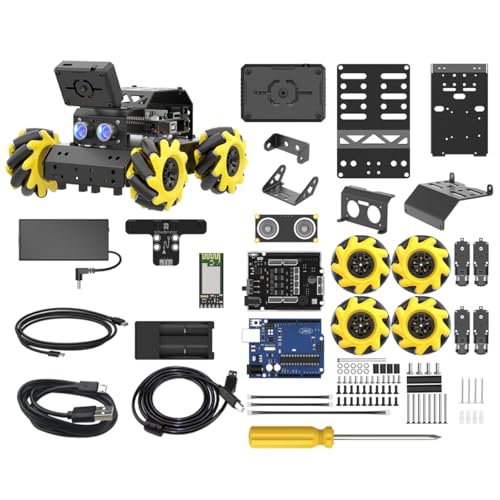
- Arduino UNO R3 with expansion board
- ESP32-S3 vision module with WiFi video
- 360° movement with Mecanum wheels
Best For: Arduino learners wanting a vision-enabled robot car
Embodied Learning Pick
Hiwonder SO-ARM101 Open-Source 6-Axis Arm
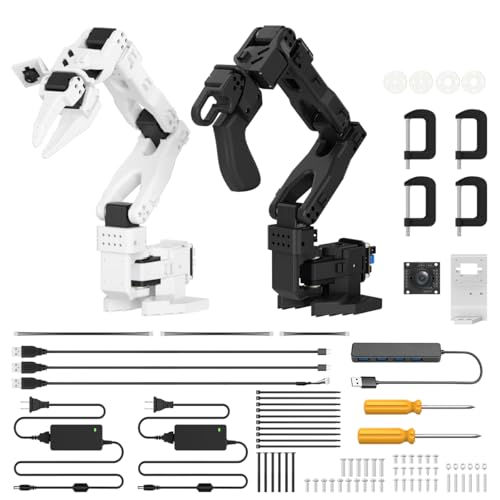
- LeRobot-compatible for imitation learning
- Dual-camera vision for manipulation and awareness
- 12 bus servos with magnetic feedback
Best For: Open-source AI arm projects and research-style vision learning
Multi-Input STEM Pick
xArmAI Vision and Voice Robotic Arm
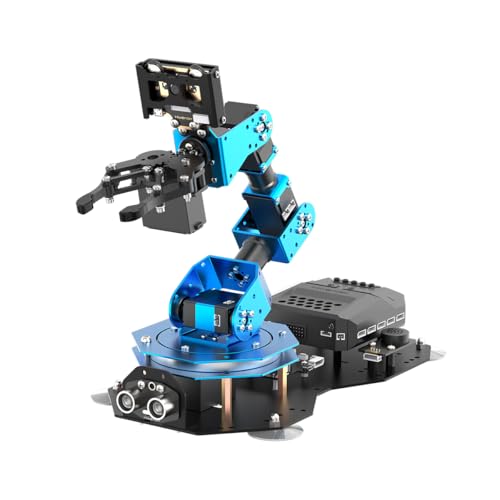
- Arduino, Scratch, and Python support
- WonderCam vision plus WonderEcho voice control
- CoreX controller allows secondary development
Best For: STEM learners who want vision, voice, and coding practice
Mobile Vision Pick
MasterPi Raspberry Pi AI Robot Car Kit

- 5DOF arm with HD camera for vision tasks
- OpenCV supports sorting, tracking, and line following
- Mecanum chassis enables 360° movement
Best For: Raspberry Pi 5 builders who want a moving vision robot
AI-Enabled Learning Robot – SunFounder Raspberry Pi Vision Bot
If you’re comparing computer vision robot kits, this SunFounder model stands out for combining a Raspberry Pi platform with camera-based recognition, voice interaction, and FPV. It is built to help users explore vision, hearing, and touch in one kit while still supporting Python programming and guided learning resources.
Best For: Beginners and hobbyists who want an interactive Raspberry Pi robot with vision, voice, and app control.
Pros:
- Integrates ChatGPT-4o for voice interaction and visual recognition.
- Includes camera, mic, speaker, ultrasonic sensor, touch, and gyroscope for multi-sense interaction.
- Supports app control and FPV for real-time robot viewing and operation.
- Uses 12 servos to deliver 32 actions, including walking and playful motions.
Cons:
- Requires a Raspberry Pi-compatible setup to use the platform fully.
- Best suited to users comfortable with assembly and guided project work.
This is a strong choice if you want a feature-rich learning robot rather than a simple demo platform. The focus is on hands-on interaction, camera-based tasks, and approachable project support.
Open-Source Vision Rover – Yahboom Raspbot V2 for Pi 5
For shoppers focused on computer vision robot kits, this Yahboom Raspbot V2 is built around Raspberry Pi 5 and a smoother camera experience. It adds multimodal AI interaction, FPV, and open-source Python learning, making it a practical platform for experimenting with vision, movement, and robot control.
Best For: Raspberry Pi 5 users who want a vision-focused, open-source AI robot car for learning.
Pros:
- Raspberry Pi 5-based platform designed to improve AI performance and camera smoothness.
- Supports multimodal AI vision and voice interaction through an OpenRouter-centric system.
- Offers APP, PC, remote control, handle control, and FPV image transmission.
- Includes mecanum wheels for 360° movement plus obstacle avoidance, following, and patrol sensors.
Cons:
- Requires you to assemble the camera, main control, and expansion board yourself.
- Raspberry Pi 5 is not included in this version.
This kit is a good fit if you want a more advanced robot car platform with real AI and movement flexibility. The open-source tutorials and Python code make it especially useful for hands-on learning.
Six-Leg Vision Walker – Freenove Hexapod Robot Kit
If you’re shopping computer vision robot kits for a walking robot platform, this Freenove hexapod gives you face recognition, ultrasonic ranging, and a camera in a six-legged design. It is aimed at users who want a detailed assembly experience with Python code and wireless control options.
Best For: Students and makers who want a walking Raspberry Pi robot with camera-based features.
Pros:
- Six legs with three motors each create a more advanced walking robot form.
- Includes a rotatable head with camera and ultrasonic distance sensor.
- Supports face recognition, self-balancing, and ultrasonic ranging.
- Comes with a step-by-step assembly guide and complete Python code.
Cons:
- Raspberry Pi and battery are not included.
- Assembly is required and the tutorial is a download, not a paper guide.
This kit makes sense if you want a more mechanical, legged robot with vision features rather than a simple rover. Its learning value is high, but it does expect a bit more setup effort.
AI Vision Patrol Car – Yahboom Raspbot V2 ROS2 Edition
Among computer vision robot kits, this Yahboom Raspbot V2 ROS2 edition targets users who want AI vision, tracking, and a strong control system around Raspberry Pi 5. It combines FPV, multimodal AI, and open-source learning resources in a metal-chassis robot car format.
Best For: Raspberry Pi 5 learners who want a ROS2-ready AI vision robot car platform.
Pros:
- Built for Raspberry Pi 5 with improved AI performance and smoother camera images.
- Supports AI vision, tracking, and multimodal voice interaction.
- Offers APP, PC, remote, and handle control plus FPV image transmission.
- Includes mecanum wheels, patrol sensors, ultrasonic sensing, and an OLED temperature display.
Cons:
- Raspberry Pi 5 is not included with this kit.
- Requires assembly of the camera, main control, and expansion board.
This is a solid pick if you want a robot car that mixes AI vision features with a structured learning platform. The ROS2-oriented design and open-source code make it useful for robotics study and experimentation.
Open-Source Learning Pick – LeArm 6DOF Robotic Arm Kit
If you want computer vision robot kits that are built for hands-on experimentation, the LeArm Open Source robotic arm is a flexible place to start. It combines ESP32 control, Arduino compatibility, and open expansion ports, so you can grow from basic movement into sensor-driven projects and secondary development.
Best For: Students, engineers, and makers who want an open-source robotic arm for programming, AI exploration, and expandable STEM projects.
Pros:
- ESP32 controller with Arduino compatibility for flexible programming.
- Supports sensor expansion, including AI vision, voice, ultrasonic, and acceleration modules.
- Includes 200+ tutorials, sample experiments, open-source code, and schematics.
- Multiple control options: app, PC software, and wireless controller.
Cons:
- AI vision and other sensors are supported through expansion, not built in.
- Assembly is required, so it is better suited to hands-on learners.
Overall, this is a strong pick if you want a robot arm platform that goes beyond simple demo use and into real learning. Its open-source design and learning materials make it especially useful for users who plan to tinker, upgrade, and build custom projects over time.
AI Spider Platform – SunFounder PiCrawler Robot Kit
The SunFounder PiCrawler stands out among computer vision robot kits because it pairs Raspberry Pi compatibility with AI-driven voice and vision features. With support for multiple LLMs, camera input, microphone, speaker, and app control, it is designed for users who want a robot that can interact, recognize, and respond in real time.
Best For: Raspberry Pi users, students, and makers who want a quadruped robot for AI, voice interaction, and computer vision learning.
Pros:
- Supports ChatGPT, Gemini, Grok, Ollama, Qwen, DeepSeek, and more.
- Includes camera, microphone, speaker, STT, and TTS for voice-and-vision interaction.
- Offers face detection, color recognition, gesture recognition, QR scanning, and obstacle detection.
- Compatible with Raspberry Pi 5/4/3B+/Zero 2W and supports Python and Scratch.
Cons:
- Raspberry Pi is not included.
- Assembly is required, so it is not a plug-and-play option.
PiCrawler is a good fit if your priority is an AI robot that actively demonstrates computer vision and natural-language interaction. Its broad software support and feature set make it especially appealing for learners who want to explore physical AI rather than just basic robot motion.
Vision Car Choice – miniAuto AI Camera Robot Kit
For buyers comparing computer vision robot kits, the miniAuto Standard Kit is built around an Arduino controller plus an ESP32-S3 vision module. That combination gives it a practical balance of programming access, WiFi video transmission, and vision-based behaviors like face recognition and color tracking.
Best For: Arduino learners and STEM builders who want a camera robot car with vision recognition and omnidirectional movement.
Pros:
- Arduino UNO R3 controller with expansion board for secondary development.
- ESP32-S3 vision module supports WiFi video transmission and AI vision tasks.
- Mecanum wheels enable 360° omnidirectional movement.
- Includes autonomous driving features like line following, crossroad recognition, and traffic light detection.
Cons:
- Assembly is not required, which may make it less hands-on than other kits.
- Robot gripper is an expansion, not part of the standard kit.
This is a strong option if you want a camera robot car that focuses on movement flexibility and vision-based navigation. It is especially attractive for projects centered on line following, recognition tasks, and classroom STEM experimentation.
Embodied Learning Pick – Hiwonder SO-ARM101 Open-Source 6-Axis Arm
If you’re shopping for computer vision robot kits that focus on modern AI workflows, the Hiwonder SO-ARM101 is built around embodied imitation learning and dual-camera vision. It’s aimed at users who want an open-source arm that can support research-style experimentation, calibration, and repeatable motion tasks.
Best For: Developers, researchers, and advanced hobbyists who want an open-source robotic arm platform for imitation learning and vision-based manipulation.
Pros:
- Compatible with the LeRobot open-source framework for imitation learning workflows.
- Dual-camera setup adds both gripper-level and external environmental vision.
- Uses 12 high-torque bus servos with magnetic feedback for smoother motion.
- Includes BusLinker V3.0 tools for servo scanning, monitoring, and trajectory control.
Cons:
- Geared toward adult users and programming-oriented projects rather than casual play.
- As a fixed arm platform, it is less versatile than mobile robot kits.
This is a strong choice if your priority is a serious vision-and-manipulation platform instead of a general STEM toy. The open-source compatibility and dual-camera design make it especially relevant for AI experimentation and controlled learning setups.
Multi-Input STEM Pick – xArmAI Vision and Voice Robotic Arm
For buyers comparing computer vision robot kits that also add voice interaction, the xArmAI stands out with vision, audio, and coding support in one arm platform. It supports Arduino, Scratch, and Python, making it easier to match the learning curve to the user’s experience level.
Best For: Students, beginners, and STEM learners who want an AI robot arm with vision, voice, and multiple programming options.
Pros:
- Supports Arduino, Scratch, and Python for flexible learning paths.
- WonderCam enables color recognition, tag tracking, and facial recognition.
- WonderEcho adds voice broadcasting and voice control.
- CoreX controller supports secondary development with multiple ports for expansion.
Cons:
- Designed for adult users, so it may be more involved than beginner toy kits.
- Focuses on arm-based projects rather than a full mobile robotics platform.
Overall, this is a practical pick if you want a teaching-friendly arm that covers coding, AI vision, and voice interaction in a single kit. Its flexible software support and learning materials make it especially approachable for education-focused use.
Mobile Vision Pick – MasterPi Raspberry Pi AI Robot Car Kit
If you want computer vision robot kits with both movement and manipulation, the MasterPi combines a 5DOF arm, HD camera, and omnidirectional Mecanum chassis. It is built for Raspberry Pi 5 and uses Python and OpenCV for tasks like color sorting, target tracking, and line following.
Best For: Raspberry Pi 5 users who want a vision robot car with a robotic arm for tracking, sorting, and navigation projects.
Pros:
- 5DOF arm and end-of-arm HD camera support object handling and first-person viewing.
- OpenCV-based vision enables color sorting, target tracking, and line following.
- Mecanum wheels provide 360° omnidirectional movement.
- App remote control adds convenient motion and gripping control.
Cons:
- Raspberry Pi 5 is not included, so some buyers must supply their own hardware.
- The setup is less focused on a dedicated arm-only workflow than some alternatives.
MasterPi is a strong all-in-one option if your projects need both computer vision and mobile robotics. The mix of Python programmability, OpenCV support, and a camera-equipped arm makes it especially useful for practical STEM experiments.
How We Picked These Computer Vision Robot Kits
We looked for kits that offer a meaningful computer vision experience, not just basic remote control. That means support for camera-based recognition, tracking, obstacle avoidance, voice or app control where relevant, and enough documentation to help buyers get started.
We also weighed platform compatibility, including Raspberry Pi, Arduino, and open-source software ecosystems, since those usually matter most for long-term use and customization.
Quick Comparison: What Each Type Does Best
Different Computer Vision Robot Kits serve different goals. Rover-style kits are usually better for navigation, tracking, and autonomy experiments. Hexapods add stability and motion learning, while robotic arms are better for sorting, picking, imitation learning, and vision-guided manipulation.
If you want the broadest AI learning path, choose a kit with strong camera integration, Python support, and active community resources. If you want a more guided educational experience, simpler programming environments and clearer tutorials may be more valuable than raw capability.
Key Buying Factors for Computer Vision Robot Kits
Vision Features
Look for features such as object detection, face recognition, target tracking, line following, and obstacle avoidance. The more clearly a kit describes its vision pipeline, the easier it is to match the kit to your goals.
Controller and Software Support
Check whether the kit works with Raspberry Pi, Arduino, or dedicated controllers, and whether it supports Python, Scratch, or ROS2. Open-source support is especially useful if you plan to modify behaviors or build custom AI workflows.
Mechanical Platform
Wheeled robots are usually best for speed and navigation experiments, while legged robots offer more advanced motion control. Robotic arms are ideal if you care more about visual sorting, grasping, or embodied AI learning than mobile autonomy.
Ease of Assembly
Some Computer Vision Robot Kits are beginner-friendly and include tutorials, while others assume you already know basic electronics and programming. Consider how much time you want to spend building versus experimenting.
Who Should Buy Which Computer Vision Robot Kits?
Beginners and students should favor kits with clear guides, app control, and straightforward coding tools. Intermediate makers may prefer open-source platforms with stronger customization options, especially if they want to learn Python or AI integration.
Advanced users and hobbyists looking for more ambitious projects should focus on kits with better expandability, camera-based automation, and support for modern AI workflows. If your goal is research, prototyping, or robotics demos, choose the platform that gives you the most software freedom and the best documentation.
In short, the best choice depends on whether you want a mobile robot, a walking platform, or a vision-enabled arm. Match the form factor and software stack to your project goals, and you will get much more value from your kit.