
If you’re looking to jump into the world of robotics, choosing the right desk robot arm can make all the difference. With a variety of kits available, each offering unique features and learning opportunities, it’s essential to find one that matches your skill level and interests. From user-friendly designs to advanced programming options, there’s something for everyone. Let’s explore the top contenders that can help you kickstart your robotics journey.
LewanSoul Robotic Arm Kit 6DOF
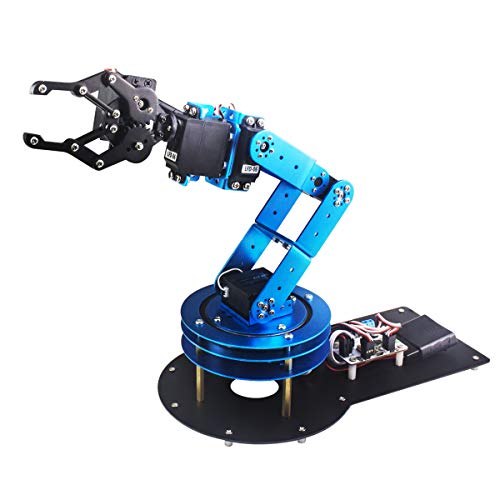
The LewanSoul Robotic Arm Kit 6DOF is an ideal choice for beginners enthusiastic to immerse themselves in the world of robotics. Weighing just 4.2 pounds and featuring a sturdy metal bracket, this 6DOF arm comes with five high-torque servos and a mechanical claw for versatile functionality. You can easily control it via PC software or an app, making programming intuitive. Assembling the kit helps you learn essential robotics and engineering skills. With protective features like anti-blocking servos, it’s designed for longevity. Plus, you’ll find plenty of tutorials to guide you, ensuring a productive learning experience.
Best For: The LewanSoul Robotic Arm Kit is best for students, engineers, and robotics enthusiasts looking to develop their programming and engineering skills.
Pros:
- High-torque servos and sturdy metal construction provide durability and stability.
- Offers multiple control options including PC software, app, and wireless handle for ease of use.
- Includes tutorials and programming support to facilitate learning and assembly.
Cons:
- Requires assembly, which may be challenging for some beginners.
- The weight may limit portability for some users.
- Warranty details are not explicitly stated, which could raise concerns about long-term support.
LewanSoul Robotic Arm Kit for Arduino and Python Programming

If you’re diving into the world of robotics, the LewanSoul Robotic Arm Kit is an ideal choice for beginners enthusiastic to explore programming with Arduino and Python. This smart robot arm features a link mechanism that allows movement along x, y, and z axes, making it perfect for STEM education. With support for WiFi and Bluetooth connectivity, you can control it through apps or a PC. The kit includes three precision bus servos for accurate movements and sensor expansion ports for future AI projects. Plus, it comes fully assembled, so you can jump right into your learning experience!
Best For: Beginners in robotics and STEM education looking to learn programming with Arduino and Python.
Pros:
- User-Friendly: Fully assembled, making it easy for beginners to get started without the hassle of assembly.
- Accurate Movements: Equipped with three precision bus servos and a trajectory planning algorithm for precise maneuvering.
- Versatile Control Options: Supports WiFi and Bluetooth connectivity, allowing control through various devices like apps and PCs.
Cons:
- Limited Age Range: While it targets a broad age range, younger users (under 16 months) may not fully benefit from the kit.
- Weight: At 1.89 kg, it may be slightly heavier than other beginner kits, potentially affecting portability.
- External Power Supply Required: Needs an external power source, which may limit where it can be used compared to battery-operated models.
Robotic Arm with Arduino 5DOF/Axis STEM Educational Kit

Looking to plunge into robotics? The Robotic Arm with Arduino 5DOF/Axis STEM Educational Kit by LewanSoul is a fantastic choice. This open-source kit is designed for adults keen to enhance their programming skills. Measuring 5 x 13 x 8 inches and weighing just 1.28 kg, it’s compact yet powerful. With control options like app control and knob potentiometers, you can edit actions in real time. Plus, it supports sensor integration, allowing you to expand your projects creatively. With a 4.2-star rating and robust educational resources, you’ll have everything you need to start your robotics journey successfully!
Best For: Adults looking to enhance their programming skills through hands-on robotics projects.
Pros:
- Open-source design allows for flexibility and customization in projects.
- Multiple control options including app control and real-time editing enhance user experience.
- Supports sensor integration, enabling creative project expansion and learning opportunities.
Cons:
- Limited components in the Starter Kit may require additional purchases for full functionality.
- Weight and size may not be suitable for all users, especially those seeking portability.
- Learning curve may be steep for beginners without prior programming or robotics experience.
Hiwonder xArm1S 6DOF Robotic Arm Kit for Arduino
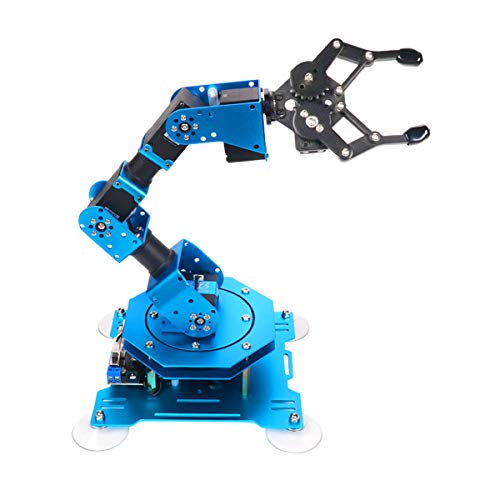
For beginners enthusiastic to explore robotics, the Hiwonder xArm1S 6DOF Robotic Arm Kit for Arduino stands out as an excellent choice. This high-quality kit offers six degrees of freedom and can grasp objects up to 500g, making it perfect for various tasks. You’ll appreciate its durable aluminum alloy construction and high-precision servos that provide essential feedback. Control it easily through a PC, mobile app, or even a wireless PS2 controller. With a user-friendly assembly process and an engaging educational focus, the xArm1S is a fantastic way to engage in programming and robotics while having fun.
Best For: Beginners and enthusiasts looking to explore robotics and programming through a hands-on experience.
Pros:
- Durable construction: Made from premium aluminum alloy for stability and longevity.
- Versatile control options: Can be operated via PC, mobile app, or wireless PS2 controller.
- Educational value: Ideal for learning programming and STEM concepts with engaging and customizable tasks.
Cons:
- Assembly required: Users need to assemble the robotic arm, which may be challenging for some beginners.
- Weight limit: Can only grasp objects weighing up to 500g, which may limit certain applications.
- Age restriction: Recommended for users over 14 years old, potentially excluding younger robotics enthusiasts.
Thames & Kosmos Bionic Robotic Arm STEM Experiment Kit

The Thames & Kosmos Bionic Robotic Arm STEM Experiment Kit stands out as an excellent choice for aspiring young engineers aged 10 and up. With nearly 300 plastic pieces and nylon cables, you’ll assemble a functional robotic arm that can open, close, and rotate its claw 180 degrees. The intuitive joystick control system makes maneuvering simple and engaging. An optional eel head attachment adds a fun twist! The full-color manual not only guides you through assembly but also teaches you about biomimicry and mechanical engineering. This kit promotes critical thinking, dexterity, and problem-solving, making it an awesome educational experience.
Best For: The Thames & Kosmos Bionic Robotic Arm STEM Experiment Kit is best for young engineers aged 10 and up who are interested in robotics and hands-on learning.
Pros:
- Engaging assembly experience with nearly 300 pieces and a functional design.
- Intuitive joystick control allows for easy manipulation of the robotic arm.
- Educational manual provides insights into biomimicry and mechanical engineering concepts.
Cons:
- May require adult supervision for younger users aged 10-13.
- Assembly can be time-consuming and may challenge some users.
- Plastic materials may not be as durable as metal components in other robotics kits.
Thames & Kosmos Dusty Robot Vacuum Cleaner STEM Kit

If you’re enthusiastic to explore robotics and engineering, the Thames & Kosmos Dusty Robot Vacuum Cleaner STEM Kit is an excellent choice. You’ll build a compact robotic vacuum that effectively picks up dust and crumbs from your desk. With smart navigation, it avoids collisions and tracks edges with its moveable probe arm. The kit includes a 52-page manual that guides you through assembly while teaching you about motors and gear trains. Plus, Dusty’s personality shines through changing facial expressions based on its cleaning tasks. It’s a fun, educational project perfect for ages 8 and up, making it a unique gift option!
Best For: The Thames & Kosmos Dusty Robot Vacuum Cleaner STEM Kit is best for young tinkerers aged 8 and up who are interested in robotics and engineering.
Pros:
- Educational Value: Teaches engineering concepts and the science behind robotic vacuums through hands-on assembly and a detailed manual.
- Engaging Design: Features smart navigation and a playful personality with changing facial expressions, making learning fun.
- Practical Use: Effectively cleans small debris from surfaces like desks, combining play with a real-world application.
Cons:
- Age Restriction: Requires adult assistance for younger users, which may limit independent play for those under 12.
- No Batteries Included: Requires additional purchases for operation, potentially increasing overall cost.
- Limited Surface Use: Specifically recommended for glass surfaces, which may restrict usability on other types of surfaces.
LewanSoul 6DOF Robotic Arm Kit
Designed with aspiring roboticists in mind, the LewanSoul 6DOF Robotic Arm Kit offers a hands-on approach to learning robotics and programming. Weighing only 4.2 pounds, this kit features five high-torque servos, an exquisite metal bracket, and industrial-grade bearings for stability. You can control it through PC software, an app, or a wireless handle. It’s perfect for students, engineers, and enthusiasts aged 16 and up. With capabilities like remote grasping and custom actions, you’ll immerse yourself in practical programming. Plus, clear tutorials make assembly and learning accessible, enhancing your robotics skills while having fun!
Best For: The LewanSoul 6DOF Robotic Arm Kit is best for students, engineers, and robotics enthusiasts aged 16 and up who are interested in learning robotics and programming.
Pros:
- Hands-on Learning: Provides practical experience in robotics and programming with clear tutorials.
- Versatile Control Options: Can be operated via PC software, mobile app, or a wireless handle for convenience.
- Robust Design: Features high-torque servos and an industrial-grade construction that enhances stability and longevity.
Cons:
- Assembly Required: Requires assembly, which may be challenging for some users without prior experience.
- Weight Limitations: May not be suitable for very heavy objects due to its design and servo capabilities.
- Age Restriction: Intended for users aged 16 and above, limiting accessibility for younger learners.
Hiwonder-xArm1S 6DOF Robotic Arm Kit for Arduino
For budding robotics enthusiasts looking to immerse themselves in the world of coding and mechanics, the Hiwonder-xArm1S 6DOF Robotic Arm Kit for Arduino stands out as an excellent choice. This durable arm, made from premium aluminum alloy, features six degrees of freedom, enabling tasks like grasping and transporting objects weighing up to 500g. You can control it via a PC, mobile app, or even a wireless PS2 controller. With an easy assembly process and a user-friendly interface for programming, you’ll quickly delve into STEM concepts. Plus, it’s backed by a 30-day return guarantee, ensuring a risk-free experience.
Best For: Budding robotics enthusiasts and students over 14 years old who want to explore coding and mechanical engineering.
Pros:
- High precision: Equipped with 6 intelligent servos that provide accurate position, voltage, and temperature feedback.
- Versatile control options: Can be controlled through PC, mobile app, or wireless PS2 controller, allowing for various user preferences.
- Educational value: Ideal for learning programming and robotics concepts with an easy-to-use interface for action editing.
Cons:
- Assembly required: Users need to assemble the arm themselves, which may be challenging for beginners.
- Weight limit: Capable of grasping objects only up to 500g, which may limit its application for heavier tasks.
- Age restriction: Recommended for users over 14 years old, potentially excluding younger robotics enthusiasts.
Waveshare Robotic Arm Kit, Desktop Robot Kit Based On ESP32

The Waveshare Robotic Arm Kit, with its user-friendly cross-platform WEB application, is perfect for beginners enthusiastic to plunge into robotics. Weighing less than 850 grams and featuring a 360° omnidirectional base, it delivers impressive control with a payload capacity of 0.5 kg. The onboard ESP32 MCU enables various wireless control modes, making it adaptable for different projects. You’ll appreciate the rich graphic and video tutorials that ease your learning process. Plus, with open-source control codes, you can customize and innovate your own End of Arm Tooling (EoAT). Get ready to explore the world of robotics with this versatile kit!
Best For: Beginners looking to explore robotics through a user-friendly and customizable desktop robot kit.
Pros:
- Rich graphic and video tutorials facilitate easy learning for newcomers.
- Lightweight design and 360° omnidirectional base enhance maneuverability and control.
- Open-source control codes allow for extensive customization and innovation in projects.
Cons:
- The payload capacity of 0.5 kg may limit the complexity of tasks that can be performed.
- Customer reviews indicate a moderate satisfaction level with an average rating of 3.7 out of 5 stars.
- Potential testing fees may apply for returns citing misrepresented conditions.
Robot Arm for Arduino – Smart Building Kit for Learning Electronics and Programming

If you’re enthusiastic to immerse yourself in the world of robotics, the Robot Arm for Arduino is perfect for beginners, teens, and adults alike. This smart building kit features a 4-axis flexible robotic arm, allowing movement like a 260° clip and 180° rotations for the wrist, elbow, and base. With step-by-step assembly instructions and easy programming tutorials, you’ll quickly learn about electronics and coding. Plus, it can record and repeat up to 170 actions! Supported by quick-response after-sales service, this kit weighs just 0.56 kilograms and comes with a 30-day warranty. Immerse yourself in robotics and enhance your skills today!
Best For: The Robot Arm for Arduino is best for beginners, teens, and adults interested in learning about robotics, electronics, and programming.
Pros:
- Step-by-step assembly instructions make it easy for beginners to start.
- Versatile movement capabilities with 260° clip and multiple rotations enhance learning opportunities.
- Action memory function allows users to record and repeat up to 170 actions, promoting creativity.
Cons:
- The average customer rating of 3.7 out of 5 stars indicates mixed feedback from users.
- Limited age suitability, with a minimum age requirement of 13+.
- Relatively low Best Sellers Rank may suggest limited market popularity compared to other educational kits.
Factors to Consider When Choosing Deskrobot Arms for Beginners
When you’re choosing a desk robot arm as a beginner, you should think about several key factors. Consider the age appropriateness, as some kits are designed for specific age groups. Also, look into assembly requirements and programming compatibility to guarantee the arm fits your skill level and learning goals.
Age Appropriateness
How do you guarantee that a desk robot arm is suitable for a beginner? Start by checking the recommended age range. Many kits are designed for users aged 10 and up, ensuring a safe introduction to robotics concepts. If you’re looking for something for older teens or adults, aim for products meant for ages 16 and above, as they often involve more complex assembly and programming. Some kits even cater to a wide age range, from 16 months to 100 years, allowing for both child and adult engagement. Finally, consider the assembly complexity; younger users will thrive with simpler kits, while older beginners can tackle more intricate designs and coding challenges. Choose wisely to match the learner’s age and skill level.
Assembly Requirements
Choosing a desk robot arm that requires assembly can enhance your understanding of robotics while providing a hands-on learning experience. When selecting a kit, consider whether it’s pre-assembled or requires assembly, as this affects your learning curve and time investment. Kits with multiple components and servos are great for teaching basic engineering concepts, but make certain the assembly instructions are clear and user-friendly, especially if you’re a beginner. Look for kits that offer additional resources like tutorials or guides to assist you during assembly. Finally, assess the complexity of the assembly process and choose a kit that matches your skill level. This way, you’ll strike a balance between challenge and achievable success, making your learning journey enjoyable.
Programming Compatibility
After you’ve tackled assembly, the next important factor to evaluate is programming compatibility. This aspect is essential for your learning experience, as it affects how easily you can implement various functionalities with your robotic arm. Look for models that support popular programming languages like Arduino and Python; these are great entry points. Some arms even offer graphical programming interfaces, allowing you to visualize commands without needing extensive coding knowledge. Additionally, check for the availability of tutorials and documentation specific to your chosen environment, as they can greatly enhance your understanding. Compatibility with mobile apps and PC software also opens up versatile control methods, enabling you to experiment with different programming techniques and strategies.
Control Methods
When exploring desk robot arms, it is crucial to take into account the control methods available, as they greatly influence your hands-on experience. You can choose between PC software, mobile apps, wireless controllers, and even mouse inputs, allowing you to find the interface that suits you best. Look for models that support multiple wireless communication protocols, which enhance connectivity and flexibility. Many robotic arms also feature intuitive control systems for real-time adjustments, utilizing knob potentiometers or graphical programming interfaces. If you’re aiming for precision, consider advanced models with smart servos that provide feedback on position and temperature. Finally, open-source control codes can enable you to customize and expand functionality for your specific projects, making your robot arm even more versatile.
Educational Value
Educational robotic arms offer a unique opportunity to enhance your programming and engineering skills while diving into the world of robotics and STEM concepts. These kits often come with user-friendly software and tutorials, making it easier for you to grasp programming languages like Arduino and Python. As you assemble your robotic arm, you’ll improve your critical thinking and problem-solving abilities, troubleshooting any challenges that arise. Many kits also provide expansion options for integrating sensors, encouraging you to explore advanced robotics technologies. Additionally, feedback mechanisms such as position and temperature sensors teach you about control systems and real-time data processing. Overall, these robotic arms are invaluable tools for building a solid foundation in robotics.
Weight and Dimensions
Choosing the right weight and dimensions for your desk robot arm is vital for both performance and usability. The weight of the arm impacts its stability and ease of use, with beginner kits typically ranging from 1.1 kg to 4.2 pounds. If you’re tight on space, a smaller robotic arm may be ideal, offering a compact design. However, keep in mind that it might sacrifice reach and payload capacity. Conversely, a larger arm provides a greater movement range but may require more workspace and can be less portable. Weight distribution is also significant; a well-balanced arm enhances precision during operation. Always consider your workspace dimensions to guarantee smooth operation without obstructions.
Materials and Durability
The materials used in desk robot arms play a significant role in their durability and performance. Aluminum alloy and high-quality plastic are common choices, with metal constructions typically providing better stability and longevity. When selecting a robotic arm, look for high-torque servos and industrial-grade bearings; these features enhance reliability, especially during frequent movements and load handling. Additionally, a robust assembly design with anti-blocking servos and gear clutches can prevent wear and tear, boosting durability over time. Keep in mind that while lighter materials may ease handling, they might sacrifice sturdiness compared to heavier, more durable options. Finally, prioritize quality components like precision servos, which help prevent overheating and mechanical failures, ensuring your robotic arm lasts longer.
Price Range
When it comes to desk robotic arms for beginners, you’ll typically find prices ranging from $50 to $300, depending on the features and complexity of the model. Basic kits usually cost around $50 to $100, making them accessible for entry-level users. If you’re looking for more advanced models with programmable features or extra components, expect to spend between $150 and $300. Many educational robotic arms hover around the $100 mark, promoting STEM learning affordably. It’s essential to compare the value of different kits, as some may offer additional software or components at similar prices. Don’t forget to evaluate your long-term investment; pricier models often provide more customization and educational benefits over time.