
In 2025, desk robotic arms are set to revolutionize your workspace, blending technology with creativity for a more productive environment. These innovative tools cater to hobbyists, educators, and tech enthusiasts alike, offering versatility and user-friendly programming. As you explore the top 10 robotic arms, you’ll discover features that can greatly enhance your projects. But which ones stand out, and what should you consider before making a choice?
Hiwonder-xArm1S 6DOF Robotic Arm for Arduino Coding
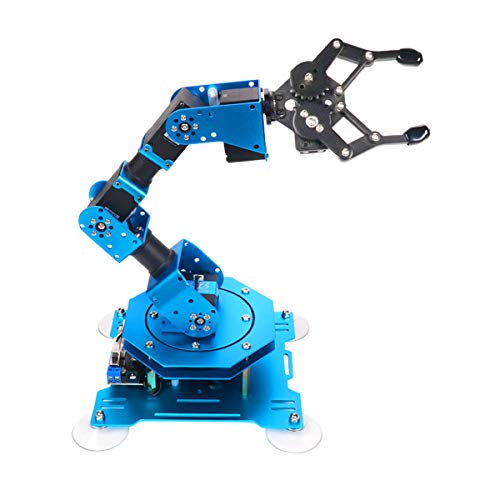
If you’re looking to plunge into the world of robotics and coding, the Hiwonder-xArm1S 6DOF Robotic Arm is a fantastic choice. This compact arm, measuring 6.1 x 5.5 x 9.68 inches and weighing just 2.42 pounds, offers a robust 6-axis full metal construction. You can control it wirelessly using your PC, phone app, mouse, or even a PS2 controller. With a grasping capacity of up to 500g, it’s perfect for STEM education and creative projects. Plus, the user-friendly interface simplifies programming, making learning bionic robotics an engaging experience for all skill levels.
Best For: The Hiwonder-xArm1S 6DOF Robotic Arm is best for students and hobbyists interested in robotics, coding, and STEM education.
Pros:
- Versatile Control: Multiple control options (PC, app, mouse, PS2 controller) allow for flexible operation.
- Robust Construction: The aluminum alloy and high-torque servos provide durability and stability for various projects.
- User-Friendly Programming: The intuitive interface makes it easy for beginners to learn and experiment with coding.
Cons:
- Weight Limit: The maximum grasping capacity of 500g may limit the types of objects it can handle.
- Learning Curve: While user-friendly, some users may still face challenges in programming without prior experience.
- Customer Ratings: Although rated at 4.0 stars, the feedback suggests that improvements could enhance user satisfaction.
Waveshare Robotic Arm Kit, Desktop Robot Kit

The Waveshare Robotic Arm Kit stands out as an ideal choice for hobbyists and educators looking to explore robotics and automation without getting overwhelmed. With its 4-DOF design based on the ESP32, it boasts high-torque serial bus servos for impressive performance. You’ll appreciate the multiple wireless control modes enabled by the onboard MCU, making device connectivity a breeze. Plus, the included graphic tutorials and user-friendly web application simplify your learning process. The expansion plate allows for customized End of Arm Tooling, supporting innovative applications. Weighing under 850g, it’s perfect for flexible mounting on various platforms.
Best For: Hobbyists and educators seeking an accessible entry point into robotics and automation.
Pros:
- User-friendly: Comes with graphic tutorials and a web application for easy learning and control.
- Flexible customization: Expansion plate allows for tailored End of Arm Tooling for specific applications.
- Lightweight design: Weighs under 850g, facilitating easy mounting on various platforms.
Cons:
- Limited payload capacity: Effective payload of only 0.5kg at 0.5m may restrict heavier applications.
- Requires secondary development knowledge: Open-source codes and communication interfaces may require programming skills for full utilization.
- Potential complexity: Multiple wireless control modes and protocols might overwhelm beginners without prior experience.
Robotic Arm Kit 6DOF with Programming and Mechanical Claw
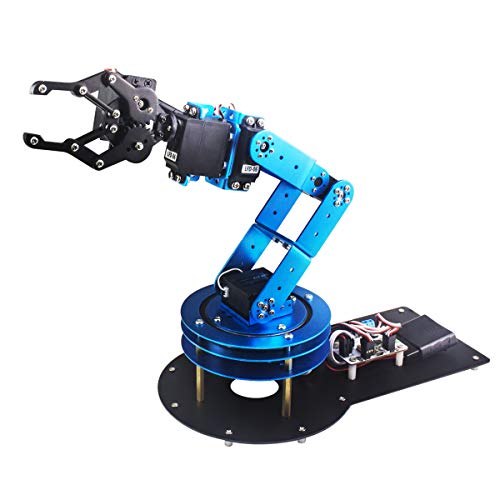
Designed with budding engineers and robotics enthusiasts in mind, the Robotic Arm Kit 6DOF stands out for its user-friendly programming capabilities and versatile control options. With 6 high-quality digital servos and a mechanical claw, it’s perfect for grasping and transporting objects. You’ll love the remote-control features and the ability to customize actions through intuitive graphical programming. Multiple control methods—including PC, app, and wireless handle—put flexibility right at your fingertips. Plus, its durable metal construction and anti-blocking servos guarantee longevity, making this kit an ideal choice for students and hobbyists keen to explore the world of robotics.
Best For: Students, engineers, and robotics enthusiasts looking to learn and experiment with bionic robotics.
Pros:
- User-friendly programming: Intuitive graphical programming makes it easy for beginners to learn.
- Versatile control options: Multiple control methods (PC, app, wireless handle) provide flexibility and convenience.
- Durable construction: Metal brackets and high-quality servos ensure longevity and stability for extensive use.
Cons:
- Limited payload capacity: The mechanical claw may not be suitable for very heavy objects.
- Learning curve for advanced features: While beginner-friendly, some advanced functionalities may require additional learning.
- Software compatibility issues: Potential compatibility problems with certain operating systems or devices.
Robotic Arm for Arduino Coding Programming (6DOF STEM Educational Kit)
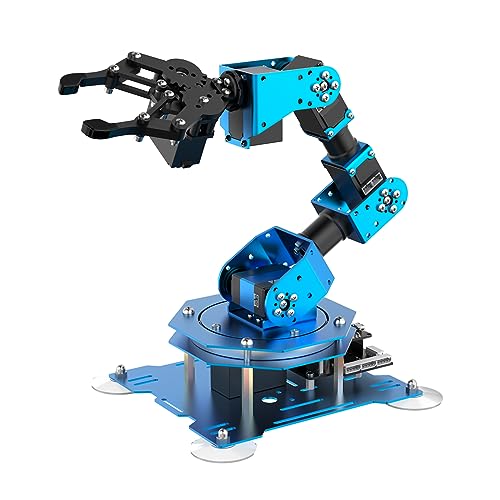
For educators and hobbyists alike, the Hiwonder-xArm1S stands out as an exceptional choice in the domain of desk robotic arms for 2025. This 6DOF STEM educational kit offers hands-on experience with Arduino coding, making it perfect for learning robotics. You’ll appreciate its robust aluminum alloy structure and high-torque servos, enabling it to grasp objects up to 500g. With multiple control methods—PC, app, and wireless—you can easily engage with the arm. Plus, the user-friendly action editing interface allows you to customize movements. It’s an invaluable tool for sparking creativity and enhancing programming skills in STEM education.
Best For: The Hiwonder-xArm1S is best for educators and hobbyists seeking a hands-on experience in robotics and Arduino coding.
Pros:
- Versatile control methods including PC, app, and wireless options enhance user interaction.
- High-precision servos provide strong torque and stability, allowing the arm to grasp objects up to 500g.
- User-friendly action editing interface encourages creativity and customization of robotic movements.
Cons:
- Requires some basic knowledge of coding and robotics, which may be challenging for complete beginners.
- The kit is designed for educational purposes, which may limit its appeal for advanced robotics enthusiasts looking for more complex functionalities.
- As an assembled version, it may not provide the same level of learning experience as a DIY kit for those interested in building from scratch.
Robotic Arm with Arduino 5DOF/Axis Educational Building Kit

Looking to immerse yourself in robotics and coding? The Robotic Arm with Arduino 5DOF/Axis Educational Building Kit is perfect for you! Built on the Atmega328 platform, it’s compatible with Arduino programming, featuring open-source code and tutorials for smooth learning. Equipped with a 6-channel knob controller and Bluetooth module, this miniArm allows for real-time control and offline action editing. With expansion ports, you can integrate various sensors like the ESP32 Cam or ultrasonic sensor, revealing endless project possibilities. This kit enhances your understanding of robotics and engineering while providing a hands-on, creative experience. Jump in and start building!
Best For: This kit is best for students and hobbyists interested in hands-on learning about robotics, coding, and engineering.
Pros:
- Open-source programming: Allows for easy customization and learning through available tutorials.
- Versatile control options: Offers both app and real-time knob control for enhanced user experience.
- Expandable features: Supports integration of various sensors, enabling diverse project possibilities.
Cons:
- Requires some programming knowledge: Beginners may find the coding aspect challenging without prior experience.
- Limited advanced features: May not satisfy highly experienced users looking for more complex robotics projects.
- Potential assembly complexity: Assembling the robotic arm may take time and patience, especially for younger users.
Waveshare Robotic Arm Kit with Wireless Control

The Waveshare Robotic Arm Kit with Wireless Control stands out for tech enthusiasts and hobbyists seeking a versatile desktop solution. With its 5 + 1 degrees of freedom and 360° omnidirectional movement, this arm offers impressive flexibility. The direct-drive joint design enhances positioning accuracy, while the robust shoulder joint ensures stable operation. You can control it wirelessly or via a wired connection using the ESP32 MCU, making integration straightforward. Plus, it’s compatible with ROS2 and supports advanced learning methods. The included web application and rich tutorials help you get started quickly, making this kit an excellent choice for your workspace.
Best For: Tech enthusiasts and hobbyists looking for a versatile and programmable robotic arm solution for desktop applications.
Pros:
- Versatile Movement: Offers 5 + 1 degrees of freedom and 360° omnidirectional movement for a wide range of applications.
- Wireless Control: Features ESP32 MCU for both wireless and wired control options, facilitating easy integration.
- Educational Resources: Comes with a web application and extensive tutorials, making it beginner-friendly.
Cons:
- Complexity for Beginners: Advanced features may be challenging for complete novices without prior experience in robotics.
- Limited Load Capacity: May not support heavier components due to the design constraints of the arm.
- Potential Compatibility Issues: While compatible with ROS2, users may encounter challenges when integrating with other software platforms.
Smart Robot Arm Building Kit for Arduino & ESP32-C3

Designed specifically for beginners and hobbyists, the Smart Robot Arm Building Kit for Arduino & ESP32-C3 stands out with its user-friendly assembly process and programmable features. You’ll appreciate the 4DOF design, which lets you pick up light objects using the included claw. Control it easily through two joysticks or a web app, switching modes with just a button press. The kit comes with an informative assembly tutorial and programming documents to enhance your understanding of robotics. Plus, with an onboard battery holder and USB charging, you can keep your robot powered up and ready for action.
Best For: Beginners and hobbyists interested in exploring robotics and programming through a hands-on building experience.
Pros:
- Easy assembly process with detailed tutorials, making it accessible for newcomers.
- Flexible control options via joysticks or a web app, enhancing user experience.
- Includes a claw for picking up light objects, adding practicality to the robotic arm.
Cons:
- Battery not included, requiring a separate purchase for operation.
- Limited to lightweight items, which may restrict some potential projects.
- As a beginner kit, it may lack advanced features for more experienced users.
Thames & Kosmos Bionic Robotic Arm STEM Experiment Kit

If you’re enthusiastic to plunge into the world of robotics, the Thames & Kosmos Bionic Robotic Arm STEM Experiment Kit is a standout choice for young builders aged 10 and up. With nearly 300 pieces, you’ll assemble a fully functional robotic arm without motors or electricity. The intuitive joystick controls allow for precise movements, enabling you to grab, move, and release objects effortlessly. This kit also boasts a full-color manual that guides you through assembly and teaches essential concepts in robotics and mechanical engineering. It’s perfect for independent play starting at age 14, making it an engaging STEM challenge for any aspiring engineer.
Best For: Young builders aged 10 and up who are eager to explore robotics and engineering concepts.
Pros:
- Engaging hands-on assembly experience with nearly 300 pieces.
- Intuitive joystick controls for precise movement and functionality.
- Comprehensive manual that educates about robotics and mechanical engineering.
Cons:
- Requires adult assistance for younger users aged 10-13.
- No electronic components may limit some advanced robotic functionalities.
- Could be challenging for beginners without prior experience in building kits.
4DOF Robotic Arm Kit for Kids Compatible with Arduino IDE
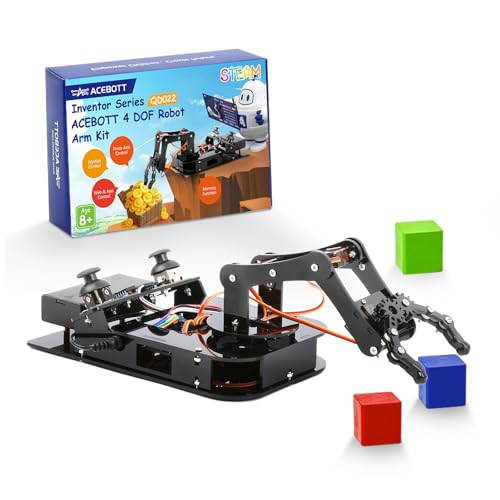
For young innovators and budding engineers aged 8 and up, the 4DOF Robotic Arm Kit stands out as an exceptional choice in the “Best Desk Robotic Arms of 2025.” This kit not only provides an engaging way to explore robotics but also fosters creativity and critical thinking, making it perfect for hands-on learning. With joystick and web app control, you can manipulate objects effortlessly in 3D space. Featuring high-precision servos and various programming options, it enhances your understanding of bionic robotics. Plus, it’s a fantastic gift for any occasion, promoting skill development while sparking interest in technology and engineering.
Best For: The 4DOF Robotic Arm Kit is best for young innovators and budding engineers aged 8 and up who are interested in exploring robotics and enhancing their problem-solving skills.
Pros:
- Engaging hands-on learning experience that fosters creativity and critical thinking.
- Multiple control options including joystick and web app make it user-friendly.
- Supports various programming languages, enhancing coding skills and understanding of robotics.
Cons:
- Requires two 18650 batteries which are not included in the kit.
- May require adult supervision for younger users due to complexity.
- Limited to users aged 8 and up, which may exclude younger children interested in robotics.
ELEPHANT ROBOTICS Open Source 6 Axis Robotic Arm (myCobot 280)

The ELEPHANT ROBOTICS myCobot 280 stands out as an ideal choice for robotics enthusiasts and educators seeking a hands-on learning experience. This 6-axis open-source robotic arm offers a collaborative design perfect for various applications. You’ll love the intuitive programming options, utilizing Blockly and Industrial ROS through UIFlow. With joystick or app control, you can easily engage in practical teaching. The myCobot features adaptive grippers and supports multiple sensors, enhancing creativity in AI education. Designed for users with basic programming knowledge, it delivers impressive speed and precision, making it a fantastic tool for exploration and innovation in robotics.
Best For: Robotics enthusiasts and educators looking for a hands-on learning experience in programming and AI applications.
Pros:
- Offers intuitive programming options through Blockly and Industrial ROS, making it user-friendly.
- Features adaptive grippers and supports multiple sensors, enhancing creativity and exploration.
- Delivers impressive speed and precision with 0.05mm repeatability, ideal for various applications.
Cons:
- Not suitable for children, requiring users to have basic programming knowledge.
- May have a steeper learning curve for individuals unfamiliar with robotics or programming concepts.
- Limited to desktop use, which may restrict mobility and application in larger environments.
Factors to Consider When Choosing Deskrobotic Arms
When choosing a desk robotic arm, you need to contemplate several important factors. Think about the control methods available, the weight capacity it can handle, and the educational value it offers. You’ll also want to look into assembly complexity and how well it works with your existing platforms.
Control Methods Available
How do you want to control your desk robotic arm? You’ve got options! Choose from PC, mobile app, joystick, or web-based interfaces that suit your style. Many models offer wireless control, letting you operate the arm without pesky cables. If you prefer customizing movements, look for user-friendly interfaces that allow easy action editing. Advanced models might even integrate with programming platforms like Arduino or ROS, perfect for tech enthusiasts. For beginners, graphical programming options enable you to engage with robotics without needing extensive coding knowledge. With these diverse control methods, you can select the one that best enhances your workflow and makes operating your desk robotic arm a breeze!
Weight Capacity Considerations
Weight capacity is an essential factor in selecting the right desk robotic arm for your needs. Typically, small to mid-sized arms can handle weights ranging from 200g to 500g. It’s important to guarantee the arm can lift the objects you intend to use. Pay attention to the grasping capacity, which depends on servo torque and structural integrity. Check specifications that detail effective payloads at various distances, as this affects the arm’s performance based on reach. Evaluate the materials used in construction; stronger materials like metal can support greater weights than plastic. Finally, consider the design and configuration of the arm’s joints, as this influences weight distribution and stability, impacting overall performance and safety.
Educational Value Offered
Choosing the right desk robotic arm goes beyond just weight capacity; it’s also about the educational value it brings. Look for robotic arms with multiple degrees of freedom (DOF) that offer hands-on learning in mechanics and programming. User-friendly programming interfaces, like graphical programming or app control, make it easier for beginners to engage and release their creativity. Features such as customizable end-effectors and sensor integration allow for innovative project development, tying theory to real-world applications. Extensive tutorials and resources included with many kits guide you through assembly, programming, and operation. Plus, the ability to perform complex tasks, like object manipulation and transportation, helps you grasp fundamental concepts of robotics, engineering, and automation in a practical context.
Assembly Complexity Levels
When selecting a desk robotic arm, the complexity of assembly plays an essential role in your overall experience. Some kits require extensive assembly with numerous components, while others offer simpler builds with fewer parts. If you’re considering advanced robotic arms, keep in mind that those with 6 degrees of freedom (6DOF) typically necessitate more intricate assembly due to their complex joints. Clear, detailed instructions—like step-by-step manuals or video tutorials—can greatly ease the assembly process. For beginners, look for educational models that come pre-assembled or feature modular designs. Finally, assess your prior experience and comfort level; more complex kits might demand advanced skills in robotics and engineering, so choose wisely to guarantee a smooth assembly experience.
Compatibility With Platforms
As you explore desk robotic arms, compatibility with programming platforms can greatly influence your project’s potential. Look for arms that work seamlessly with popular platforms like Arduino, enhancing your flexibility in coding and development. Open-source support is essential, allowing you to customize and integrate with various software and hardware systems easily. Make sure the robotic arm connects via multiple communication protocols, such as Wi-Fi or Bluetooth, to enable wireless control and connectivity with different devices. Additionally, consider the availability of graphic programming interfaces or user-friendly applications, which can simplify the learning curve for beginners. Finally, check compatibility with widely used frameworks like ROS (Robot Operating System) for added resources and community support in advanced projects.