
If you’re serious about flight simulation, choosing the right rudder pedals can make a significant difference in your experience. These pedals can enhance your control and realism, making each flight more immersive. Whether you’re a casual gamer or a dedicated enthusiast, there are several top options available. Let’s explore some of the best flight rudders on the market and what features to evaluate before making your choice.
Logitech G Pro Flight Rudder Pedals

If you’re serious about flight simulation, the Logitech G Pro Flight Rudder Pedals are an excellent choice for enhancing your control and realism. These pedals feature smooth, self-centering action and an adjustable tension dial, allowing you to tailor the response to your preferences. With differential toe brakes, you can easily manage independent left and right control, making your flying experience more authentic. They’re compatible with various Windows versions and connect via USB 2.0. The adjustable foot rests guarantee comfort for all sizes, while the non-slip materials keep you stable during intense flights. Experience the difference today!
Best For: Flight simulation enthusiasts looking for enhanced control and realism in their setup.
Pros:
- Smooth and self-centering action enhances the flying experience.
- Adjustable tension dial allows for personalized response preferences.
- Differential toe brakes provide independent control for better maneuverability.
Cons:
- Limited compatibility as it only works with Windows operating systems.
- Requires USB connection, which may limit placement options.
- Heavier build compared to some other pedal options, which may affect portability.
Thrustmaster TFRP Flight Rudder Pedals for Flight Simulators

The Thrustmaster TFRP Flight Rudder Pedals are an excellent choice for serious flight simulation enthusiasts who crave realism and precision in their control setup. With a long travel range and the innovative S.M.A.R.T slide rails system, you’ll enjoy smooth and accurate maneuvers. The ergonomic design, featuring removable heel-rests, lets you tailor your comfort while the large base provides stability. Compatible with PC, Xbox One, and PlayStation 5, these pedals connect easily through USB or RJ12. Plus, the advanced T.A.R.G.E.T software allows you to program the axes and differential brakes, ensuring a fully customized flying experience.
Best For: Serious flight simulation enthusiasts seeking realism and precision in their control setup.
Pros:
- Ergonomic design with removable heel-rests for customizable comfort.
- Innovative S.M.A.R.T slide rails system for smooth and accurate maneuvering.
- Compatible with PC, Xbox One, and PlayStation 5, with advanced programming options via T.A.R.G.E.T software.
Cons:
- May not be suitable for users with larger shoe sizes exceeding size 12.
- Requires additional Thrustmaster joysticks for full functionality, which are sold separately.
- Some users may find the price point higher compared to basic rudder pedals.
Logitech G Pro Flight Yoke System + Pro Flight Rudder Pedals Bundle

For aspiring pilots and seasoned flight simulation enthusiasts alike, the Logitech G Pro Flight Yoke System + Pro Flight Rudder Pedals Bundle stands out with its realistic yoke controls and thorough programmability. You’ll appreciate the 14-button controls and POV hat, which provide 54 programmable options for a customized experience. The self-centering rudder pedals enhance realism, while differential toe brakes give you precise control during landing and taxiing. Plus, the adjustable footrests and non-slip materials guarantee comfort and stability. This bundle offers extensive control, making it an ideal choice whether you’re just starting or looking to elevate your flight simulation experience.
Best For: Aspiring pilots and seasoned flight simulation enthusiasts looking for a realistic and customizable flying experience.
Pros:
- Realistic controls with 14-button layout and POV hat for enhanced muscle memory training.
- Self-centering rudder pedals with differential toe brakes for precise control during landing and taxiing.
- Adjustable footrests and non-slip materials enhance comfort and stability during extended use.
Cons:
- May have a learning curve for complete beginners unfamiliar with flight simulation controls.
- The bundle may require additional space for setup, which could be a limitation for smaller areas.
- Some users may find the price point higher compared to basic flight simulation setups.
Turtle Beach VelocityOne Universal Rudder Pedals for Windows and Xbox
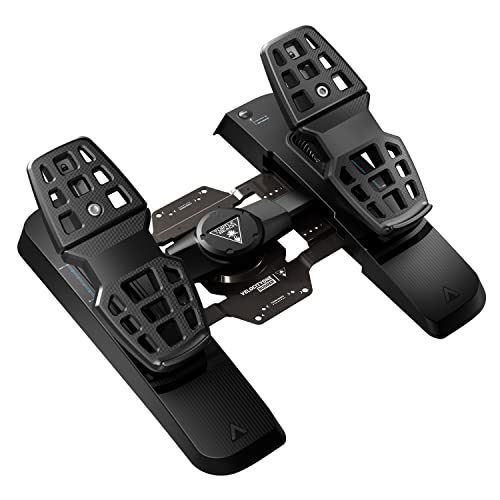
Experience unparalleled control with the Turtle Beach VelocityOne Universal Rudder Pedals, designed specifically for flight simulation enthusiasts on Windows and Xbox platforms. These pedals boast an ultra-smooth rudder axis and utilize a non-contact Hall Effect sensor across all axes, ensuring precision in your maneuvers. You’ll appreciate the two sets of swappable pedals, adjustable brakes, and customizable pedal width that cater to your preferences. With a stable, non-slip base, these pedals won’t budge during intense gameplay. Just remember, you’ll need the VelocityOne Flight Control System for full compatibility with Xbox consoles, enhancing your virtual flying experience even further.
Best For: Flight simulation enthusiasts looking for precise control and customizable features on Windows and Xbox platforms.
Pros:
- Ultra-smooth rudder axis for enhanced maneuverability.
- Non-contact Hall Effect sensor ensures long-lasting precision.
- Adjustable brakes and pedal width for a personalized experience.
Cons:
- Requires the VelocityOne Flight Control System for Xbox compatibility.
- May not be ideal for casual gamers who don’t prioritize realism.
- Limited to Xbox and Windows platforms, excluding other gaming systems.
Honeycomb Aeronautical Charlie Rudder Pedals for PC

Designed with precision in mind, Honeycomb Aeronautical Charlie Rudder Pedals are perfect for flight simulation enthusiasts seeking a high level of realism. Featuring magnetic Hall-effect sensors, these pedals translate your foot movements with incredible accuracy. The aluminum construction and adjustable foot angles let you customize your setup, while independent toe brakes enhance braking precision. With an anti-slip base and compatibility for PC and Mac, you’ll enjoy stability on any surface. Plus, they seamlessly integrate with popular flight simulators like Microsoft Flight Simulator 2020. Elevate your virtual flying experience with these top-tier rudder pedals that deliver both quality and performance.
Best For: Flight simulation enthusiasts who seek a realistic and immersive experience with customizable controls.
Pros:
- Precision Sensors: Magnetic Hall-effect sensors provide ultra-accurate translation of foot movements.
- Adjustable Features: Customizable foot angles and tension settings enhance comfort and control during flight.
- Stability: Non-slip base ensures stability on various surfaces, making it suitable for different setups.
Cons:
- Weight: At 17.05 pounds, the pedals may be cumbersome for some users to move or store.
- Price Point: Premium features may come at a higher cost compared to entry-level options.
- Compatibility Limits: While it supports PC and Mac, some users may find limited compatibility with other platforms outside the specified systems.
Honeycomb Aeronautical Charlie Rudder Pedals with Adjustable Tension Knob
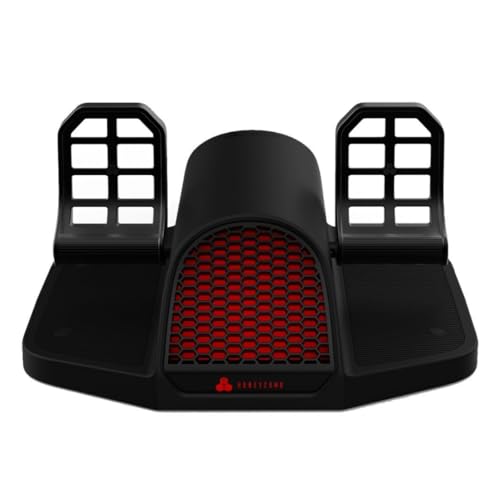
The Honeycomb Aeronautical Charlie Rudder Pedals stand out with their adjustable tension knob, making them an excellent choice for flight simulation enthusiasts seeking customizable control. With durable aluminum construction and an innovative belt drive system, these pedals guarantee longevity and smooth operation. The latest generation magnetic Hall Effect sensors provide precise coordination, minimizing the need for corrections. High-friction surface strips and deployable carpet spikes enhance safety and stability during intense sessions. They’re compatible with PC, MAC, and Alpha Flight Controls XPC, and they work seamlessly with popular software like Microsoft Flight Simulator and X-Plane 12. Elevate your virtual flying experience today!
Best For: Flight simulation enthusiasts looking for customizable and precise control in their virtual flying experience.
Pros:
- Durable aluminum construction ensures long-lasting use.
- Adjustable tension knob allows for personalized control settings.
- High-friction surface strips and carpet spikes enhance stability and safety.
Cons:
- Requires Honeycomb Xbox Hub for compatibility with Xbox consoles.
- May be considered expensive compared to basic rudder pedals.
- Setup may require additional configuration for optimal performance with specific software.
Honeycomb Aeronautical Charlie Rudder Pedals Bundle with Bravo Throttle Quadrant and Alpha Flight Controls Yoke

For serious flight simulation enthusiasts looking to elevate their experience, the Honeycomb Aeronautical Charlie Rudder Pedals Bundle is a standout choice. This extensive kit includes the Charlie Rudder Pedals, Bravo Throttle Quadrant, and Alpha Flight Controls Yoke. The rudder pedals feature durable aluminum construction, a belt drive system, and magnetic Hall Effect sensors for unmatched precision. Fully adjustable, they guarantee comfort during long flights. The Bravo Throttle Quadrant adds versatility with its configurable throttle setup and multiple cockpit components. Whether you’re simulating single or multi-engine aircraft, this bundle provides everything you need for an immersive flight experience.
Best For: Serious flight simulation enthusiasts seeking a comprehensive and immersive cockpit experience.
Pros:
- Durable aluminum construction ensures longevity and stability during use.
- Innovative features like magnetic Hall Effect sensors provide precise control and coordination.
- Versatile setup accommodates various aircraft types, enhancing the simulation experience.
Cons:
- The bundle may be considered expensive for casual users or beginners.
- Requires additional hardware (Honeycomb Xbox Hub) for Xbox compatibility.
- Relatively heavy at 53.7 pounds, which may affect portability and setup.
Thrustmaster T-Flight Full Kit (Compatible with Xbox Serie X|S and PC)

Offering seamless compatibility with both Xbox Series X|S and PC, the Thrustmaster T-Flight Full Kit stands out as an ideal choice for gamers seeking an immersive flight simulation experience. With high-precision HOTAS controls, you’ll enjoy enhanced gameplay across various genres, from space adventures to civil flight. The innovative rudder pedals utilize Thrustmaster’s S.M.A.R.T slide rails system for smooth steering, and the ergonomic design guarantees comfort during long sessions. The detachable throttle features 5 axes and 14 buttons, including a rapid-fire trigger, allowing for intuitive navigation and panoramic views. Elevate your virtual flying experience with this all-encompassing flight kit.
Best For: Gamers seeking an immersive flight simulation experience on Xbox Series X|S and PC.
Pros:
- High-precision HOTAS controls enhance gameplay across various flight simulation genres.
- Ergonomic design ensures comfort during extended gaming sessions.
- Detachable throttle with multiple axes and buttons allows for intuitive navigation and control.
Cons:
- May be complex for casual gamers not familiar with flight simulation controls.
- The size of the kit may require ample space for setup.
- Price point might be higher compared to basic game controllers.
Logitech G PRO Flight Yoke System for PC

Engineered for both novice and seasoned pilots, the Logitech G PRO Flight Yoke System elevates your flight simulation experience with its realistic controls. You’ll appreciate the smooth, accurate handling provided by its robust stainless steel shaft. With a POV hat, 14 buttons, and a 3-position mode switch, you can access at least 75 programmable controls, making it easy to manage aircraft functions. The flexible 2-position desk clamp allows you to mount it on various desk types. Plus, with reliable USB connectivity and compatibility with popular flight simulators, it’s the perfect addition to your virtual cockpit.
Best For: The Logitech G PRO Flight Yoke System is best for both new and experienced flight simulation enthusiasts seeking realistic control and functionality.
Pros:
- Offers at least 75 programmable controls for easy management of aircraft functions.
- Features a robust stainless steel shaft for smooth and accurate handling.
- Flexible mounting options with a 2-position desk clamp for various desk types.
Cons:
- Requires optional software download for use with certain flight simulators.
- Limited to Windows operating systems, which may exclude some users.
- The throttle quadrant uses a PS/2 connector, which may require additional adapters for some setups.
Honeycomb Alpha Flight Controls Yoke & Switch Panel for Flight Simulator

The Honeycomb Alpha Flight Controls Yoke & Switch Panel stands out for its true-to-life flight control, making it an ideal choice for serious flight simulation enthusiasts. Featuring a 180° rotation and a solid steel shaft, you’ll enjoy smooth control and accurate maneuvers thanks to its dampened, self-centering mechanism. The integrated switch panel provides essential controls like light switches and a 5-position ignition switch with LED backlighting. With sturdy construction and dual mounting options, you can easily set it up on any surface. Rated highly by users, this yoke enhances your flying experience and delivers reliability for countless hours of simulation.
Best For: Serious flight simulation enthusiasts looking for a realistic and reliable control experience.
Pros:
- True-to-life flight control with minimal deadzone and dampened self-centering for precise maneuvers.
- Integrated switch panel with essential controls and LED backlighting for enhanced visibility during night flights.
- Durable construction and multiple mounting options make it suitable for various setups and long-lasting use.
Cons:
- Weighty design at 10.78 pounds may be cumbersome for some users to move or adjust.
- Limited compatibility with certain flight simulation software may require additional configuration.
- Higher price point compared to basic flight control options may not be suitable for casual users.
Factors to Consider When Choosing Flight Rudders for Simulators
When you’re picking flight rudders for your simulator, there are several key factors to think about. You’ll want to guarantee compatibility with your systems, assess the build quality, and consider adjustability and comfort. Don’t forget to look at performance features and connectivity options to get the most out of your experience.
Compatibility With Systems
Choosing the right flight rudder pedals for your simulator means ensuring they’re compatible with your system. First, check your operating system; many pedals support specific versions of Windows or may have additional requirements for consoles. Next, look at the connection type—some use USB, while others might need proprietary connectors or extra software. It’s essential to verify compatibility with your flight simulation software, as certain models only work with specific simulators. Additionally, consider if the pedals can integrate with your existing flight control systems, like joysticks or yokes, to enhance your experience. Finally, review the manufacturer’s specifications; some rudder pedals function solely on PC, while others support multiple gaming systems.
Build Quality and Materials
After guaranteeing compatibility with your system, it’s time to focus on build quality and materials. Look for flight rudder pedals made from durable materials like aluminum, as they enhance longevity and reliability during extensive use. Advanced sensor technology, such as magnetic Hall-effect sensors, boosts precision and responsiveness, giving you a more authentic flying experience. Additionally, a non-slip base or rubber grip pads are essential to keep the pedals stable and prevent unwanted movement that can disrupt control. Pay attention to ergonomic design elements too, as they contribute to your comfort during long sessions. Investing in high-quality build materials guarantees your simulator experience remains enjoyable and immersive.
Adjustability and Comfort
To enhance your flight simulation experience, consider how adjustability and comfort can greatly impact your control and enjoyment. Look for adjustable footrests on flight rudder pedals, which accommodate various foot sizes and improve comfort during long sessions. Many models also feature adjustable tension dials, letting you customize the resistance level to suit your preferences for control feel. Ergonomic designs often include removable heel rests, helping you find the perfect foot positioning. Additionally, non-slip materials guarantee stability, preventing any unwanted movement while you fly. Some rudder pedals even offer adjustable pedal width, allowing for a tailored setup that enhances your overall flying experience. Prioritizing these features will help you achieve maximum comfort and control.
Performance Features
When it comes to selecting the right flight rudder pedals for simulators, performance features play an essential role in enhancing your overall experience. Look for pedals with a self-centering rudder axis that balances smoothness and resistance, allowing for precise maneuvers. Adjustable tension knobs are a great addition, letting you customize rudder resistance to fit your flying style. Confirm the pedals include differential toe brakes for independent control over left and right braking, which boosts realism during landing and taxiing. High-quality sliding mechanisms or rail systems are critical for smooth, consistent pedal movement. Finally, evaluate pedals with advanced sensors like Hall-effect sensors, as they provide accurate foot movement translation, greatly improving your simulation performance.
Connectivity Options
Choosing the right connectivity options for flight rudder pedals can greatly impact your simulation experience. Most pedals connect via USB, guaranteeing compatibility with various PC and console flight simulation software. However, some models may utilize proprietary connections like RJ12, which can enhance functionality when paired with specific joysticks. It’s essential to check for advanced programming software that allows you to customize controls and axis assignments, giving you a tailored experience. Additionally, verify compatibility with operating systems like Windows 10 or 11 for seamless integration. Keep in mind that certain models may require extra hardware, such as specific flight control systems or hubs, to work correctly with console platforms. Make your choice wisely for the best experience!
Pedal Design Ergonomics
Connectivity options play a significant role in your flight simulation experience, but the design ergonomics of flight rudder pedals can make or break your comfort and performance during extended sessions. Look for pedals that feature an ergonomic design to keep your feet in a natural position, reducing fatigue. Removable heel rests allow for customizable foot placement, accommodating various sizes. Adjustable pedal width and angle enhance usability, ensuring a better fit for your body type. Non-slip materials on footrests provide stability, preventing unwanted movement for precise control. Additionally, pedals with adjustable resistance features let you tailor the tension for your individual preferences, further enhancing your control and overall flying experience.
Price and Value
While exploring your options for flight rudder pedals, it’s essential to weigh both price and value to guarantee you get the best experience for your investment. Prices can range from $100 to over $500, often reflecting features, brand reputation, and build quality. When evaluating value, consider adjustable tension, ergonomic designs, and compatibility with various simulation software, as these enhance your flying experience. Check customer reviews and ratings; higher ratings often indicate better performance and satisfaction, showing good value for your money. Don’t overlook features like non-slip bases, differential toe brakes, and smooth rudder axes, which can justify a higher price by greatly improving realism and control during your virtual flights.
Warranty and Support
When evaluating flight rudders for simulators, understanding warranty and support options can greatly influence your purchase decision. Always review the warranty terms offered by the manufacturer, as they can vary considerably in duration and coverage. Some brands may even provide extended warranty options, enhancing your investment’s value. It’s also wise to check the return policy, especially for items that might arrive damaged or unopened, to know your options for a full refund. Customer support availability is another vital factor—effective support can help you troubleshoot and maintain your equipment. Finally, reading customer reviews can give you valuable insights into the reliability of a manufacturer’s warranty and the responsiveness of their support services.