
If you’re looking to elevate your virtual flying experience in Microsoft Flight Simulator, choosing the right flight sim bundle can make all the difference. From realistic joysticks to advanced control systems, these bundles offer precision and comfort for both casual gamers and serious enthusiasts. But with so many options available in 2026, how do you decide which one suits your needs best? Let’s explore the top contenders that could transform your cockpit experience.
Logitech G Pro Flight Yoke System + Pro Flight Rudder Pedals Bundle

If you’re looking to elevate your flight simulation experience, the Logitech G Pro Flight Yoke System + Pro Flight Rudder Pedals Bundle is a fantastic choice for both aspiring and seasoned pilots. This bundle features realistic yoke controls with 14 programmable buttons and a 3-position mode switch, ensuring you have everything you need at your fingertips. The self-centering rudder pedals enhance your control with adjustable damping and independent toe brakes for precise handling. With its ergonomic design and compatibility with Windows, you’ll enjoy a truly immersive flying experience. Plus, the solid customer reviews reflect its quality and performance!
Best For: Flight simulation enthusiasts, both beginners and experienced pilots, looking for realistic controls and customizable features.
Pros:
- Realistic controls with 14 programmable buttons and a 3-position mode switch for enhanced versatility.
- Self-centering rudder pedals with adjustable damping for precise aircraft handling.
- Ergonomic design and compatibility with Windows, ensuring comfort and ease of use during extended flight sessions.
Cons:
- May require a learning curve for new users unfamiliar with flight simulation controls.
- Limited compatibility with non-Windows operating systems, restricting potential users.
- Some users may find the initial setup and configuration time-consuming.
Turtle Beach VelocityOne Flight Universal Control System for Xbox and Windows PCs

The Turtle Beach VelocityOne Flight Universal Control System stands out as the ideal choice for serious flight simulation enthusiasts on Xbox and Windows PCs. Its all-in-one design features a realistic yoke handle, customizable throttle quadrant, and dedicated trim wheel, ensuring smooth control with true-to-life 180° rotation. You’ll love the integrated rudder and brake controls for coordinated maneuvers. With a full-color flight management display and customizable ambient lighting, you can tailor your experience. Plus, it’s compatible with major flight titles and connects easily via USB. Weighing 10 pounds, it’s sturdy and ergonomic, making your virtual flying more immersive than ever.
Best For: Serious flight simulation enthusiasts looking for an all-in-one control system for Xbox and Windows PCs.
Pros:
- Comprehensive control setup with customizable features for a personalized flying experience.
- Realistic yoke handle with smooth 180° rotation enhances immersion in flight simulations.
- Includes a full-color flight management display for easy system configuration and real-time alerts.
Cons:
- Weighing 10 pounds, it may not be easily portable for users who wish to move it frequently.
- The price point may be higher compared to simpler flight control setups.
- Limited to compatibility with major flight simulation titles, which may not cover all user preferences.
Thrustmaster T-Flight Hotas One Flight Stick & Throttle Controller for Xbox Series X|S & PC
For those seeking an immersive flight simulation experience on both Xbox Series X|S and PC, the Thrustmaster T-Flight Hotas One Flight Stick & Throttle Controller stands out as an exceptional choice. This officially licensed controller offers 10-bit precision with five axes, including Z-axis rudder control, and features 14 action buttons for quick maneuvers. Its detachable throttle allows for flexible setups, while the adjustable joystick resistance guarantees comfort during extended flights. Plug-and-play compatibility makes setup a breeze, letting you plunge into various flight simulation types. With a solid customer rating and ergonomic design, it’s a must-have for any virtual pilot.
Best For: Flight simulation enthusiasts looking for a high-quality and versatile controller for Xbox Series X|S and PC.
Pros:
- 10-bit precision with five axes ensures accurate control and smooth maneuvers.
- Detachable throttle allows for customizable setup options, whether on a desk or lap.
- Plug-and-play compatibility makes it easy to set up and start using right away.
Cons:
- May feel bulky for users with limited desk space due to its dimensions.
- Limited compatibility with certain advanced flight simulation setups without additional equipment (e.g., rudder pedals).
- The weight of 2040 grams might be cumbersome for some users during extended use.
Thrustmaster TFRP Flight Rudder Pedals – Compatible with PS5, Xbox Series X|S & PC

Elevate your flight simulation experience with the Thrustmaster TFRP Flight Rudder Pedals, designed specifically for serious flight sim enthusiasts. Compatible with PS5, Xbox Series X|S, and PC, these pedals enhance your control in Microsoft Flight Simulator and other top games. Enjoy smooth, accurate turns with a long travel range on the rudder axis, while the self-centering feature balances resistance and fluidity. The S.M.A.R.T. Rail Sliding System guarantees friction-free motion for precise inputs. With an ergonomic design and sturdy construction, these pedals provide stability and comfort during extended flights. Step up your simulation game with this essential addition to your setup.
Best For: Serious flight simulation enthusiasts looking to enhance their control and realism in flight games.
Pros:
- Smooth and accurate control: Long travel range on the rudder axis allows for precise turns and coordinated flight.
- Friction-free motion: The S.M.A.R.T. Rail Sliding System ensures consistent control inputs without resistance.
- Comfortable and stable design: Ergonomic structure and sturdy construction provide stability during extended flight sessions.
Cons:
- Limited compatibility: While compatible with PS5, Xbox Series X|S, and PC, it may not work with all flight simulation software.
- Potential learning curve: Users new to flight simulation may take time to adapt to the pedal controls.
- Requires adequate space: The design may need a larger setup area, which could be a concern for users with limited space.
Logitech G Pro Flight Switch Panel

Looking for an immersive flight simulation experience? The Logitech G Pro Flight Switch Panel is your key to realistic control in the cockpit. With 14 customizable buttons, you can easily manage landing gear and start aircraft engines, all while receiving LED indicators for gear status. Its modular design lets you integrate it with other Saitek Instrument Panels for a tailored setup. Compatible with major simulation software and supporting various Windows versions, setup is a breeze via USB. Weighing just 14.78 ounces and measuring 11.1 x 3.27 x 2.48 inches, it fits perfectly into your flight simulation rig.
Best For: Flight simulation enthusiasts looking for a realistic and customizable cockpit control experience.
Pros:
- Customizable Control: Offers 14 buttons for a variety of cockpit functions, allowing for personalized setup.
- LED Indicators: Provides clear visual feedback on landing gear status, enhancing realism.
- Modular Design: Can be integrated with other Saitek Instrument Panels for expanded functionality.
Cons:
- Limited to Specific Software: Compatibility primarily with major simulation software may not suit all users.
- Weight and Size: Weighs nearly 15 ounces and has specific dimensions, which may not fit all setups comfortably.
- Warranty Limitations: The 90-day manufacturer warranty may be short for some users concerned about durability.
Thrustmaster T-Flight Hotas X Flight Throttle and Joystick

The Thrustmaster T-Flight Hotas X Flight Throttle and Joystick stands out as an excellent choice for flight simulation enthusiasts seeking an immersive experience. Its ergonomic design features a wide hand rest and a real-size throttle control, reducing wrist fatigue during long sessions. You’ll appreciate the 12 programmable buttons and customizable axes for various flight scenarios, while the plug-and-play setup makes getting started a breeze. With high precision and adjustable resistance, every aerial maneuver feels smooth and accurate. Plus, its dual rudder control options add versatility. Rated 4.4 out of 5 stars, it’s a solid addition to your flight sim arsenal.
Best For: Flight simulation enthusiasts looking for a comfortable and customizable joystick and throttle setup.
Pros:
- Ergonomic design reduces wrist fatigue for extended gaming sessions.
- Fully programmable buttons and axes allow for personalized control settings.
- High precision and adjustable resistance ensure smooth and accurate aerial maneuvers.
Cons:
- Heavy weight may affect portability for some users.
- Limited compatibility as it is primarily designed for PC use.
- Initial learning curve may be challenging for beginners in flight simulation.
Logitech G USB G Pro Flight Radio Panel

For flight simulation enthusiasts seeking realism, the Logitech G USB G Pro Flight Radio Panel stands out with its intuitive twin concentric adjustment dials that allow for quick frequency selection. Weighing just 14.78 ounces and featuring real-time LED displays for COM, NAV, DME, ADF, and XPDR functions, it enhances your flying experience. The standby switch offers swift activation of standby frequencies, ensuring you’re always ready to go. Compatible with major flight simulation software, it eliminates the need for onscreen controls. With a mounting bracket included, this panel integrates seamlessly into your setup, making your virtual flying even more immersive.
Best For: Flight simulation enthusiasts who desire a realistic and immersive flying experience with intuitive controls.
Pros:
- Easy frequency selection with twin concentric adjustment dials.
- Real-time LED displays for essential flight functions enhance usability.
- Compatible with popular flight simulation software, reducing the need for onscreen controls.
Cons:
- Limited compatibility with older flight simulation software versions.
- Requires USB connectivity, which may limit placement options.
- The 90-day warranty may not be sufficient for long-term use.
Thrustmaster HOTAS Warthog Flight Stick and Throttle Controller for PC

If you’re serious about flight simulation, the Thrustmaster HOTAS Warthog Flight Stick and Throttle Controller is an exceptional choice that brings unparalleled realism to your setup. This metal dual throttle system replicates U.S. Air Force A-10C controls, ensuring durability and precision. Thanks to H.E.A.R.T technology, you’ll experience ultra-precise accuracy without wear. The dual throttle allows independent engine control, while 55 programmable buttons and an 8-way hat enable deep customization. Weighing 13.23 pounds, its solid build transforms your desk into a realistic cockpit. With a 4.5-star rating from thousands of users, it’s a premium investment for any flight sim enthusiast.
Best For: Serious flight simulation enthusiasts and professionals seeking a realistic and durable control system.
Pros:
- Exceptional build quality with a metal construction for enhanced durability.
- Ultra-precise accuracy thanks to H.E.A.R.T technology, ensuring long-lasting performance without wear.
- Extensive customization options with 55 programmable buttons and an 8-way hat for comprehensive control.
Cons:
- Heavier than many competing flight sticks, which may not suit all users.
- Mostly designed for PC, limiting compatibility with other platforms.
- Higher price point compared to entry-level flight controllers, making it a premium investment.
Logitech G Saitek X52 Pro Flight Control System

Designed for serious flight simulation enthusiasts, the Logitech G Saitek X52 Pro Flight Control System stands out with its illuminated buttons, enhancing gameplay even in low-light environments. You’ll appreciate the intuitive LCD multi-function display that keeps essential information at your fingertips. With a progressive throttle featuring resistance adjustment and detents for Afterburner and Idle, control feels seamless. The precision centering mechanism guarantees your movements are accurate, while the soft-touch grip offers comfort during long sessions. Plus, customizable settings through smart technology software let you tailor the experience to your liking, making this controller a top choice for any flight sim pilot.
Best For: Serious flight simulation enthusiasts looking for a high-quality controller that enhances their gaming experience with customizable options and ergonomic comfort.
Pros:
- Illuminated buttons improve visibility in low-light conditions.
- Intuitive LCD multi-function display provides quick access to essential information.
- Progressive throttle with resistance adjustment allows for precise control during flight.
Cons:
- Requires a minimum of two USB 2.0 ports, which may limit connectivity options for some users.
- Software customization requires an internet connection for download.
- May be considered bulky or complex for casual gamers or those new to flight simulation.
Thrustmaster TCA Sidestick Airbus X Edition (Compatible with XBOX & PC)
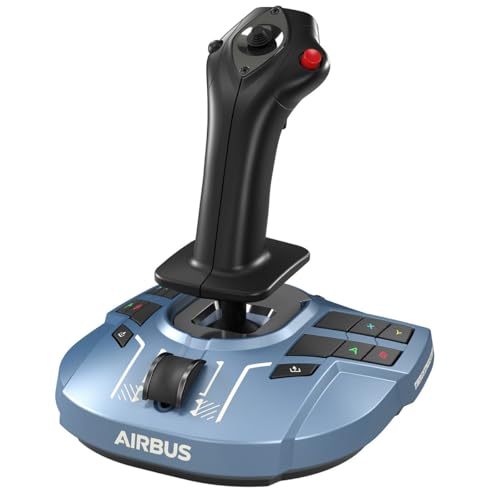
The Thrustmaster TCA Sidestick Airbus X Edition is the ideal choice for flight simulation enthusiasts seeking an authentic Airbus experience on both Xbox and PC. This ergonomic sidestick replicates the A320 controls and is officially licensed by Airbus and Xbox. With 21 action buttons, including swappable joystick head modules, you can customize your setup easily. The redesigned base guarantees stability, while the enhanced throttle offers comfort and reliability. Plus, the new tact switch buttons provide improved responsiveness, making your virtual flying even more immersive. It’s truly the ultimate tool for TCA Airbus Edition fans on Xbox Series X|S.
Best For: Flight simulation enthusiasts looking for an authentic Airbus sidestick experience on Xbox and PC.
Pros:
- 21 action buttons with customizable joystick head modules for personalized controls.
- Redesigned base and enhanced throttle provide improved stability and comfort during long flights.
- Officially licensed by Airbus and Xbox, ensuring a high-quality and immersive experience.
Cons:
- May require additional setup for compatibility with existing Thrustmaster Airbus ecosystem.
- Limited to Airbus-style controls, which may not appeal to users preferring other aircraft designs.
- The price point may be higher compared to non-branded alternatives on the market.
Factors to Consider When Choosing Flight Sim Bundles for MSFS
When you’re choosing flight sim bundles for MSFS, think about compatibility with your simulator and the precision of the controls. Comfort is key too, since you’ll be spending hours in the cockpit, so consider ergonomic design. Don’t forget to check the customization options and build quality to guarantee your setup lasts.
Compatibility With Flight Simulators
Choosing the right flight sim bundle for MSFS involves more than just picking the latest model; you need to guarantee compatibility with various flight simulation software like Microsoft Flight Simulator X, Prepar3D, and X-Plane. Many flight control systems are designed to work seamlessly with recent editions of Microsoft Flight Simulator, including versions 2020 and 2024, enhancing your immersive experience. Verify that the hardware connects via USB and supports necessary operating systems, typically Windows 7, 8, 10, and 11. Additionally, consider bundles with modular designs that integrate with your existing flight controls, allowing for expanded compatibility. Finally, look for bundles that accommodate a range of flight types, from commercial aviation to combat jets, ensuring a versatile simulation experience.
Control Precision and Responsiveness
Control precision and responsiveness are essential for an immersive flight simulation experience. When choosing flight sim bundles, look for systems that offer a high number of programmable controls—some provide up to 75. Quality flight sticks equipped with Hall Effect sensors deliver smooth, precise movements, ensuring accuracy without mechanical wear. Features like adjustable resistance and long travel ranges on rudder axes enhance responsiveness, making your maneuvers more coordinated. Additionally, dedicated pitch trim wheels and modular throttle quadrants enable real-time adjustments, allowing you to fine-tune your controls during flight. These elements combine to create a more engaging simulation, ensuring that every input feels natural and responsive, ultimately enhancing your overall flying experience.
Ergonomic Design and Comfort
A comfortable setup considerably enhances your flight simulation experience, especially during lengthy sessions. When choosing flight sim bundles for MSFS, look for ergonomic designs featuring adjustable throttle knobs and contoured grips. These elements help reduce wrist fatigue and improve control with a progressive throttle that offers resistance adjustment. Precision centering mechanisms and no-contact technology on control axes guarantee a smooth, responsive flying experience. Additionally, non-slip footrests and self-centering rudder designs provide stability, enhancing your comfort during extended flights. Some systems even allow customizable handle adjustments to fit various hand sizes, promoting overall user comfort and control. Prioritizing ergonomics in your selection can make all the difference in elevating your virtual flying adventures.
Customization Options Available
When it comes to enhancing your flight simulation experience, the customization options available in flight sim bundles for MSFS can make a significant difference. Many bundles offer programmable controls, allowing you to tailor your flight experience to match your preferences and specific aircraft handling. Modular throttle quadrants with customizable lever handles let you adjust throttle responses for different types of planes. You’ll also find adjustable ergonomic designs that let you modify button placements and joystick resistance, improving comfort during long sessions. Advanced flight control systems often include multiple action buttons and assignable switches, giving you extensive control over cockpit functions. Plus, some bundles come with software that supports programmable settings for each game, enabling you to save configurations for various flight simulation titles.
Build Quality and Durability
Build quality and durability are essential factors to take into account when selecting flight sim bundles for MSFS. Look for materials that can withstand extended use, like metal components in controllers, which provide increased durability and stability during intense sessions. Ergonomic designs make long flights more comfortable, featuring adjustable resistance and contoured grips to reduce fatigue. High-quality construction guarantees precise control responses while minimizing mechanical wear, which is influenced by the materials used. Modular designs offer customization options and upgrades, enhancing longevity and adaptability to your evolving preferences. Finally, reliable performance often shines through customer ratings, so pay attention to products with high feedback scores, as they typically indicate superior build quality and user satisfaction.
Price and Value Assessment
Evaluating price and value in flight sim bundles for MSFS is essential for making a smart investment. Start by considering the total features and functionalities offered; higher-priced bundles typically provide advanced controls and customization options. Check customer ratings—aim for bundles rated 4.0 stars or higher, which reflect perceived value. Don’t overlook the weight and dimensions; lighter, compact systems often offer better portability without sacrificing essential features. Additionally, bundles with extensive compatibility across major flight simulation software can justify a higher price due to their versatility. Finally, investigate warranty offerings, like one-year warranties, as these enhance perceived value by assuring product quality and support. All these factors will help you find the best deal for your virtual flying experience.
Included Accessories and Features
After evaluating price and value, it’s time to look at the included accessories and features in flight sim bundles for MSFS. Consider the number and types of controls, like yokes, throttles, and rudder pedals, to guarantee they suit your flying style. Customizable buttons and programmable controls can enhance your experience, making flights more personal and versatile. Ergonomics matter, too; comfortable accessories will keep you focused during long sessions. Compatibility with major flight simulation software is essential, as some bundles integrate better with specific titles. Finally, check for additional features like LED displays or integrated management systems, which can considerably boost your situational awareness while you navigate the skies. Choose wisely to elevate your virtual flying experience.