
If you’re looking to enhance your flight simulation experience, the right hardware bundle can make all the difference. With options ranging from the Turtle Beach VelocityOne to the Logitech G PRO Flight Yoke System, each bundle offers unique features tailored for immersive flying. But how do you choose the best fit for your setup? Let’s explore the top contenders and what factors you should consider before making your decision.
Turtle Beach VelocityOne Flight Universal Control System for Xbox and Windows

If you’re looking for an immersive flight simulation experience on your PC or Xbox, the Turtle Beach VelocityOne Flight Universal Control System is an excellent choice. Designed for Xbox Series X|S, Xbox One, and Windows 10 & 11, it features a yoke handle, throttle quadrant, and customizable controls. You’ll enjoy smooth 180° yoke rotation and an integrated rudder for realistic maneuvering. With a full-color flight management display and real-time alerts, you’ll have all the information you need at your fingertips. Plus, its compatibility with popular flight simulators guarantees you’re ready for takeoff right away.
Best For: Flight simulation enthusiasts looking for an immersive and realistic experience on Xbox and Windows platforms.
Pros:
- Comprehensive control features with 12 analog axes and 26 assignable buttons for customizable gameplay.
- Full-color flight management display provides real-time alerts and system configurations.
- Ergonomic design ensures comfort during long flight simulation sessions.
Cons:
- Weighs 10 pounds, which may be cumbersome for some users to move or store.
- Limited compatibility with some older flight simulation titles may restrict usage options.
- Customer rating of 4.0 stars indicates mixed reviews, suggesting potential quality concerns for some users.
Logitech G X56 H.O.T.A.S Flight Simulator Game Controller
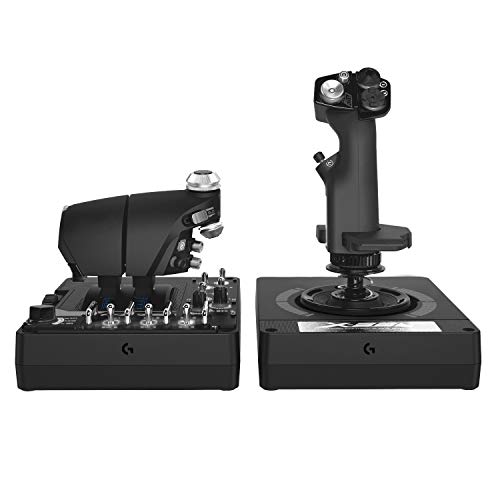
The Logitech G X56 H.O.T.A.S Flight Simulator Game Controller stands out for its military-grade precision, making it an ideal choice for serious flight simulation enthusiasts and aspiring combat pilots. With 189 programmable controls and adjustable stick force, you’ll experience complete command over your aircraft. The ergonomic design, featuring twin throttles and mini analog sticks, guarantees you can navigate with ease. Plus, its customizable RGB backlighting lets you match your gaming rig. Compatible with various Windows versions and perfect for VR gaming, the X56 promises a thrilling and immersive flying experience. Elevate your simulation game with this top-tier controller.
Best For: Serious flight simulation enthusiasts and aspiring combat pilots seeking military-grade precision and extensive control options.
Pros:
- Customizable controls with 189 programmable options for a tailored flying experience.
- Ergonomic design featuring twin throttles and mini analog sticks for enhanced navigation and comfort.
- RGB backlighting allows users to match the controller with their gaming rig for a cohesive aesthetic.
Cons:
- Relatively heavy at 6.9 pounds, which may not be ideal for portability.
- Requires 2 USB 2.0 ports, limiting compatibility with some setups.
- Higher price point compared to standard flight controllers, which may not appeal to casual gamers.
Logitech G PRO Flight Yoke System for PC

For aspiring pilots and seasoned flight simulation enthusiasts alike, the Logitech G PRO Flight Yoke System offers an unparalleled experience with its realistic controls and extensive programmability. This professional-grade yoke features 75 programmable controls, including configurable knobs, providing you with the flexibility to customize your setup. The sturdy steel shaft and modular design enhance durability and compatibility with various flight simulators like Microsoft Flight Simulator and X-Plane. Weighing just 6.2 pounds, it’s easy to mount with its two-position desk clamp. With a 2-year warranty and a solid customer rating, this yoke system is a top choice for serious sim pilots.
Best For: Aspiring pilots and seasoned flight simulation enthusiasts looking for a professional-grade yoke system to enhance their flying experience.
Pros:
- Realistic flight experience with precise control, simulating actual aircraft handling.
- Extensive programmability with 75 customizable controls, allowing for tailored setups.
- Sturdy and modular design that ensures durability and compatibility with various flight simulators.
Cons:
- Requires optional software downloads for full compatibility with certain flight simulators.
- Weight may be a factor for those seeking a more portable solution.
- Initial setup may be complex for beginners unfamiliar with flight simulation equipment.
Thrustmaster T 16000M SPACE SIM DUO STICK (Compatible with PC)

Looking for a flight stick that offers precision and comfort? The Thrustmaster T.16000M FCS Space Sim Duo Stick is your ideal choice. With its dual joystick design and magnetic sensors, you’ll enjoy unmatched accuracy during intense dogfights. Boasting 32 action buttons with Braille-style identification, accessing commands is effortless. Its ergonomic wide hand rests and weighted bases guarantee stability, making long sessions enjoyable for both left and right-handed players. Plus, the T.A.R.G.E.T software lets you customize your setup. Weighing 5.45 pounds, it’s a robust yet manageable addition to your flight sim arsenal. Elevate your gaming experience today!
Best For: Gamers seeking a high-precision flight stick for immersive space simulation experiences.
Pros:
- Dual joystick design enhances control and maneuverability in flight simulation games.
- Ergonomic features such as wide hand rests and weighted bases provide comfort during extended gaming sessions.
- Customizable settings through T.A.R.G.E.T software allow for tailored game profiles.
Cons:
- Weight of 5.45 pounds may be cumbersome for some users when adjusting during gameplay.
- Limited compatibility as it is only designed for PC use.
- Learning curve for new users unfamiliar with dual joystick setups might be steep.
Logitech G Pro Flight Rudder Pedals

Experience unparalleled control in your flight simulations with the Logitech G Pro Flight Rudder Pedals, designed specifically for both casual and serious enthusiasts. These pedals feature smooth, accurate self-centering, allowing for realistic handling. You can easily customize the adjustable tension dial, giving you a lighter response for small aircraft or a more robust feel for heavy jets. The differential toe brakes guarantee precise control during runway operations, enhancing your overall flying experience. Compatible with various Windows versions, these pedals are USB 2.0-compliant and built for realism, making them an essential addition to your flight simulation setup.
Best For: Flight simulation enthusiasts seeking realistic control and customizable response in their setups.
Pros:
- Smooth and accurate self-centering for enhanced realism in flight handling.
- Adjustable tension dial allows for personalized response based on aircraft type.
- Differential toe brakes provide precise control for better runway operations.
Cons:
- Limited compatibility with operating systems (only Windows 7, 8, 8.1, and 10).
- Requires internet connection for optional software download, which may be inconvenient for some users.
- Weight and size may not be ideal for users with limited space or looking for portability.
Thrustmaster T-Flight Full Kit (Compatible with Xbox Serie X|S and PC)

The Thrustmaster T-Flight Full Kit stands out as an excellent choice for gamers who want a seamless changeover between their Xbox Series X|S and PC flight simulations. With high-precision HOTAS controls, including a large detachable throttle featuring five axes and 14 buttons, you’ll experience exceptional control during your flights. The kit’s rudder pedals incorporate the innovative S.M.A.R.T slide rails system for smooth steering, ensuring ergonomic comfort. Whether you’re diving into space adventures or civil flights, the T-Flight Full Kit enhances your experience, allowing easy access to social features and console navigation. It’s truly a versatile option for any virtual pilot.
Best For: Gamers seeking a high-quality flight simulation experience on both Xbox Series X|S and PC.
Pros:
- High-precision HOTAS controls for enhanced flight accuracy.
- Large detachable throttle with multiple axes and buttons for customizable control.
- Ergonomically designed rudder pedals with smooth steering mechanics.
Cons:
- May require a learning curve for beginners unfamiliar with flight simulation gear.
- Limited compatibility with non-flight simulation games.
- Bulkiness of the kit may require ample space for setup.
Thrustmaster TFRP Flight Rudder Pedals for Flight Simulator

For serious flight sim enthusiasts, the Thrustmaster TFRP Flight Rudder Pedals stand out as an essential addition to your setup. These pedals enhance your flying experience with realistic controls, compatible with PS5, Xbox Series X|S, and PC. You’ll appreciate the long range of travel on the rudder axis, enabling smooth, accurate turns for coordinated flight. The S.M.A.R.T. Rail Sliding System provides friction-free motion, ensuring precise control inputs. Designed ergonomically, these pedals offer comfort and stability during extended sessions, while sturdy construction keeps them securely mounted in your cockpit. Elevate your simulation with this high-quality, essential piece of hardware.
Best For: Serious flight sim enthusiasts looking to enhance their simulation experience with high-quality, realistic flight controls.
Pros:
- Realistic controls designed to improve flight simulation experience.
- Smooth, accurate turns with long range of travel on the rudder axis.
- Ergonomic design for comfort during extended flying sessions.
Cons:
- May be considered an investment for casual gamers.
- Setup may require additional space in the cockpit.
- Compatibility limitations with some older flight simulator games.
Thrustmaster HOTAS Warthog Flight Stick and Throttle

Serious flight simulation enthusiasts will find the Thrustmaster HOTAS Warthog Flight Stick and Throttle to be an exceptional choice. This metal dual throttle system replicates U.S. Air Force A-10C controls, ensuring durability and realism. With H.E.A.R.T technology, you’ll enjoy ultra-precise accuracy without mechanical wear. The independent engine control enhances your experience in modern combat aircraft simulations. Plus, it features 55 programmable buttons and an 8-way hat for deep customization. Weighing 13.23 pounds and built from metal, it transforms your desk into a realistic cockpit. With a 4.5-star rating, it’s a reliable option for both enthusiasts and professionals alike.
Best For: Serious flight simulation enthusiasts and professionals seeking a realistic and durable flight control system.
Pros:
- Exceptional build quality with a metal construction for durability and realism.
- Ultra-precise accuracy with H.E.A.R.T technology, ensuring long-lasting performance.
- Extensive customization options with 55 programmable buttons and an 8-way hat.
Cons:
- Heavier design may not be suitable for users with limited desk space.
- Primarily designed for PC, limiting compatibility with other platforms.
- Higher price point compared to entry-level flight sticks may be a barrier for some users.
Thrustmaster T-Flight Hotas X Flight Throttle and Joystick

Designed specifically for flight simulation enthusiasts, the Thrustmaster T-Flight Hotas X Flight Throttle and Joystick offers an immersive experience with its ergonomic HOTAS design, ensuring comfort during extended gaming sessions. You’ll appreciate the real-size throttle control that minimizes wrist fatigue. With 12 programmable buttons and 5 customizable axes, you can tailor your controls for various flight scenarios. The plug-and-play feature makes setup a breeze, while dual rudder control options enhance your maneuvers. Its high-precision joystick, featuring adjustable resistance, guarantees smooth and accurate handling, making this a top choice for both beginners and seasoned pilots alike.
Best For: Flight simulation enthusiasts looking for an immersive and comfortable gaming experience.
Pros:
- Fully programmable with 12 action buttons and 5 customizable axes for tailored controls.
- Ergonomic design reduces wrist fatigue, enhancing comfort during long gaming sessions.
- High precision joystick with adjustable resistance ensures smooth and accurate maneuvers.
Cons:
- Only compatible with PC, limiting use for console gamers.
- Some users may find the weight (2165 grams) cumbersome for portability.
- The learning curve for beginners may be steep due to the extensive customization options.
Thrustmaster Sol-R2 HOSAS Dual Flight Joysticks for Flight Simulator

The Thrustmaster Sol-R2 HOSAS Dual Flight Joysticks stand out for their remarkable Hall Effect Technology, making them an excellent choice for avid flight sim enthusiasts. With 88 action buttons and 16-bit resolution, you’ll experience precise control without drift or deadzone. The ergonomic design, featuring interchangeable wrist and thumb rests, guarantees comfort during long sessions. Plus, the sci-fi inspired backlit design enhances your setup’s aesthetic. These joysticks are compatible with PC and easily connect via USB. You can also expand your configuration with additional Thrustmaster accessories, guaranteeing you’re always equipped for your next virtual flight adventure.
Best For: Avid flight simulation enthusiasts seeking precise control and customizable comfort during extended gaming sessions.
Pros:
- 88 action buttons provide extensive control options for combat, navigation, and system operations.
- H.E.A.R.T. HallEffect AccuRate Technology ensures accurate input with zero drift and zero deadzone.
- Ergonomic design with interchangeable wrist and thumb rests enhances comfort for long gameplay sessions.
Cons:
- Weight of 2539 grams may make it less portable for users who want to move their setup frequently.
- Design may not appeal to users looking for a more traditional flight stick aesthetic.
- Limited compatibility as it is only compatible with PC and Windows, excluding other gaming systems.
Factors to Consider When Choosing Flight Sim Hardware Bundles for PC
When choosing flight sim hardware bundles for your PC, you should reflect on several key factors. Compatibility with your preferred simulators, ergonomics for long sessions, and customization options can all impact your experience. Plus, don’t forget to take into account build quality and price to guarantee you get the best value for your investment.
Compatibility With Flight Simulators
Choosing the right flight sim hardware bundle means guaranteeing compatibility with major flight simulation titles like Microsoft Flight Simulator 2020 and 2024, X-Plane, and others. Start by checking the system requirements, as some controllers may only work with specific versions of Windows, like 10 or 11. Look for bundles that feature USB connectivity, a common standard for connecting your flight sim hardware to your PC. It’s also crucial to take into account whether the hardware allows for customizable settings or profiles tailored to different simulators, enhancing your experience. Finally, verify the hardware supports necessary features like analog axes, programmable buttons, and rudder controls, so you get a thorough and immersive flight simulation experience.
Ergonomics and Comfort
While diving into the world of flight simulation, prioritizing ergonomics and comfort in your hardware bundle can make all the difference during extended sessions. Look for controllers designed to promote natural hand positioning, which can considerably reduce fatigue. Many options offer adjustable resistance and tension settings, so you can tailor the responsiveness to your liking. Features like wide hand rests and detachable components enhance comfort, especially if you tend to experience wrist strain. Modular designs let you configure your setup according to your ergonomic needs, creating a more personalized experience. Finally, choose products that maintain stability during intense gaming, as this prevents unnecessary adjustments and keeps your focus on flying. Comfort truly enhances your virtual flying experience.
Control Customization Options
Comfort and ergonomics play an essential role in your flight simulation experience, but control customization options can elevate it even further. Look for hardware that offers a high number of programmable buttons and axes—some models feature up to 189 controls for extensive personalization. Adjustable stick force or tension settings let you fine-tune resistance, enhancing your flying experience. Opt for systems with dedicated components like customizable throttle quadrants and trim wheels for added operational flexibility. Additionally, choose controllers that support software for creating and managing mapping profiles, allowing you to adapt settings for various flight scenarios. Finally, consider ergonomic features like customizable grips and wrist rests to improve comfort during those long simulation sessions.
Build Quality and Durability
When investing in flight sim hardware bundles for your PC, the build quality and durability of the components are essential factors to weigh. Look for products made with metal construction, as they’re often more robust and long-lasting than their plastic counterparts. Ergonomic designs are also important; they enhance comfort and reduce wear during extended sessions, minimizing the risk of damage. Heavier products, especially those over 10 pounds, provide better stability, which can prolong their lifespan during intense gaming. Additionally, features like non-contact hall effect sensors help reduce mechanical wear and tear. Finally, a generous warranty of one to two years can indicate the manufacturer’s confidence in the product’s build quality and durability, giving you peace of mind with your purchase.
Price and Value Proposition
As you explore flight sim hardware bundles for your PC, it’s important to reflect on the price and overall value they offer. Consider the total cost of ownership, including any additional accessories you might need. Higher-priced bundles often provide more programmable controls and advanced features that can greatly enhance your flying experience, so weigh those options carefully. Check customer ratings and reviews to see how others perceive the value; highly rated products usually indicate better performance. Don’t forget to look at warranties and return policies—longer warranties can offer peace of mind. Finally, verify the bundle’s compatibility with popular flight simulation titles, as well-matched hardware can improve your experience and reduce future upgrade costs.