
Choosing the right throttle quadrant can make a flight sim setup feel far more precise, immersive, and intuitive. Whether you fly general aviation, airliners, or military aircraft, the best match depends on lever layout, detents, build quality, and compatibility.
This roundup highlights the best flight sim throttle quadrant for PC options in 2026, with picks suited to different aircraft types and budgets so you can buy once and build around your preferred cockpit style.
Best 10 Flight Sim Throttle Quadrant for PC Picks for 2026
Best All-in-One Cockpit Controls
Honeycomb Bravo Throttle Quadrant

- Configurable for GA, twin-engine, and airliner setups
- Includes autopilot, annunciator, gear, flaps, and trim controls
- Compatible with MSFS, X-Plane 11/12, and Prepar3D
Best For: PC sim pilots who want a versatile, cockpit-like throttle quadrant with lots of controls.
Best for GA Cockpits
Flight Sim Stuff Cessna Style TPM Controller
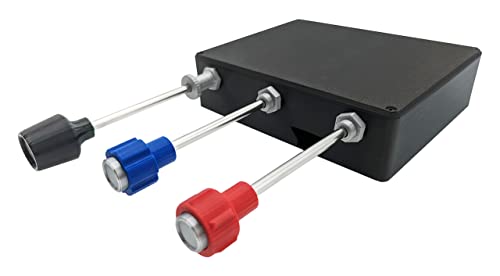
- Separate throttle, prop, and mixture controls
- Friction lock throttle for finer adjustment
- Windows/Mac plug-and-play setup
Best For: PC sim pilots flying general aviation aircraft who want authentic three-axis engine control.
Best for Extra Control
Logitech G Saitek PRO Flight Throttle Quadrant

- 3 axis levers for throttle, flaps, mixture, and prop pitch
- 3 two-way rocker switches add extra control options
- Adjustable mount and swappable lever heads for custom setups
Best For: PC sim pilots who want a flexible throttle quadrant with more physical controls.
Best For GA Pilots
Cessna Style Throttle Prop Mixture Controller

- Separate throttle, prop, and mixture levers
- Trim wheel with 10 rotations for precision
- Plug-and-play Windows and Mac support
Best For: PC sim pilots flying Cessnas and other general aviation aircraft.
Best for Authentic A-10 Controls
Thrustmaster Warthog Dual Throttle

- Magnetic sensors for precise, drift-free throttle input
- Idle and afterburner detents for realistic aircraft handling
- Heavy metal build with 17 programmable buttons
Best For: Ideal for simmers who want an authentic dual-throttle setup for military aircraft and advanced control.
Best for TPM Flying
Flight Sim Stuff TPM Flaps Controller

- Dedicated throttle, prop, and mixture levers
- Flap switch with auto-center action
- Plug-and-play Windows and Mac support
Best For: Sim pilots who want dedicated TPM controls with flap switching and easy setup.
Best for Beginners
Logitech G Pro Flight Yoke & Throttle Quadrant

- Complete yoke-and-throttle bundle
- Stable steel shaft and desk clamps
- Plenty of programmable controls
Best For: New and intermediate sim pilots building a flexible PC flight control setup.
Best for Airbus-Style Control
Thrustmaster TCA Quadrant Airbus Edition

- Airbus-style detents and thrust reversers
- Hall-effect sensors for smoother control
- 16 buttons with twin throttle axes
Best For: PC sim pilots who want an Airbus-inspired throttle quadrant with realistic commercial-jet controls.
Best for DCS Viper Fans
Thrustmaster Viper TQS Metal Throttle

- 1:1 metal replica with U.S. Air Force licensing
- 21 buttons, 5 axes, and CHAFF/FLARE slap switch
- 16-bit H.E.A.R.T precision with DCS plug and play
Best For: DCS pilots and Viper enthusiasts who want a realistic, metal throttle quadrant with authentic military-style controls.
Best for Boeing-Style Cockpits
Thrustmaster TCA Quadrant Boeing Edition

- Boeing-inspired dual-engine throttle levers
- Hall-effect sensors for smooth, precise control
- 17 buttons and autopilot functions cut keyboard use
Best For: PC sim pilots building a Boeing-style cockpit with realistic twin-engine throttle control.
Best All-in-One Cockpit Controls – Honeycomb Bravo Throttle Quadrant
If you want a flight sim throttle quadrant for pc that does more than move throttles, the Honeycomb Bravo is built like a full cockpit control hub. It combines configurable engine levers with autopilot, annunciator, gear, flap, and trim controls, making it a strong fit for simmers who fly both GA and airliners.
Best For: PC sim pilots who want an all-in-one throttle quadrant with realistic cockpit-style controls and broad aircraft support.
Pros:
- Highly configurable for single-engine, multi-engine, and commercial aircraft setups
- Includes autopilot panel, annunciator lights, gear lever, flap lever, and trim wheel
- Works smoothly with Microsoft Flight Simulator, X-Plane 11/12, and Prepar3D
- Solid, aerospace-grade build quality aimed at long-term use
Cons:
- More expensive than basic throttle-only options
- Size and feature set may be overkill for casual flyers
- Setup can take time if you want custom aircraft profiles
For simmers who value realism and flexibility, the Honeycomb Bravo stands out as a flight sim throttle quadrant for pc that can grow with your hangar. It’s especially appealing if you want one controller to cover both general aviation and airliner-style flying.
Best for GA Cockpits – Flight Sim Stuff Cessna Style TPM Controller
If you want a more authentic flying feel from a flight sim throttle quadrant for pc, this Cessna-style push-pull controller is a practical way to handle throttle, prop, and mixture separately. It’s especially useful for general aviation aircraft in Microsoft Flight Simulator, X-Plane, and Prepar3D, and the friction-lock throttle helps you set power more precisely.
Best For: PC sim pilots who fly GA aircraft and want dedicated throttle, prop, and mixture control without driver setup.
Pros:
- Separate push-pull controls for throttle, prop, and mixture
- Friction lock nut helps keep throttle settings steady
- Plug-and-play on Windows and Mac with no drivers needed
- Compatible with MSFS 2020/2024, X-Plane, and Prepar3D
Cons:
- Not compatible with Xbox or PlayStation
- More specialized for GA flying than jet-style throttle setups
This is a strong pick if you’re shopping for a flight sim throttle quadrant for pc and mainly fly Cessna or other piston aircraft. It prioritizes realism and simple setup over extra buttons or console support, making it a focused choice for desktop simmers.
Best for Extra Control – Logitech G Saitek PRO Flight Throttle Quadrant
If you want a flight sim throttle quadrant for pc that adds more than just a basic throttle slider, this Logitech G Saitek unit is a practical upgrade. The three axis levers and extra rocker switches give you more hands-on control for throttle, flaps, mixture, and prop pitch without taking up much desk space.
Best For: Sim pilots who want a flexible, desktop-mountable throttle quadrant with plenty of assignable controls.
Pros:
- Three axis levers expand control for multi-engine and general aviation setups
- Three two-way rocker switches add useful extra inputs for flight sims
- Adjustable mounting works on top of or in front of your desk
- Swappable lever heads help you customize the layout for your aircraft
Cons:
- Windows-only compatibility limits use to PC sim setups
- No built-in display or advanced programming features
This is a strong choice if you want a flight sim throttle quadrant for pc that feels straightforward, customizable, and easy to place in a cockpit-style setup. It’s especially appealing for flyers who want more physical controls than a single throttle axis can provide.
Best For GA Pilots – Cessna Style Throttle Prop Mixture Controller
If you want a more realistic flight sim throttle quadrant for pc, this Cessna-style unit gives you separate throttle, prop, mixture, flaps, and trim controls in one desktop setup. It’s a practical choice for simmers who fly general aviation aircraft and want tactile, plug-and-play control without driver headaches.
Best For: PC sim pilots who fly Cessnas and other GA aircraft and want dedicated analog-style engine and trim controls.
Pros:
- Separate throttle, prop, and mixture controls for more realistic engine management
- Trim wheel with 10 full rotations for fine elevator adjustments
- Plug-and-play on Windows and Mac with no drivers required
- Includes flaps switch, desktop mount, and 10′ USB cable
Cons:
- Not compatible with Xbox or PlayStation
- 3D-printed build may not feel as polished as mass-market metal units
For GA-focused simmers, this is a well-targeted flight sim throttle quadrant for pc that prioritizes realism over extras. If you mainly fly airliners, you may want a more complex multi-engine quadrant, but for Cessna-style flying it covers the essentials well.
Best for Authentic A-10 Controls – Thrustmaster Warthog Dual Throttle
If you want a flight sim throttle quadrant for pc that feels closer to real aircraft hardware than a typical desktop accessory, the Thrustmaster HOTAS Warthog Dual Throttle is built to deliver. Its metal construction, magnetic sensors, and replica A-10C layout make it a strong pick for simmers who value realism, precise engine control, and a more immersive cockpit setup.
Best For: Simmers who want a heavy, realistic dual-throttle unit for military aircraft, complex engine management, and long-term durability.
Pros:
- Magnetic sensors provide smooth, accurate throttle tracking with no drift
- Adjustable friction plus idle and afterburner detents add authentic tactile control
- 17 programmable buttons and hat switches reduce keyboard dependence
- Weighted metal base helps keep the unit stable during intense sessions
Cons:
- Premium price puts it above entry-level throttle options
- Large, heavy design is not ideal for compact desks
- Most appealing to users who fly aircraft that benefit from dual throttles
For pilots building a serious flight sim throttle quadrant for pc, this model stands out for its realism and precision more than sheer simplicity. It is a better fit for enthusiasts who want authentic feel and deep customization than for casual flyers looking for a basic plug-and-play throttle.
Best for TPM Flying – Flight Sim Stuff TPM Flaps Controller
If you want a focused flight sim throttle quadrant for pc use, this hand-built TPM controller adds throttle, prop, mixture, and flap controls in one compact unit. It’s a practical choice for piston aircraft flying in Microsoft Flight Simulator 2020/2024, X-Plane, and Prepar3D, especially if you prefer push-pull levers over a generic joystick throttle.
Best For: Sim pilots who want dedicated TPM controls with flap switching, plug-and-play setup, and desktop mounting support.
Pros:
- Dedicated throttle, prop, and mixture levers for more realistic piston-aircraft control
- Flap up/down momentary switch with auto-center action
- No drivers needed; works with Windows and Mac
- Throttle friction lock adds resistance and helps hold position
Cons:
- Not compatible with Xbox or PlayStation
- 3D-printed ABS build may not feel as polished as metal-bodied units
- TPM layout is more specialized than full multi-engine quadrants
This is a strong pick if you want a simple, hands-on flight sim throttle quadrant for pc flying without driver hassles. It’s especially appealing for general aviation simmers who value dedicated levers, easy setup, and a layout that matches the aircraft they’re flying.
Best for Beginners – Logitech G Pro Flight Yoke & Throttle Quadrant
If you want a flight sim throttle quadrant for pc that feels approachable but still offers real sim features, the Logitech G Pro Flight Yoke System is a smart starting point. It combines a yoke and separate throttle quadrant with plenty of programmable controls, making it easier to learn core cockpit workflows without jumping straight into a complex full-rig setup.
Best For: New and intermediate sim pilots who want a complete, modular control setup for general aviation or airliner practice.
Pros:
- Includes both a yoke and a separate throttle quadrant for a more complete setup
- Steel shaft and desk clamps help keep inputs smooth and stable
- Three-position mode switch and multiple buttons provide lots of assignable controls
- Compatible with major PC flight sims including Microsoft Flight Simulator, X-Plane, and Prepar3D
Cons:
- Requires some setup and software configuration to unlock all functions
- Bulkier than simpler single-lever throttle options
- Not the most advanced choice for serious multi-engine or study-level cockpits
As a flight sim throttle quadrant for pc, this bundle stands out for accessibility and expandability rather than sheer realism depth. It gives you a practical foundation for learning aircraft handling, and the modular design makes it a good platform to build on over time.
Best for Airbus-Style Control – Thrustmaster TCA Quadrant Airbus Edition
If you want a flight sim throttle quadrant for pc that feels closer to a real airline cockpit, the Thrustmaster TCA Quadrant Airbus Edition is built around Airbus-style detents, thrust reversers, and a detailed layout of switches. It gives you twin axes, 16 buttons, and Hall-effect sensors for smoother, more precise input than basic budget throttles.
Best For: Airbus fans, airline simmers, and PC pilots who want an authentic commercial-jet throttle setup with lots of tactile control.
Pros:
- Airbus-inspired detents and reverser controls add realistic throttle behavior
- Hall-effect sensors help improve smoothness and long-term precision
- 2 axes and 16 buttons provide solid control for complex cockpit mapping
- Linear mode makes it easier to adapt for different aircraft types
Cons:
- Airbus styling may not suit pilots who prefer a generic or Boeing-style layout
- Physical complexity can take time to learn if you are new to sim hardware
Overall, this is a strong pick if you want a flight sim throttle quadrant for pc that emphasizes realism, cockpit-style feedback, and airline-focused operation over universal simplicity.
Best for DCS Viper Fans – Thrustmaster Viper TQS Metal Throttle
If you want a flight sim throttle quadrant for pc that feels as close as possible to the real Viper, the Thrustmaster Viper TQS stands out with its 1:1 replica metal handle, U.S. Air Force licensing, and strong attention to cockpit realism. It’s a great fit for simmers who value authentic control layout, firm throttle travel, and plug-and-play convenience in DCS World.
Best For: DCS pilots and Viper enthusiasts who want a realistic, metal throttle quadrant with authentic military-style controls.
Pros:
- 1:1 replica metal handle with excellent realism and ergonomics
- CHAFF/FLARE slap switch, detents, and 21 buttons for combat immersion
- 16-bit H.E.A.R.T sensor delivers precise, smooth throttle input
- Plug and play in DCS World with no setup required
Cons:
- Primarily aimed at Viper-style setups, so it’s less versatile for other aircraft
- Premium build and licensing put it in a higher price tier
- Some features are most useful if you fly combat sims regularly
Overall, this is a standout flight sim throttle quadrant for pc if you want realism first and don’t mind paying for a specialized, high-fidelity build. For DCS users and modern fighter fans, it delivers one of the most authentic throttle experiences in the category.
Best for Boeing-Style Cockpits – Thrustmaster TCA Quadrant Boeing Edition
If you want a flight sim throttle quadrant for pc that feels closer to a real airliner than a generic gaming accessory, the Thrustmaster TCA Quadrant Boeing Edition is a strong fit. It pairs Boeing-inspired dual levers with Hall-effect sensors and adjustable resistance for smooth, accurate power control in serious simulator setups.
Best For: PC sim pilots building a Boeing-style cockpit who want realistic multi-engine throttle control, integrated autopilot functions, and fewer keyboard inputs.
Pros:
- Dual-engine levers with adjustable resistance for more authentic airline-style handling
- Hall-effect sensors provide smooth, contactless throttle precision and long-term durability
- 17 integrated controls help reduce keyboard reliance during complex flight sessions
- Official Boeing and Xbox licensing adds credibility for cockpit-focused builds
Cons:
- Feels most valuable when paired with other Thrustmaster flight controls
- More specialized than a simple starter throttle for casual flyers
For simmers who want a flight sim throttle quadrant for pc with airline-inspired ergonomics and believable twin-engine control, this add-on stands out as a cockpit-first choice. It is especially appealing if you plan to build a coordinated Boeing-style control setup around Microsoft Flight Simulator or similar PC titles.
How We Picked the Best Flight Sim Throttle Quadrant for PC
For this list, we focused on controls that deliver accurate axis movement, strong PC compatibility, and layouts that make sense for real-world aircraft workflows. We prioritized products with useful extras like reverse thrust, flaps or mixture control, programmable buttons, and durable construction.
We also looked at how well each Flight Sim Throttle Quadrant for PC fits a specific type of flying, since a good GA setup is not always the best choice for airliners or combat sims.
Quick Comparison
In simple terms, the list breaks down into four main categories: Cessna-style TPM units for general aviation, airliner-style quadrants with detents and reversers, combat-oriented throttles with specialized switches, and all-in-one systems that combine throttle controls with yokes or cockpit functions.
If you want the most realistic workflow, choose the quadrant that matches the aircraft you fly most often rather than the one with the most buttons.
Key Buying Factors for Flight Sim Throttle Quadrant for PC
Aircraft Type
General aviation pilots usually benefit from throttle, prop, and mixture controls. Airliner flyers often want dual levers, detents, and thrust reversers. Jet and military sim fans may prefer magnetic sensors, adjustable friction, and afterburner or idle cutoffs.
Axis Count and Detents
Check how many independent axes you need and whether the detents match your sim habits. For example, reverse thrust, idle cutoff, and afterburner stops can make a big difference in realism and control.
Build Quality and Feel
Metal construction, Hall-effect or magnetic sensors, and adjustable tension generally provide smoother, longer-lasting performance. Lighter plastic units can still be solid choices if you want a lower-cost entry point.
Buttons and Integration
Extra switches are useful for gear, flaps, autopilot, and view controls, especially if you want to reduce reliance on the keyboard. If you already own a yoke or stick, make sure the quadrant complements the rest of your controls.
Who Should Buy Which Flight Sim Throttle Quadrant for PC?
Choose a Cessna-style TPM if you mainly fly piston aircraft and want faithful engine management. Pick an airliner quadrant if you fly Airbus or Boeing jets and want detents and reversers that feel natural. Go with a combat-style throttle if you want the most tactile control for jets and fighters. If you want an all-in-one cockpit-style solution, a bundled yoke-and-quadrant setup can be the easiest path.
For most buyers, the best Flight Sim Throttle Quadrant for PC is the one that matches your aircraft and gives you the right mix of realism, comfort, and expandability.