
Looking for a more immersive cockpit setup? The right yoke-and-pedals combo can make takeoffs, coordinated turns, and landings feel far more natural.
Below, we’ve narrowed the field to the best options for different budgets, platforms, and sim-cabinet setups so you can choose with confidence.
Best 10 Flight Sim Yokes with Rudder Pedals Picks for 2026
Best for Complete Control
Logitech G Pro Flight Yoke + Rudder Pedals Bundle

- Yoke, throttle quadrant, and pedals in one setup
- Self-centering pedals with toe brakes
- Many programmable controls for custom mappings
Best For: Sim pilots who want a full yoke-and-pedals setup for realistic control.
Best Twist-Rudder Option
Thrustmaster T16000M FCS Flight Pack

- Precise H.E.A.R.T sensor for consistent input
- Twist rudder reduces the need for pedals
- Ambidextrous grip with 16 buttons and POV hat
Best For: PC simmers who want a precise joystick setup with built-in rudder control.
Best for Beginners
Logitech G PRO Flight Yoke System

- Steel shaft provides smooth, accurate control
- Separate throttle quadrant adds realism
- 54+ programmable controls for simulator functions
Best For: New sim pilots who want a configurable yoke-and-throttle setup to pair with rudder pedals.
Best for Pedal Precision
Thrustmaster TFRP Rudder Pedals

- Long travel axis for more precise yaw control
- Self-centering feel helps with smooth re-centering
- PS5, Xbox Series X|S, and PC compatibility
Best For: Sim pilots who want accurate rudder control with a smooth, stable pedal feel.
Best for Realistic Rudder Control
Logitech G Pro Flight Rudder Pedals

- Smooth self-centering rudder movement
- Adjustable tension for different aircraft feels
- Differential toe brakes for taxi and landing control
Best For: Sim pilots who want dependable rudder pedals with adjustable feel and toe brakes.
Best for Xbox Sim Racers

- Includes rudder pedals, throttle, and stick in one bundle
- Hall-effect joystick and adjustable resistance improve control feel
- Official Xbox integration adds convenient Guide, View, and Menu buttons
Best For: Xbox and PC pilots who want an all-in-one HOTAS bundle with pedals included.
Best Cockpit Frame
Thermaltake GF500 Flight Simulator Cockpit

- Rigid aluminum-and-steel frame for stable control mounting
- Adjustable yoke, throttle, and pedal positions
- Includes fiberglass seat; controls and pedals sold separately
Best For: Sim pilots who want a full cockpit frame for existing yokes and rudder pedals.
Best Starter Flight Kit
Thrustmaster T.Flight Full Kit X

- Joystick, throttle, and rudder pedals included
- Compatible with Xbox Series X|S, Xbox One, and PC
- Great value for an all-in-one starter setup
Best For: Beginners who want a complete flight control bundle for Xbox or PC.
Best for Universal Rudder Pedal Mounting
OpenWheeler Config 4 Rudder Pedal Plate Kit
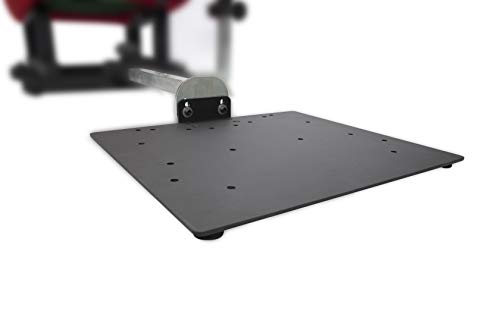
- Broad compatibility with many major rudder pedal brands
- Predrilled for hard mounting to an OpenWheeler rig
- Adjustable reach and swivel plate improve fit
Best For: Sim pilots who want a flexible, hard-mounted rudder pedal solution for an OpenWheeler cockpit.
Best Add-On Kit
OpenWheeler Config 5 Mk2 Flight Sim Add-On Kit
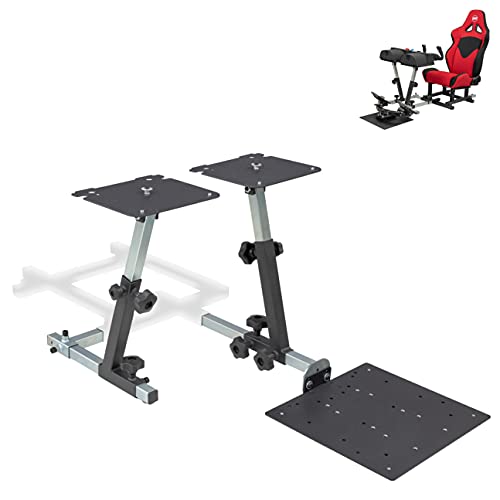
- Adds mounting for yoke, throttle, and rudder pedals
- Compatible with Honeycomb, VelocityOne, Logitech, and CH
- Designed for existing OpenWheeler cockpit owners
Best For: OpenWheeler users building a fixed flight-sim rig around their own controls.
Best for Complete Control – Logitech G Pro Flight Yoke + Rudder Pedals Bundle
If you want flight sim yokes with rudder pedals in one purchase, this Logitech bundle covers the core controls with a realistic yoke, throttle quadrant, and self-centering pedals. It’s a practical choice for pilots who want full aircraft-style input without piecing together separate hardware.
Best For: Sim pilots who want an all-in-one yoke-and-pedals setup for more realistic takeoff, rudder, and braking control.
Pros:
- Includes both the yoke system and rudder pedals in one bundle
- Self-centering pedals with differential toe brakes add realism
- Yoke offers many programmable controls for custom mappings
- Adjustable foot rests help fit a wider range of users
Cons:
- Takes more desk and floor space than a yoke-only setup
- Better suited to PC flight sim use than casual plug-and-play gaming
This bundle makes sense for buyers who want a more authentic cockpit feel from day one. Among flight sim yokes with rudder pedals, it stands out for combining essential controls, broad programmability, and a straightforward upgrade path for serious practice.
Best Twist-Rudder Option – Thrustmaster T16000M FCS Flight Pack
If you want a capable entry into flight sim yokes with rudder pedals alternatives, the Thrustmaster T16000M FCS Flight Pack is a strong PC-friendly pick thanks to its precise stick, twist rudder, and deep button layout. It is better suited to sim pilots who want accurate control from a joystick setup rather than a full yoke-and-pedal rig.
Best For: PC simmers who want a precise, customizable flight stick with built-in rudder control instead of separate pedals.
Pros:
- H.E.A.R.T sensor technology helps maintain precise input over time.
- Twist rudder and 4 axes reduce the need for separate rudder pedals.
- 16 buttons plus an 8-way hat switch give you plenty of in-sim control.
- Ambidextrous design works for left- or right-handed pilots.
Cons:
- Not a true yoke system, so it may not suit players seeking authentic civilian cockpit feel.
- PC-only compatibility limits use across consoles and other platforms.
For pilots shopping the flight sim yokes with rudder pedals category, this pack makes the most sense if you prioritize precision and flexibility over a traditional yoke layout. It is a practical choice for space sims, combat flights, and general PC flight simulation.
Best for Beginners – Logitech G PRO Flight Yoke System
If you’re comparing flight sim yokes with rudder pedals, the Logitech G PRO Flight Yoke System is a practical starter-to-midrange setup that focuses on realistic hands-on control. The steel yoke shaft, separate throttle quadrant, and programmable buttons make it easier to learn procedures and build muscle memory without jumping straight to a full cockpit rig.
Best For: New sim pilots and hobbyists who want an affordable, configurable yoke-and-throttle setup to pair with rudder pedals.
Pros:
- Realistic yoke feel with a smooth stainless steel shaft
- Includes a separate throttle quadrant for more authentic engine control
- Lots of programmable inputs for common simulator functions
- Desk clamps help keep the setup secure during use
Cons:
- Rudder pedals are not included, so you’ll need to buy them separately
- Setup may require optional software and some configuration time
Overall, this is a strong pick if you want a yoke-centric setup that pairs well with rudder pedals and gives you plenty of control without a huge learning curve. It’s especially appealing for simmers who want a realistic upgrade path before moving to more advanced flight sim yokes with rudder pedals.
Best for Pedal Precision – Thrustmaster TFRP Rudder Pedals
If you want a dedicated rudder solution for flight sim yokes with rudder pedals, the Thrustmaster TFRP is a solid pick for smoother coordination and more accurate ground handling. Its long travel, self-centering axis, and aluminum rail system are aimed at sim pilots who want more control without jumping to a full cockpit setup.
Best For: Flight sim players who want responsive, realistic rudder control for PC, PS5, or Xbox setups.
Pros:
- Long travel on the rudder axis helps with precise yaw control and gentle corrections.
- Self-centering design adds realistic resistance and makes re-centering feel predictable.
- Aluminum rail sliding system improves smoothness and stability during use.
- Works across PS5, Xbox Series X|S, and PC for flexible setup options.
Cons:
- Rudder pedals are sold separately from yokes, so this is not a full control bundle.
- Best suited to users who have space for a floor-mounted pedal setup.
The TFRP stands out for simmers who prioritize pedal feel and fine control over extra features. For buyers comparing flight sim yokes with rudder pedals, it’s a practical way to add more realism to coordinated turns, taxiing, and landing control.
Best for Realistic Rudder Control – Logitech G Pro Flight Rudder Pedals
If you’re building one of the more immersive flight sim yokes with rudder pedals setups, the Logitech G Pro Flight Rudder Pedals are a solid, straightforward upgrade. They add smooth yaw control, adjustable resistance, and toe brakes that make taxiing, runway alignment, and landings feel much more natural.
Best For: Sim pilots who want affordable, reliable rudder control with adjustable feel and toe brakes for a more complete cockpit setup.
Pros:
- Smooth, self-centering rudder action helps with precise coordinated turns
- Adjustable tension dial lets you tune the pedal feel for light GA or heavier jet aircraft
- Differential toe brakes improve taxiing and stopping control on the runway
- USB plug-and-play design keeps setup simple on Windows PCs
Cons:
- Limited to Windows compatibility
- Plastic construction won’t feel as premium as higher-end pedals
- Axis resolution is lower than some enthusiast-grade alternatives
Overall, these pedals strike a practical balance between realism and ease of use, making them a dependable choice for pilots who want to round out flight sim yokes with rudder pedals without overcomplicating their setup.
Best for Xbox Sim Racers – T-Flight Full Kit HOTAS
If you want one of the most complete flight sim yokes with rudder pedals for Xbox and PC-style flying, this Thrustmaster bundle is an easy all-in-one pick. It combines a HOTAS stick, detachable throttle, and included rudder pedals, so you get coordinated control for takeoff, taxiing, and landing without piecing together separate accessories.
Best For: Console and PC pilots who want a full control set with pedals included, especially if Xbox compatibility matters.
Pros:
- Includes rudder pedals, throttle, and stick in one package
- Hall-effect joystick and adjustable resistance help keep inputs smooth and precise
- Official Xbox buttons make menu navigation easier on Series X|S
- 14 mappable buttons and a hat switch give you plenty of flight sim control
Cons:
- Not a true yoke, so it may not suit prop-aircraft purists
- Plastic-heavy bundle is more entry-to-midrange than premium
- Full setup takes more desk space than a stick-only controller
This is a strong value choice if you want a complete starter bundle instead of buying flight sim yokes with rudder pedals separately. The pedals and HOTAS layout make it especially appealing for players who fly across space sims, jets, and civil aircraft.
Best Cockpit Frame – Thermaltake GF500 Flight Simulator Cockpit
If you’re building a more realistic home setup for flight sim yokes with rudder pedals, the Thermaltake GF500 gives you the cockpit structure to mount everything securely instead of juggling desk clamps. It’s aimed at sim pilots who want a stable, adjustable rig with room for a yoke, throttle, and pedal set from major brands.
Best For: Sim racers and flight sim fans who already own yokes and rudder pedals and want a rigid, adjustable cockpit frame with a seat.
Pros:
- Aluminum base frame and steel supports make it feel solid under heavier controls.
- Adjustable yoke, throttle, and pedal mounts help dial in a comfortable layout.
- Fiberglass bucket seat adds a more immersive, all-in-one cockpit feel.
- Broad compatibility with Thrustmaster, Logitech, Turtle Beach, VKB, Virpil, Winwing, and more.
Cons:
- Pedals and controls are not included, so total cost can climb quickly.
- Takes up much more space than a desk-mounted setup.
- Assembly and tuning will take more effort than a simple stand.
For buyers comparing flight sim yokes with rudder pedals, the GF500 stands out as a cockpit-first solution rather than just a mount. It makes the most sense if you want stability, adjustability, and a dedicated seat to support a more serious sim setup.
Best Starter Flight Kit – Thrustmaster T.Flight Full Kit X
If you want an easy way to get into flight sim yokes with rudder pedals without piecing together multiple accessories, this all-in-one kit is a practical place to start. It bundles the essentials for smoother airborne control on Xbox and PC, making setup straightforward for new sim pilots.
Best For: Beginners and budget-minded sim players who want a complete flight control set for Xbox or PC.
Pros:
- Includes joystick, throttle, and rudder pedals in one package
- Works with Xbox Series X|S, Xbox One, and PC
- Good value for a complete entry-level flight control setup
- Simple option for getting started quickly
Cons:
- Not as refined as higher-end dedicated yoke systems
- More basic feel than premium standalone controls
Overall, this kit is a strong fit for anyone comparing flight sim yokes with rudder pedals and looking for the easiest path to a full control setup. It sacrifices some realism and upgrade flexibility, but the convenience and platform support make it a solid value pick.
Best for Universal Rudder Pedal Mounting – OpenWheeler Config 4 Rudder Pedal Plate Kit
If you’re building out a cockpit around flight sim yokes with rudder pedals, this OpenWheeler Configuration 4 add-on is a practical way to hard-mount pedals to your rig. The plate is designed for broad compatibility, with predrilled support for many popular rudder sets and adjustable positioning to help you get the reach and angle dialed in.
Best For: Sim pilots who want a flexible, hard-mounted rudder pedal solution for an OpenWheeler cockpit.
Pros:
- Works with a wide range of rudder pedals, including Thrustmaster, Logitech, CH Products, VKB, VirPil, MFG Crosswind, and Slaw
- Predrilled plate makes hard mounting straightforward
- Adjustable foot reach and swivel plate help fine-tune comfort
- Mounting hardware and tools are included
Cons:
- Only useful if you already have an OpenWheeler setup or plan to use one
- It’s an add-on kit, not a standalone pedal set
For pilots shopping for flight sim yokes with rudder pedals, this kit stands out as an easy compatibility upgrade rather than a full control package. It is a strong pick if you already own pedals and want a more secure, cockpit-style mount.
Best Add-On Kit – OpenWheeler Config 5 Mk2 Flight Sim Add-On Kit
If you already own an OpenWheeler cockpit and want a more complete setup, this add-on kit is a practical way to mount flight sim yokes with rudder pedals and throttle hardware in one place. It’s designed as a hardware package, so it’s best for builders who want a stable, cockpit-style layout without replacing their existing seat or controls.
Best For: OpenWheeler owners who want a dedicated mounting solution for yoke, quadrant, and rudder pedal hardware.
Pros:
- Combines yoke, throttle quadrant, and rudder pedal mounting in one kit
- Compatible with popular setups from Honeycomb, VelocityOne, Logitech/Saitek, and CH Products
- Hardware-focused package keeps everything fixed and organized inside the cockpit
- Good fit for simmers upgrading an existing OpenWheeler rig
Cons:
- Does not include the yoke, quadrant, rudder pedals, or seat
- Only works with OpenWheeler cockpit systems
- Not a standalone all-in-one flight control solution
For simmers comparing flight sim yokes with rudder pedals, this kit makes the most sense when you already have the controls and just need a cleaner, more immersive mounting system. It’s a niche add-on, but a useful one for turning a racing-style cockpit into a dedicated flight sim setup.
How We Picked the Best Flight Sim Yokes with Rudder Pedals
We focused on control quality, realism, compatibility, and value. For Flight Sim Yokes with Rudder Pedals, the most important factors are smooth axis response, sturdy construction, reliable centering, and enough mounting flexibility to fit a desk or cockpit rig.
We also considered whether the bundle makes sense for the platform you use most, since PC-only and console-compatible setups can differ a lot in feature support.
Quick Comparison
If you want the simplest path to a full setup, a bundled yoke-and-pedal package is usually the easiest buy. If you already own a yoke or want to build a more advanced cockpit, standalone pedals or add-on cockpit mounts may be the smarter choice.
For most buyers, the key tradeoff is realism versus simplicity: entry-level kits are easier to set up, while higher-end hardware often offers better adjustability and a more precise feel.
Key Buying Factors for Flight Sim Yokes with Rudder Pedals
Compatibility
Check your platform first. Some Flight Sim Yokes with Rudder Pedals are built primarily for PC, while others support Xbox or PlayStation. Also confirm game support and driver requirements before buying.
Pedal Feel and Travel
Rudder pedals should offer predictable centering, enough travel for smooth directional control, and resistance that does not feel too light or too stiff. Differential braking is also useful for taxiing and landing control.
Yoke Precision and Controls
A good yoke should feel stable through the full range of motion and include enough buttons, switches, or axes to reduce reliance on the keyboard. More controls are helpful in study-level sims and multi-engine aircraft.
Mounting and Ergonomics
Consider desk clamps, floor placement, and chair clearance. If you fly often, a cockpit frame or add-on mounting kit can improve comfort and keep the controls from shifting during use.
Who Should Buy Which Flight Sim Yokes with Rudder Pedals?
Beginners usually do best with an all-in-one bundle that includes both the yoke and pedals. PC sim pilots who want more features may prefer a more configurable yoke or a modular pedal upgrade. Console users should prioritize verified compatibility over extra controls.
If you already have a flight chair or rig, look for add-on plates and cockpit-compatible mounts that keep the controls secure and properly aligned. That often makes a bigger difference than chasing the longest feature list.
In short, the best Flight Sim Yokes with Rudder Pedals are the ones that match your platform, fit your space, and feel comfortable during long sessions.