
When it comes to enhancing your flight simulation experience, choosing the right joystick can make all the difference. You want precision, comfort, and compatibility with your favorite games. From the advanced Logitech G X56 H.O.T.A.S to the versatile Thrustmaster T-Flight Hotas One, there are plenty of options out there. But which joystick truly stands out? Let’s explore the top contenders and what they bring to your virtual cockpit.
Logitech G X56 H.O.T.A.S Flight Simulator Game Controller

If you’re a serious flight simulation enthusiast looking for military-grade precision, the Logitech G X56 H.O.T.A.S Flight Simulator Game Controller is your top choice. With 189 programmable controls and customizable surface options, you can tailor your experience for pitch, roll, and yaw. The 16-bit aileron and elevator axis guarantee accurate movements, while the advanced 4-spring system allows you to adjust stick force to your liking. Plus, the twin throttles come with a friction adjuster for fine-tuning. Designed for VR and featuring customizable RGB lighting, this controller not only performs excellently but also enhances your gaming rig’s aesthetics.
Best For: Serious flight simulation enthusiasts seeking military-grade precision and extensive customization options.
Pros:
- 189 programmable controls for a highly personalized flying experience.
- Advanced 4-spring system allows adjustment of stick force for optimum comfort and control.
- Customizable RGB lighting enhances aesthetics and allows for integration with gaming rig setups.
Cons:
- Requires 2x USB 2.0 ports, which may limit compatibility with devices.
- Windows-only compatibility may exclude users with other operating systems.
- The learning curve for setup and customization can be steep for newcomers.
Thrustmaster T-Flight Hotas One for Microsoft Flight Sim 2024

The Thrustmaster T-Flight Hotas One for Microsoft Flight Sim 2024 stands out as an excellent choice for both casual and dedicated flight simulation enthusiasts. With official licensing for Xbox Series X|S and PC, it offers 10-bit precision across five axes, including a Z axis. You’ll appreciate the 14 buttons, rapid trigger, and adjustable joystick resistance, all ergonomically placed for easy access. The detachable throttle enhances versatility, letting you use it comfortably on your lap or desk. Plus, the dual rudder system allows for smooth maneuvering, making it adaptable for all types of flights, ensuring an immersive experience.
Best For: Flight simulation enthusiasts looking for an immersive experience with precision controls on Xbox Series X|S and PC.
Pros:
- 10-bit precision with 5 axes for enhanced control and realism.
- Ergonomic design with adjustable joystick resistance for comfortable extended use.
- Detachable throttle allows for versatile positioning on lap or desk.
Cons:
- May require additional purchases, like the Thrustmaster TFRP for optimal performance.
- Limited compatibility with games outside of Microsoft Flight Simulator.
- Could be considered bulky for users with limited desk space.
Thrustmaster T-Flight Hotas X (Compatible with PC)

For flight simulation enthusiasts looking for a reliable and comfortable control experience, the Thrustmaster T-Flight Hotas X stands out as an excellent choice. Weighing 4.32 pounds, its wide hand-rest and ergonomic throttle guarantee extended gaming sessions feel effortless. With 12 programmable buttons and 5 axes, you can customize controls to your liking. The dual-system control offers versatility, while the high-precision joystick with adjustable resistance enhances your flying accuracy. Plus, its Plug & Play installation means you’ll be airborne in no time. Don’t forget, it’s backed by solid customer reviews, making it a top pick for your PC flight experience.
Best For: Enthusiasts of flight simulation who seek a comfortable and customizable control experience on PC.
Pros:
- Wide hand-rest and ergonomic throttle design provide comfort for long gaming sessions.
- 12 programmable buttons and 5 axes allow for extensive customization of controls.
- Plug & Play installation makes setup quick and easy.
Cons:
- Limited to PC compatibility, which may not suit console gamers.
- Some users may find the joystick resistance adjustment insufficient for their preferences.
- The weight of 4.32 pounds may be cumbersome for users seeking a lighter setup.
Turtle Beach VelocityOne Flightstick Universal Simulation Controller

Looking for the ultimate flight simulation experience? The Turtle Beach VelocityOne Flightstick Universal Simulation Controller is your go-to choice. Compatible with Xbox Series X|S, Xbox One, and Windows 10/11 PCs, it features high-precision axes and customizable throttle and flap levers. With 27 programmable buttons and an OLED Flight Management Display, you can effortlessly adjust your settings. Its ambidextrous design and RGB lighting add flair while supporting your preferences. Enjoy superior performance with its ultra-precise controls and Turtle Beach audio functions for immersive sound. With a solid customer rating, this flightstick’s ready to elevate your gaming experience!
Best For: Flight simulation enthusiasts seeking a versatile, high-precision controller compatible with multiple platforms.
Pros:
- High precision: Features 8 high-precision axes for accurate controls and extended durability.
- Customizable: Offers 27 programmable buttons and customizable throttle and flap levers for personalized gameplay.
- Integrated audio functions: Supports Turtle Beach audio features for an immersive sound experience during gameplay.
Cons:
- Weight: At 1.81 pounds, some users may find it heavier than expected for prolonged use.
- Learning curve: New users may require time to adjust to the extensive customization options and controls.
- Limited compatibility: While compatible with popular platforms, it may not work with all flight simulation games.
Thrustmaster T-Flight Hotas One (compatible with XBOX and PC)

Experience the ultimate in flight simulation with the Thrustmaster T-Flight Hotas One, the first official joystick designed specifically for Xbox consoles. This versatile controller is compatible with Xbox One, Xbox Series X/S, and Windows, making it perfect for any setup. Its ergonomic design and detachable, full-size throttle enhance your maneuverability, especially in virtual reality. With 5 axes, 14 action buttons, a rapid-fire trigger, and a multidirectional hat switch, you’ll have extensive control over your flight experience. Whether you’re battling in space or flying civil aircraft, this joystick elevates your gameplay to new heights.
Best For: Flight simulation enthusiasts looking for a versatile and ergonomic joystick compatible with Xbox consoles and PC.
Pros:
- Ergonomic design provides comfort during extended gaming sessions.
- Detachable throttle enhances maneuverability, especially in virtual reality environments.
- Comprehensive control options with 5 axes and 14 action buttons for an immersive experience.
Cons:
- Limited compatibility with non-flight simulation games.
- Initial setup may require adjustments for optimal performance.
- Size and weight may not be ideal for all users or setups.
Thrustmaster T-Flight Full Kit (Compatible with Xbox Serie X|S and PC)

The Thrustmaster T-Flight Full Kit stands out as an ideal choice for gamers who crave versatility and precision in their flight simulation experience. Compatible with both Xbox Series X|S and PC, it features official Xbox buttons for easy navigation. The high-precision HOTAS controls enhance gameplay across various flight genres, from space adventures to vintage warplanes. Unique rudder pedals, utilizing the S.M.A.R.T slide rail system, provide smooth steering and comfort. With a detachable throttle boasting 5 axes and 14 buttons, including a rapid-fire trigger, you’ll enjoy a highly immersive and ergonomic gaming experience that keeps you engaged for hours.
Best For: Gamers seeking an immersive and versatile flight simulation experience on Xbox Series X|S and PC.
Pros:
- High-precision HOTAS controls enhance gameplay across various flight simulation genres.
- Ergonomic design provides comfort for extended gaming sessions.
- Detachable throttle with multiple axes and buttons allows for customizable controls.
Cons:
- May have a steeper learning curve for beginners to flight simulations.
- The size of the kit may require ample desk space for setup.
- Some users may prefer additional features not included in the basic kit.
Logitech G Saitek X52 Pro Flight Control System

For flight simulation enthusiasts seeking precision and comfort, the Logitech G Saitek X52 Pro Flight Control System stands out with its illuminated buttons and intuitive LCD multi-function display. Its five-position handle adjustment accommodates all hand sizes, while the soft-touch, contoured grip guarantees maximum comfort during long sessions. You’ll appreciate the progressive throttle, featuring resistance adjustment and detents for Afterburner and Idle. The precision centering mechanism and no contact technology on the X and Y axes provide improved control. Plus, customizable settings using smart technology software make it compatible with Windows 10, 8.1, and 7, enhancing your flying experience.
Best For: Flight simulation enthusiasts who prioritize precision and comfort in their control systems.
Pros:
- Customizable controller settings enhance gameplay experience.
- Soft-touch, contoured grip provides comfort during extended use.
- Illuminated buttons and LCD multi-function display improve visibility and usability.
Cons:
- Requires two USB ports, which may limit connectivity options.
- Compatibility is restricted to certain Windows versions.
- May have a steeper learning curve for beginners in flight simulation.
Thrustmaster TCA Captain Pack Xbox – Airbus Edition

Looking for a joystick that delivers an authentic Airbus flying experience? The Thrustmaster TCA Captain Pack Xbox – Airbus Edition is your go-to choice. It’s officially licensed by Airbus and Xbox, making it compatible with both Xbox and PC. You’ll love its ergonomic design, featuring a replica sidestick and throttle quadrant. With 14 remappable buttons and a built-in thrust reverser, it enhances functionality. Plus, the joystick includes iconic Airbus controls like trim and landing gear. Experience total immersion with 31 action buttons and 4 axes on the Quadrant, offering endless possibilities for your flight simulations. Get ready for takeoff!
Best For: Flight simulation enthusiasts seeking an authentic Airbus experience on Xbox and PC.
Pros:
- Ergonomic design with realistic Airbus sidestick and throttle quadrant enhances comfort during use.
- Extensive control options with 14 remappable buttons and 31 action buttons for a customizable experience.
- Built-in thrust reverser and iconic Airbus controls provide an immersive flying experience.
Cons:
- Limited to Airbus-style flying, which may not appeal to users interested in other aircraft types.
- May require additional setup time to fully customize controls for optimal use.
- Price may be higher compared to standard gaming joysticks without specialized features.
Thrustmaster T16000M FCS Flight Pack (Compatible with PC)

Experience unmatched precision with the Thrustmaster T16000M FCS Flight Pack, ideal for flight simulation enthusiasts seeking realism. With its H.E.A.R.T technology, this joystick guarantees consistent accuracy over time, enhancing your flying experience. The fully ambidextrous design allows you to customize it with three removable components, catering to both left and right-handed users. You’ll appreciate the 16 action buttons, an 8-way Point of View hat switch, and four independent axes, including a twist rudder. Plus, the T.A.R.G.E.T software lets you create and load personalized mapping profiles for each game, making this flight pack a versatile choice for any virtual pilot.
Best For: Flight simulation enthusiasts looking for a high-precision, customizable joystick experience.
Pros:
- Features H.E.A.R.T technology for consistent precision over time.
- Fully ambidextrous design with removable components for user preference.
- T.A.R.G.E.T software for customizable game mapping profiles.
Cons:
- Compatibility limited to PC via USB, excluding other platforms.
- May require time to set up and customize for optimal use.
- Some users may find the number of buttons overwhelming.
Logitech G X52 Flight Control System – Standard Packaging
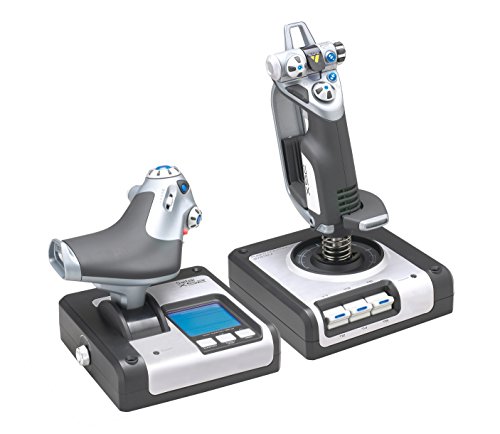
The Logitech G X52 Flight Control System is an excellent choice for serious flight simulation enthusiasts who demand precision and control. Its advanced multi-function display (MFD) enhances your interactive flying experience, while dedicated buttons and rotary dials provide easy access to essential functions. With a joystick featuring a precision centering mechanism and non-contact technology, you’ll enjoy smooth movements on the X and Y axes. The progressive throttle allows tension adjustments, ensuring you can handle Afterburner and Idle detents effortlessly. Compatible with various Windows versions, this ergonomic system supports long flights, making it an ideal addition to your setup.
Best For: Serious flight simulation enthusiasts who demand precision and control in their flying experience.
Pros:
- Advanced multi-function display (MFD) enhances interactive flying experience.
- Joystick features a precision centering mechanism for smooth movements.
- Ergonomic design supports extended use during long flights.
Cons:
- May require additional setup time compared to simpler controllers.
- Limited compatibility with non-Windows operating systems.
- Heavier than some other flight control options, which may affect portability.
Factors to Consider When Choosing Flight Simulator Joysticks
When choosing a flight simulator joystick, you’ve got to take into account several key factors. Think about compatibility with your system, control precision, and how comfortable the design feels during long sessions. Customization options and button layout also play an essential role in enhancing your flying experience.
Compatibility With Systems
How can you guarantee your flight simulator joystick meets your gaming needs? First, confirm it’s compatible with your operating system, whether it’s Windows 11, 10, 8.1, or 7, as peak performance often depends on specific versions. If you’re a console gamer, check if the joystick is designed solely for systems like Xbox Series X|S or PlayStation, which limits your options. Be mindful of USB requirements; some joysticks need multiple ports for full functionality. Also, look for models with official licensing for specific flight simulation titles, as this boosts compatibility and enhances your experience. Finally, verify how well the joystick adapts to various flight simulation types, from combat to civil aviation or space exploration, confirming it fits your preferred genre.
Control Precision and Features
What features truly enhance your control in a flight simulator joystick? Look for joysticks equipped with high-precision technologies like Hall-effect sensors or H.E.A.R.T technology for consistent accuracy. Opt for controllers with at least five axes to master complex maneuvers such as pitch, roll, and yaw. A joystick with 14 or more programmable buttons lets you access essential functions quickly, keeping you focused on flying rather than steering through menus. Don’t overlook the throttle system; adjustable friction and detents for afterburner and idle can greatly improve your throttle control. Additionally, features like multi-directional hat switches or POV hats enhance guidance and panoramic views, giving you a more immersive flying experience.
Ergonomic Design and Comfort
While selecting a flight simulator joystick, you can’t underestimate the importance of ergonomic design and comfort. A well-designed joystick promotes comfort during extended gaming sessions, helping you avoid fatigue. Look for features like wide hand-rests and contoured grips that support a natural hand position, enhancing your overall flying experience. Adjustable joystick resistance is another key aspect; it caters to different hand sizes and preferences, allowing for personalized control. A weighted base offers stability, ensuring your joystick stays put during intense maneuvers, which is essential for precision. Also, consider ambidextrous designs that accommodate both right and left-handed users, making it easier for everyone to enjoy immersive gameplay. Prioritize comfort to elevate your simulation experience.
Customization Options Available
When choosing a flight simulator joystick, you’ll find that customization options can greatly enhance your experience. Many joysticks offer extensive programmable buttons, with some providing up to 189 controls tailored to your gameplay. You can also enjoy customizable RGB lighting to match your gaming setup’s aesthetic. Advanced models often feature detachable throttle systems, allowing you to configure your setup for comfort, whether on a desk or in your lap. Some joysticks come with multiple spring options or adjustable resistance, letting you modify stick force for different flight types. Additionally, customizable control surfaces like mini analog sticks and rotary dials enhance versatility, providing more precise movements for various flight simulations, making your experience even more immersive.
Button Layout and Accessibility
Choosing a flight simulator joystick with an effective button layout is crucial for enhancing your overall experience. A well-designed layout guarantees that frequently used controls are easily reachable, allowing you to maintain focus during your flight simulation. Ergonomic button placement on the joystick or throttle provides quick access to essential functions, improving your response times in critical situations. Look for programmable buttons that let you customize controls to suit your preferences, streamlining gameplay. Tactile feedback on buttons helps you identify controls by feel, reducing the need to visually locate them when the action heats up. Multi-directional hat switches and rapid-fire triggers offer versatile control options, enabling smooth navigation and quick adjustments throughout your flight.
Build Quality and Durability
Build quality and durability are essential factors that can greatly impact your flight simulation experience. Look for joysticks made from high-quality materials that can withstand prolonged use, ensuring reliability during intense gaming sessions. Assess the weight and stability of the joystick; a heavier base often provides better control and reduces wear over time. Design features matter too—opt for ergonomic layouts and comfortable grips to enhance your experience and minimize fatigue during extended flights. Check the durability of components like buttons and switches, which should be rated for thousands or even millions of activations. Finally, consider models with replaceable parts or modular designs, allowing you to easily swap out worn components instead of investing in a new joystick.
Price and Value Proposition
Price plays an essential role in your decision-making process when selecting a flight simulator joystick. You’ll find options ranging from around $50 for basic models to over $300 for advanced systems. It’s vital to assess the value proposition by looking at features like programmable buttons, axes, and custom lighting. Higher-priced joysticks often offer enhanced precision and broader compatibility with simulation software, making them worthwhile investments for serious enthusiasts. If you’re a casual user, budget options might meet your needs, but they may lack the advanced features that enhance realism and responsiveness. Additionally, checking brand reputation and customer reviews can help you determine if a joystick justifies its price, as established brands usually provide better support and durability.