
If you’re looking to enhance your flight simulation experience in Microsoft Flight Simulator, choosing the right flight yoke can make all the difference. With a variety of options available, each offering unique features, it’s essential to find one that suits your needs. From beginner-friendly models to those designed for serious enthusiasts, there’s something for everyone. Let’s explore the top contenders that could transform your virtual flying experience.
Logitech G PRO Flight Yoke System for PC

The Logitech G PRO Flight Yoke System is an excellent choice for both novice and seasoned pilots looking to enhance their flight simulation experience in MSFS. Its realistic yoke controls help you build muscle memory, making every flight feel authentic. You’ll appreciate the 14 button controls, a POV hat, and a 3-position mode switch, offering over 75 programmable controls for easy access to aircraft functions. The sturdy stainless steel shaft guarantees smooth handling, while the 2-position desk clamp allows for flexible mounting. With reliable USB connectivity, this yoke system is compatible with various Windows versions and popular flight simulation software.
Best For: The Logitech G PRO Flight Yoke System is best for both novice and experienced pilots seeking an immersive and realistic flight simulation experience.
Pros:
- Realistic yoke controls help build muscle memory for authentic flying.
- Over 75 programmable controls provide easy access to various aircraft functions.
- Sturdy construction with a stainless steel shaft ensures smooth and accurate handling.
Cons:
- Requires optional software download for full compatibility with certain flight simulators.
- Limited to Windows operating systems, which may exclude some users.
- May take up significant desk space due to its design and mounting requirements.
Turtle Beach VelocityOne Flight Universal Control System for Xbox and Windows PCs
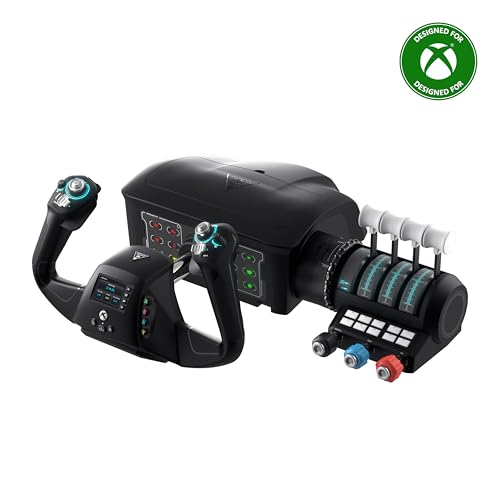
For those seeking an immersive flight experience on Xbox and Windows PCs, the Turtle Beach VelocityOne Flight Universal Control System stands out with its all-in-one design that combines a yoke handle, throttle quadrant, and trim wheel. It features a true-to-life 180° yoke rotation and a modular throttle quadrant, ensuring smooth control. With 12 analog axes, dedicated rudder controls, and 18 assignable buttons, you can customize your flight experience. The full-color flight management display enhances usability, while the secure clamping system provides stability. It’s compatible with popular flight simulations, making it an excellent choice for any aspiring pilot.
Best For: Flight simulation enthusiasts looking for a comprehensive and customizable control system for immersive gameplay on Xbox and Windows PCs.
Pros:
- All-in-one design: Combines yoke handle, throttle quadrant, and trim wheel for a realistic flying experience.
- Customization options: Offers 18 assignable buttons and a modular throttle quadrant for personalized controls.
- Integrated flight management display: Provides real-time alerts and system configuration for enhanced usability.
Cons:
- Limited compatibility: Does not support Xbox One and Xbox Cloud Gaming versions of Microsoft Flight Simulator 2020, requiring manual control mapping for some titles.
- Weight and size: At 10 pounds and with larger dimensions, it may be cumbersome for smaller setups or portability.
- Price point: May be considered expensive compared to simpler flight control alternatives.
Logitech G Pro Flight Rudder Pedals

Experience unparalleled precision in your flight simulations with the Logitech G Pro Flight Rudder Pedals, designed for enthusiasts who crave a realistic flying experience. These pedals feature smooth, self-centering action and an adjustable tension dial, allowing you to customize your control to suit your flying style. With a 9-bit rudder axis and differential toe brakes, you’ll enjoy independent left and right control. The adjustable footrests guarantee comfort for various sizes, while the non-slip materials keep you secure. Compatible with Windows systems, these pedals are a perfect complement to your Saitek Pro Flight Yoke. Elevate your simulation with Logitech’s trusted quality!
Best For: Flight simulation enthusiasts seeking a realistic and customizable control experience.
Pros:
- Smooth, self-centering action enhances control and realism during flight simulations.
- Adjustable tension dial allows for personalized response preferences, catering to different flying styles.
- Differential toe brakes provide independent control for better maneuverability.
Cons:
- Requires internet for software download, which may be inconvenient for some users.
- USB connection may limit compatibility with non-Windows operating systems.
- Weight of 2.3 kg might be considered heavy for some users when setting up or transporting.
Honeycomb Alpha Flight Controls Yoke & Switch Panel for Flight Simulator

Designed with serious flight simulation enthusiasts in mind, the Honeycomb Alpha Flight Controls Yoke & Switch Panel offers a true-to-life flying experience. With 180° rotation and a solid steel shaft, it guarantees smooth control through its dampened, self-centering mechanism. You’ll appreciate the integrated switch panel for managing key functions, including a 5-position ignition switch with LED backlighting. The multi-function yoke handles enhance your control with various switches and buttons. Installation is a breeze too, thanks to dual mounting options. Built with durable materials, this yoke has earned a stellar 4.8 out of 5 stars from users, making it a reliable choice.
Best For: Serious flight simulation enthusiasts looking for a realistic and reliable control experience.
Pros:
- True-to-life flight control with minimal deadzone and no center detent for precise maneuvers.
- Integrated switch panel with essential functions and LED backlighting for easy use in low-light conditions.
- Sturdy construction and dual mounting options ensure stability and durability during intense flight simulations.
Cons:
- Heavier weight may pose challenges for portability or setup in smaller spaces.
- Price point may be higher compared to basic flight control options, potentially limiting access for casual users.
- Compatibility limited to PC and Mac, which excludes users on other platforms like consoles.
Honeycomb Alpha Flight Controls Yoke and Bravo Throttle Quadrant Bundle

The Honeycomb Alpha Flight Controls Yoke and Bravo Throttle Quadrant Bundle stands out as the ideal choice for sim pilots seeking an all-in-one cockpit system that elevates their flight simulation experience. This bundle includes the Alpha Yoke and a versatile throttle quadrant, configurable for everything from single-engine planes to four-engine airliners. You’ll appreciate the multiple cockpit components, like the autopilot and annunciator panel, enhancing realism. Plus, the LED landing gear indicator lights add another layer of functionality. With these features, you’ll enjoy a thorough and immersive simulation that brings your virtual flying to life.
Best For: The Honeycomb Alpha Flight Controls Yoke and Bravo Throttle Quadrant Bundle is best for sim pilots looking for an all-in-one cockpit system that enhances realism in flight simulation.
Pros:
- Comprehensive all-in-one cockpit setup with multiple components for enhanced functionality.
- Configurable throttle system suitable for a wide range of aircraft types.
- LED landing gear indicator lights provide added realism during simulations.
Cons:
- May require a significant initial investment compared to other flight simulation controls.
- The size of the yoke and throttle quadrant may require ample desk space.
- Setup may be complex for beginners unfamiliar with flight simulation hardware.
Honeycomb Alpha LITE Compact Yoke for Flight Simulation
![Honeycomb Alpha LITE - compact yoke for flight simulation, 180 rotation, programmable buttons, sturdy steel shaft, clear design perfect for sim beginners, plug & fly with MSFS 2024 [video game] [video game]](https://m.media-amazon.com/images/I/419hJ63LHAL._SL500_.jpg)
For beginners enthusiastic to plunge into flight simulation, the Honeycomb Alpha LITE Compact Yoke stands out with its user-friendly design and intuitive controls. It features a 180° rotation and a robust steel shaft, ensuring durability and smooth operation. You’ll appreciate its self-centering mechanism and minimal dead zone, offering precise control similar to real aircraft. The yoke includes handy navigation switches and programmable buttons, making it easy to customize your experience. Plus, its plug-and-fly compatibility with MSFS 2020 allows you to jump right in. With a practical setup guide for MSFS 2024, you’re ready for a seamless flying adventure.
Best For: The Honeycomb Alpha LITE Compact Yoke is best for beginners looking to immerse themselves in flight simulation with a user-friendly and intuitive control system.
Pros:
- User-Friendly Design: Easy to set up and use, perfect for entry-level flight simulation enthusiasts.
- Durable Construction: Made from high-quality materials, ensuring longevity and reliable performance.
- Customizable Controls: Features programmable buttons and navigation switches for a personalized flying experience.
Cons:
- Limited Advanced Features: May lack some advanced functionalities that experienced users seek in flight simulation yokes.
- Compact Size: While convenient for beginners, some users may find it less comfortable for extended use.
- Compatibility Limitations: Primarily designed for MSFS 2020 and MSFS 2024, which may restrict usage with other flight simulation software.
Logitech G Saitek PRO Flight Throttle Quadrant
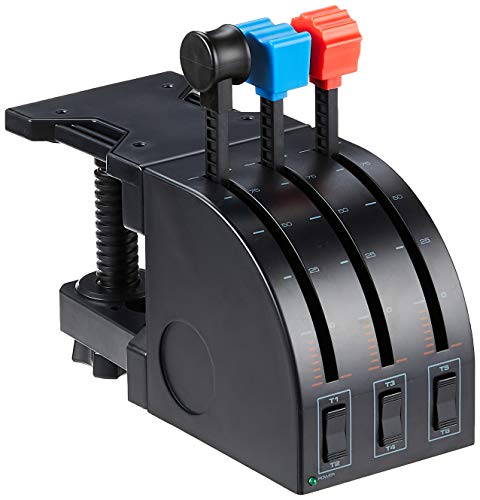
Pilots seeking a realistic experience in Microsoft Flight Simulator will find the Logitech G Saitek PRO Flight Throttle Quadrant an essential tool. With three axis levers, you gain enhanced control during flight simulations, allowing for precise adjustments. The two-way rocker switches provide additional control options, making it easier to manage various flight parameters. You can mount the quadrant on your desk for ideal accessibility, whether you’re sitting in the pilot or co-pilot seat. Plus, customize it with different lever heads to suit your throttle, flaps, mixture, and prop pitch preferences. It’s compatible with Windows 7, 8, and 10, ensuring broad usability.
Best For: Pilots and flight simulation enthusiasts looking for enhanced control and realism in their flying experience.
Pros:
- Enhanced Control: Three axis levers provide precise adjustments for realistic flight simulations.
- Customizable Options: Additional quadrant lever heads allow users to tailor controls for throttle, flaps, mixture, and prop pitch.
- Versatile Mounting: Can be mounted on top or in front of the desk for optimal accessibility from either pilot or co-pilot position.
Cons:
- Limited Compatibility: Only compatible with Windows 7, 8, and 10 operating systems.
- Requires Desk Space: The mounting options may take up significant space on the desk.
- Learning Curve: May take time for users to become proficient with the additional controls and customization options.
Thrustmaster TCA Yoke Boeing Edition (Compatible with Xbox Series X/S, PC)

Designed for flight simulation enthusiasts, the Thrustmaster TCA Yoke Boeing Edition delivers an authentic experience with its 1:1 scale ergonomic replica inspired by the Boeing 787. You’ll appreciate the PENDUL_R mechanism, which mimics the pendular sensation of the Dreamliner with an 8.3-inch travel range. Enjoy smooth motion thanks to adjustable springs and two additional axes for versatile maneuvers. With 18 action buttons utilizing magnetic technology, every command is at your fingertips. Compatible with Xbox Series X/S and PC, it easily integrates into Microsoft Flight Simulator, enhancing your flight experience like never before. Elevate your simulation game today!
Best For: Flight simulation enthusiasts looking for an authentic Boeing flying experience.
Pros:
- 1:1 scale ergonomic design replicates the Boeing 787 for a realistic feel.
- Smooth motion with adjustable springs and additional axes allows for versatile maneuvering.
- Integrates seamlessly with Microsoft Flight Simulator on Xbox and PC for enhanced gameplay.
Cons:
- May require additional rudder systems for optimal performance, which are sold separately.
- Heavier weight compared to traditional controllers may not suit all users.
- Limited compatibility with other flight simulation software outside of Microsoft Flight Simulator.
Honeycomb Bravo Throttle Quadrant for Flight Simulator

The Honeycomb Bravo Throttle Quadrant stands out for serious flight simulation enthusiasts seeking an immersive cockpit experience. This all-in-one system supports a fully configurable throttle setup for a range of aircraft, from single-engine planes to four-engine jets. You’ll appreciate its realistic components, including an autopilot panel, gear lever, and thrust reversers, enhancing your simulation. With 7 programmable keys and multiple switches, you can customize controls to match various aircraft types. Built with aerospace-grade materials, it’s durable and seamlessly integrates with major flight simulation software like MSFS, X-Plane, and Prepar3D, making it a solid choice for any pilot.
Best For: Serious flight simulation enthusiasts looking for an immersive and customizable cockpit experience.
Pros:
- Fully configurable throttle setup supporting various aircraft types, enhancing versatility.
- Realistic components such as an autopilot panel and thrust reversers for a comprehensive flying experience.
- Durable construction with aerospace-grade materials and compatibility with major flight simulation software.
Cons:
- May require a learning curve for new users unfamiliar with flight simulation controls.
- Higher price point compared to basic throttle quadrants, which may not suit casual users.
- Limited availability in some regions, making it harder to purchase.
Thrustmaster TCA Yoke PACK Boeing Edition (Compatible with Xbox Series X/S, PC)

For those seeking an authentic flying experience, the Thrustmaster TCA Yoke PACK Boeing Edition stands out as an exceptional choice for MSFS. This officially licensed Boeing yoke and throttle quadrant are compatible with Xbox Series X/S and PC, offering a 1:1 scale ergonomic design. The suspended PENDUL_R mechanism mimics the pendular sensation of the Boeing 787, while the sturdy metal construction guarantees durability. With 35 action buttons and interchangeable throttle levers, you’ll have precise control over your flight. Plus, it integrates seamlessly with Microsoft Flight Simulator, enhancing your simulation experience like never before.
Best For: Flight simulation enthusiasts looking for an authentic Boeing flying experience on Xbox Series X/S and PC.
Pros:
- Officially licensed Boeing design provides an immersive flying experience.
- Durable 100% metal internal structure ensures stability and longevity.
- Seamless integration with Microsoft Flight Simulator enhances gameplay.
Cons:
- May be considered expensive compared to other flight controllers.
- Limited compatibility with non-flight simulation games.
- Initial setup might be complex for new users.
Factors to Consider When Choosing Flight Yokes for MSFS
When choosing a flight yoke for MSFS, you’ll want to take into account several key factors. Build quality and durability guarantee longevity, while control features and customization enhance your flying experience. Don’t forget to check compatibility with your simulator and evaluate the design and connectivity options available.
Build Quality and Durability
Choosing a flight yoke for MSFS hinges on build quality and durability, which play an essential role in your simulation experience. A sturdy construction guarantees your yoke withstands extensive use, providing reliability when you need it most. Premium flight yokes often feature a robust internal structure made of metal, enhancing stability and delivering a more realistic control feel. High-quality materials, like stainless steel shafts and durable plastics, contribute to better performance and minimize wear over time. Look for a smooth motion mechanism achieved through high-precision components, such as ball bearings or dampened systems. Additionally, adjustable tension dials and modular components help accommodate frequent adjustments and varying preferences, guaranteeing comfort and control precision during your flights.
Control Features and Customization
Control features and customization are essential elements that can elevate your MSFS experience. When choosing a flight yoke, look for models with programmable buttons, switches, and axes to tailor your control scheme to your preferences. Dedicated controls for pitch trim, flap adjustments, and rudder control enhance realism and precision during your flights. The ability to re-map controls is vital, so opt for yokes with numerous assignable options for easy access to various aircraft functionalities. Some systems even include integrated displays for flight management, offering real-time information and customizable alerts to boost situational awareness. By prioritizing these features, you’ll create a more immersive and enjoyable flight simulation experience tailored just for you.
Compatibility With Flight Simulators
Compatibility with flight simulators is essential for a seamless MSFS experience. First, verify the flight yoke you choose is compatible with the specific simulator version you plan to use, as some may need extra software for full functionality. Confirm that it supports the latest versions, like Microsoft Flight Simulator 2020 and 2024, since compatibility can differ by model. Additionally, check if the yoke works with both PC and console platforms, expanding your options. Look for yokes that integrate smoothly with flight simulation software, enabling automatic recognition during setup. Finally, review user feedback on setup ease and any compatibility issues with specific simulators to secure a trouble-free experience. Your enjoyment of flight simulation hinges on this compatibility.
Design and Ergonomics
When selecting a flight yoke for MSFS, design and ergonomics play a significant role in enhancing your simulation experience. A realistic feel is essential, so look for features like a self-centering mechanism and minimal dead zones that mimic real aircraft handling. Ergonomic factors, such as grip shape and size, will improve your comfort and reduce fatigue during long sessions. Adjustable tension settings enable you to personalize the yoke’s resistance, tailoring control sensitivity to your liking. Also, consider build quality; materials like metal enhance durability and stability. Finally, verify the integration of additional controls, like buttons and switches, is intuitive and easily accessible, allowing you to operate seamlessly without distraction while immersed in your flight.
Connectivity Options Available
Choosing the right connectivity options for your flight yoke can greatly enhance your MSFS experience. Most flight yokes use USB connections for a simple plug-and-play setup, guaranteeing compatibility with Windows 10 and 11. Some yokes also offer additional connections like PS/2 or proprietary connectors for throttle quadrants or other controls, which can be beneficial if you’re looking to expand your setup. Pay attention to the length of the USB cable; a longer cable (around 5.9 ft or more) allows for better placement in your workspace. Finally, verify that your yoke integrates well with popular flight simulation software, as this can enhance functionality and prevent disruptions during your flight, improving your overall experience and control response.
Price and Value Comparison
While flight yokes can vary widely in price, understanding the factors that influence their value is essential for making an informed choice. Budget options around $100 might suffice for beginners, but high-end models exceeding $400 often offer superior features. Assess the number of programmable controls; some yokes boast over 75 buttons, enhancing functionality. Construction materials matter too; metal yokes typically provide better durability than plastic ones. Additionally, check compatibility with Microsoft Flight Simulator, as some yokes may require extra software for peak performance. Finally, user reviews and ratings can offer valuable insights into overall satisfaction, with higher-rated models generally representing better value for your investment. Prioritize what matters most for your simulation experience.
User Experience and Comfort
To fully enjoy your flight simulation experience in MSFS, user experience and comfort should be top priorities. An ergonomic flight yoke design can greatly enhance comfort, allowing you to enjoy long gaming sessions without fatigue. Look for models with a self-centering mechanism that provides realistic control responses, making your simulation more immersive. Adjustable tension settings let you customize resistance to match your flying style, ensuring a comfortable experience. Additionally, yokes with programmable buttons and switches offer quick access to essential functions, keeping your hands on the controls and enhancing convenience. Finally, a stable mounting system is vital; it prevents shifting during use, allowing you to focus entirely on your flight without distractions or discomfort.
Additional Accessories and Integration
When selecting a flight yoke for MSFS, consider several key factors that can greatly enhance your simulation experience. Look for yokes that come with additional accessories like throttle quadrants and rudder pedals, as these provide more realistic control options. Ascertain the yoke integrates smoothly with Microsoft Flight Simulator to guarantee all features function seamlessly. Customizable buttons and switches allow you to tailor controls to your preferences or specific aircraft configurations, enhancing your immersion. Also, check for compatibility with various platforms, including PC and gaming consoles, to maximize your flight simulation titles. Some yokes even feature built-in displays for system configuration and real-time alerts, boosting your situational awareness and overall enjoyment of the simulation.