
Choosing the right yoke can make X-Plane feel far more natural, whether you are building a simple desktop cockpit or a more complete home sim setup.
This roundup focuses on control feel, switch layout, compatibility, and overall value so you can pick the best fit for your flying style and budget.
Best 10 Flight Yokes for X Plane Picks for 2026
Best for Realistic Cessna-Style Flying
Honeycomb Alpha Yoke & Switch Panel

- 180° rotation with steel shaft and smooth self-centering action
- Integrated switch panel for ignition, avionics, and lighting
- Dual mounting setup for flexible desk installation
Best For: Sim pilots who want a realistic, durable yoke with integrated cockpit switches.
Best Rudder Pedal Upgrade
Logitech G Pro Flight Rudder Pedals

- Self-centering pedals for realistic rudder control
- Adjustable tension for different aircraft feels
- Differential toe brakes for taxiing and stopping
Best For: X-Plane sim pilots who want more precise foot control and realistic landings.
Best for Realistic Controls
Honeycomb Alpha Flight Controls Yoke

- Smooth 180° rotation with self-centering response
- Metal shaft and durable all-metal mechanism
- Built-in switch panel adds practical cockpit controls
Best For: Sim pilots who want an authentic, durable yoke with useful switches.
Best for Easy HOTAS Setup

- Detachable throttle for compact or split cockpit layouts
- 12 programmable buttons and 5 axes for flexible mapping
- Adjustable resistance plus dual rudder control for smoother handling
Best For: New and casual sim pilots who want an easy, affordable PC HOTAS for X-Plane.
Best for Custom Control
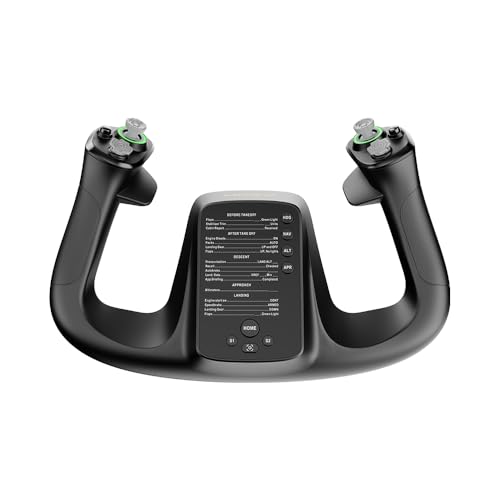
- 34 configurable inputs for detailed X-Plane mapping
- Drift-free control for precise inputs
- PA66 composite and aluminum alloy build
Best For: X-Plane pilots who want a customizable, precision-focused yoke.
Best Boeing Replica Feel
Thrustmaster TCA Yoke & Quadrant Boeing Edition

- 787-inspired yoke with pendular motion
- Metal build for a more solid, premium feel
- 35 buttons, extra axes, and autopilot-style quadrant controls
Best For: Boeing-style sim pilots who want a realistic yoke-and-quadrant cockpit setup.
Best for Complete Control
Logitech G Pro Flight Yoke + Rudder Pedals

- Yoke and pedals included in one bundle
- 54 programmable controls for X-Plane shortcuts
- Toe brakes and adjustable foot rests add realism
Best For: X-Plane pilots who want a full yoke-and-pedals setup with realistic control.
Best All-in-One Control Set
Turtle Beach VelocityOne Flight Universal Control

- Yoke, throttle quadrant, trim wheel, and rudder controls included
- 180° yoke rotation with hall effect sensing
- Packed with axes and switches for X-Plane mapping
Best For: X-Plane pilots who want a full-featured, single-box flight control setup.
Best for Serious Sim Pilots
Logitech G PRO Flight Yoke System

- Steel yoke shaft for smooth, accurate inputs
- 54+ programmable controls with throttle quadrant
- Secure desk clamps for stable simulator sessions
Best For: X-Plane pilots who want a sturdier, more configurable yoke-and-throttle setup.
Best for Realistic Desktop Flying
Logitech G PRO Flight Yoke System

- Steel shaft for a more solid yoke feel
- Separate throttle quadrant included
- 75 programmable controls with mode switching
Best For: X-Plane pilots who want a realistic yoke-and-throttle setup for desktop sim flying.
Best for Realistic Cessna-Style Flying – Honeycomb Alpha Yoke & Switch Panel
If you’re comparing flight yokes for x plane, the Honeycomb Alpha is a strong choice for pilots who want a more authentic desktop setup without moving into full professional hardware. Its 180° rotation, steel shaft, and dampened self-centering action give it a smooth, predictable feel that works well for general aviation training and everyday sim flying.
Best For: Sim pilots who want a realistic, durable yoke with integrated switches and easy PC/Mac compatibility.
Pros:
- 180° rotation with a steel shaft and ball bearings for smooth, stable control
- Built-in switch panel adds ignition, avionics, lighting, and engine controls
- Fully equipped handles include rocker switches, hat switch, buttons, and push-to-talk
- Dual mounting options make it easier to secure on different desks
Cons:
- Takes more desk space than simpler entry-level yokes
- Higher price than basic sim controllers
For flight yokes for x plane, this model stands out because it delivers a convincing control feel plus useful cockpit-style switches in one package. It is especially appealing if you fly GA aircraft and want a dependable upgrade that feels more immersive than a bare-bones yoke.
Best Rudder Pedal Upgrade – Logitech G Pro Flight Rudder Pedals
If you’re comparing flight yokes for x plane, rudder pedals are the natural next upgrade for more precise ground handling, coordinated turns, and smoother takeoffs and landings. The Logitech G Pro Flight Rudder Pedals add realistic foot control with adjustable resistance, differential toe brakes, and self-centering action that suits both light aircraft and heavier jet flying.
Best For: Sim pilots who want a more complete cockpit feel and better directional control in X-Plane.
Pros:
- Smooth self-centering pedals improve realism and control
- Adjustable tension lets you tune the feel to aircraft style
- Differential toe brakes help with taxiing and runway stops
Cons:
- It’s not a yoke, so it won’t replace primary stick or wheel controls
- Requires floor space and a stable setup
For pilots building a serious home setup, these pedals complement flight yokes for x plane by handling rudder input more accurately than a keyboard or twist axis. If you want better realism without overcomplicating the cockpit, they’re a practical add-on.
Best for Realistic Controls – Honeycomb Alpha Flight Controls Yoke
If you want one of the most realistic flight yokes for x plane, the Honeycomb Aeronautical Alpha Flight Controls stands out for its smooth 180° rotation, metal construction, and built-in switch panel. It’s aimed at simmers who want a more authentic general aviation feel without jumping to a full cockpit setup.
Best For: Flight sim pilots and students who want a sturdy, highly realistic yoke with useful onboard switches.
Pros:
- Full 180° yoke travel with smooth, self-centering control
- Solid steel shaft and metal mechanism for durability
- Integrated switch panel adds master, alternator, avionics, light, and ignition controls
- Dual mounting options support clamped or clamp-free setups
Cons:
- Bulkier than simpler budget yokes
- Best suited to desktop setups with enough space
- May be more controller than casual X-Plane flyers need
This is a strong pick if you value realism, build quality, and extra cockpit-style switches in one unit. For buyers comparing flight yokes for x plane, it’s a clear step up from entry-level plastic models.
Best for Easy HOTAS Setup – Thrustmaster T-Flight Hotas X
If you want one of the simplest flight yokes for x plane-style setups on PC, the Thrustmaster T-Flight Hotas X is a practical entry-level HOTAS with a detachable throttle, 12 programmable buttons, and adjustable stick resistance. It’s a good fit for sim pilots who want immediate plug-and-play control without a complicated desk setup.
Best For: New and casual flight sim players who want an affordable, easy-to-use HOTAS for X-Plane and similar PC sims.
Pros:
- Detachable throttle lets you choose compact or spread-out cockpit layouts
- 12 programmable buttons and 5 axes give you flexible control mapping
- Adjustable resistance and dual rudder control improve handling precision
- Preset memory and plug-and-play design make setup quick
Cons:
- Plastic, budget-focused build won’t feel as premium as higher-end sticks
- Not a full yoke system, so traditional GA sim fans may prefer another style
For flight yokes for x plane searches, this stands out more as a straightforward HOTAS than a dedicated yoke, but it’s still a strong pick if you want reliable controls, easy setup, and enough programmability to cover most sim flying needs.
Best for Custom Control – MOZA Flight Controls MFY Yoke
If you want a more tunable option among flight yokes for x plane, the MOZA Flight Controls MFY Yoke stands out with 34 configurable inputs, drift-free control, and a durable build that should suit serious sim pilots who like to map everything their way.
Best For: X-Plane users who want a highly configurable yoke with a solid, comfortable feel for desktop flying.
Pros:
- 34 configurable inputs give you plenty of room to customize cockpit controls
- PA66 composite and aluminum alloy construction feel sturdy and durable
- Drift-free control helps support smoother, more precise inputs
- Customizable RGB lighting adds a personal touch to your setup
Cons:
- PC-focused, so it is not ideal if you need broad cross-platform support
- Pricier than simpler starter yokes
- May offer more controls than casual flyers will use
Overall, this is a strong pick for flight yokes for x plane if you care more about configurability and precision than keeping things basic. It looks like a good fit for simmers who want a more capable, customizable yoke for realistic desktop flying.
Best Boeing Replica Feel – Thrustmaster TCA Yoke & Quadrant Boeing Edition
If you want flight yokes for x plane that feel closer to a real airliner than a generic desktop controller, this Thrustmaster Boeing bundle is a strong pick. The 787-inspired yoke, pendular motion, and matching throttle quadrant give sim pilots a more authentic setup for smooth cruise flying, approaches, and long-haul sessions.
Best For: Boeing fans and serious simmers who want a realistic yoke-and-quadrant setup for immersive home flying.
Pros:
- Authentic 787-style yoke with pendular movement and a wide 8.3-inch range
- Metal internal structure adds durability and a more premium feel
- Throttle quadrant includes autopilot-style controls plus extra axes and 35 buttons
- Works with PC and Xbox, making it flexible for Microsoft Flight Simulator setups
Cons:
- Not the most compact option for smaller desks
- Rudder pedals are not included
This is a great match if you care more about realism and Boeing-style ergonomics than a simple entry-level controller. For flight yokes for x plane, it stands out as an immersive, feature-rich setup that favors cockpit feel and control depth.
Best for Complete Control – Logitech G Pro Flight Yoke + Rudder Pedals
If you want flight yokes for x plane that feel more like a full cockpit setup, this Logitech bundle adds both a yoke and rudder pedals in one package. It’s a practical pick for sim pilots who want realistic handling, toe brakes, and enough programmable inputs to cover common flight tasks without piecing together separate gear.
Best For: X-Plane users who want an all-in-one control setup with yoke, rudder pedals, and dedicated toe brakes.
Pros:
- Includes both the yoke and rudder pedals for a more complete sim experience
- Self-centering pedals and toe brakes improve taxiing, turns, and runway control
- 54 programmable controls help reduce keyboard dependence in X-Plane
- Adjustable foot rests with non-slip materials suit different shoe sizes
Cons:
- Takes more desk and floor space than a yoke-only setup
- More expensive than entry-level flight yokes for x plane
- May be more control than casual flyers need
This bundle stands out when you want a grounded, realistic setup rather than just a basic yoke. For flight yokes for x plane, it’s a strong choice if you value immersion, rudder precision, and a cleaner one-box upgrade path.
Best All-in-One Control Set – Turtle Beach VelocityOne Flight Universal Control
If you want one of the more complete flight yokes for x plane, the Turtle Beach VelocityOne Flight stands out for bundling the yoke, throttle quadrant, trim wheel, and rudder controls into a single setup. It is a strong fit for sim pilots who want a more realistic cockpit feel without piecing together multiple accessories.
Best For: X-Plane users who want an all-in-one yoke system with plenty of built-in controls.
Pros:
- Includes yoke, throttle quadrant, trim wheel, and rudder controls in one package
- 180° yoke rotation with hall effect sensing for smoother, more precise input
- Lots of controls and axes for mapping complex X-Plane functions
Cons:
- May be more system than casual flyers need
- Physical footprint is larger than a basic yoke-only setup
For buyers comparing flight yokes for x plane, this model is appealing because it covers most cockpit basics right out of the box. It is less about minimalism and more about giving you a versatile, immersive control layout that can grow with your sim setup.
Best for Serious Sim Pilots – Logitech G PRO Flight Yoke System
If you want a more immersive control setup from your flight yokes for x plane search, the Logitech G PRO Flight Yoke System is a strong step up from basic entry-level gear. The steel shaft, separate throttle quadrant, and programmable buttons give you a more realistic feel for training, general aviation flying, and everyday simulator use.
Best For: X-Plane users who want a sturdier, more configurable yoke-and-throttle combo for building muscle memory.
Pros:
- Steel yoke shaft delivers smooth, accurate control input
- Throttle quadrant and 54+ programmable controls add flexibility
- Desk clamps help keep the setup stable during long sessions
- Works with X-Plane 10 on Windows, with optional software support
Cons:
- Not a full plug-and-play choice for every sim setup
- Requires desk space for both the yoke and throttle quadrant
- Some users may want more modern X-Plane compatibility support
This is a practical pick if you care more about realistic control feel than flashy extras. For flight yokes for x plane, it stands out as a dependable mid-to-pro level option that can make cockpit procedures feel more natural.
Best for Realistic Desktop Flying – Logitech G PRO Flight Yoke System
If you want a full-size control setup for flight yokes for x plane, the Logitech G PRO Flight Yoke System is a strong pick thanks to its steel shaft, separate throttle quadrant, and generous programmable controls. It aims to give sim pilots a more aircraft-like feel than a simple stick, making it a practical choice for home cockpit setups.
Best For: X-Plane users who want a more realistic yoke-and-throttle layout for commercial or private aircraft simulation.
Pros:
- Stainless steel yoke shaft feels sturdier than many entry-level alternatives
- Includes a separate three-axis throttle quadrant for more flexible engine control
- 75 programmable controls and a 3-position mode switch add strong customization
- Built-in USB hub can reduce cable clutter on a sim desk
Cons:
- Large footprint may be awkward on smaller desks
- Setup is more involved than a basic plug-and-play joystick
- Not the cheapest option for casual flyers
Overall, this is a good fit if you want flight yokes for x plane that emphasize realism, control density, and a more authentic cockpit-style feel. It’s especially appealing for pilots who plan to spend serious time in general aviation or airliner sims.
How We Picked the Best Flight Yokes for X Plane
We looked at products that offer realistic yoke movement, solid build quality, useful button and switch layouts, and reliable PC flight-sim support. For Flight Yokes for X Plane, the biggest priorities are smooth centering, enough programmable controls, and hardware that works well without constant tuning.
Quick Comparison: What Matters Most
Not every yoke is aimed at the same user. Some are better as standalone controls, while others make more sense as part of a full cockpit with pedals and a throttle quadrant. Entry-level options can be easier to set up, but advanced models usually offer better ergonomics, more inputs, and a more convincing flight feel.
Basic Vs. Advanced Control Sets
If you mainly fly general aviation aircraft in X-Plane, a yoke with a good number of buttons and a smooth pitch-and-roll response may be enough. If you fly airliners or want a more complete setup, pairing a yoke with pedals and a dedicated throttle quadrant can improve immersion and precision.
Compatibility and Ecosystem
Check platform support carefully before buying. Some Flight Yokes for X Plane are PC-focused, while others also support Xbox. If you plan to expand later, look for models that fit into a broader ecosystem of pedals, throttles, and switch panels.
Key Buying Factors for Flight Yokes for X Plane
Feel and travel: A smooth, well-damped yoke with predictable centering helps with takeoffs, trim work, and landing flare.
Rotation and motion: More realistic movement can improve control precision, especially when making small corrections.
Programmable inputs: Extra buttons, hats, and switches reduce the need to use the keyboard or mouse mid-flight.
Pedals support: Rudder pedals are not required, but they dramatically improve taxiing and coordinated turns.
Desk setup: Make sure the mounting method, footprint, and cable routing match your space.
Software and profiles: Easy mapping and stable drivers save time and make the experience more enjoyable.
Who Should Buy Which Flight Yokes for X Plane?
If you want the simplest route into desktop flying, choose a standalone yoke with enough built-in controls. If you are upgrading from a joystick and want a more authentic GA experience, a midrange yoke plus pedals is often the best value. If you are building a dedicated sim rig or flying frequently, prioritize premium Flight Yokes for X Plane with strong ergonomics, lots of inputs, and room to expand into throttles and switches.
In short, buy for the aircraft you fly most often, the space you have available, and how much realism you actually want to use day to day.