
FPV goggles with head tracking can make flying feel far more natural by letting your view follow the motion of your head or gimbal input. That added immersion can be a big advantage for pilots who want tighter control and a more cinematic experience.
In this roundup, we focus on options that balance image quality, compatibility, comfort, and real-world usability so you can choose the right set for your drone, budget, and flying style.
Best 10 Fpv Goggles with Head Tracking Picks for 2026
Premium Digital Pick

- 1080p dual displays with 50° FOV
- Built-in head tracking support
- HDMI, AV, and CVBS input options
Best For: Walksnail users who want immersive digital goggles with head-tracking support
Budget Analog Option

- Built-in DVR up to 720×576
- Auto-searching 40CH diversity receiver
- 5-inch LCD with wide 82° viewing angle
Best For: Analog FPV pilots who want a low-cost goggle with DVR
Head-Tracking Add-On

- 2-axis pitch and roll head tracking
- Mechanical stabilization reduces shake
- No-solder install with coaxial cable
Best For: Walksnail users adding head-tracking camera control to compatible rigs
Premium Legacy Digital Pick

- 1920×1080 display resolution
- Built-in accelerometer and gyroscope
- Up to 110 minutes of battery life
Best For: DJI pilots who want a high-resolution racing goggle with tracking sensors
Immersive HD Starter Pick

- 1080p screen for clear HD viewing
- Up to 3 hours with included batteries
- Built-in 1080P@60fps microSD recording
Best For: Comfort-first pilots flying compatible BETAFPV HD setups
Universal Phone-Linked Viewer

- Unibody lens design for fuller screen immersion
- Works with many DJI and GPS drones
- Uses any smartphone with no third-party apps
Best For: Camera-drone pilots wanting a comfortable headset view
Record-and-Run Option
- 1080p display with 60Hz refresh
- Built-in DVR records to microSD
- Includes two 2600mAh batteries
Best For: HD whoop and Air Unit pilots who want built-in recording
Analog Starter Pick

- Built-in DVR for recording flights
- Dual antennas for steadier reception
- 5-inch bright LCD with auto-search
Best For: Affordable analog FPV with recording and easy channel setup
Digital Head-Tracking Pick
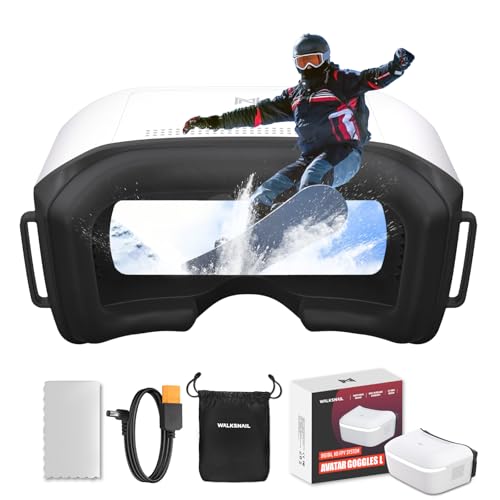
- Smart head tracking for natural viewing
- 1080p 4.5-inch screen with DVR
- Walksnail-only compatibility
Best For: Walksnail users seeking immersive HD goggles with head tracking
Compact Racing Choice

- 4.3-inch 800x480 bright LCD
- Auto-search tunes channels quickly
- Built-in DVR with replay support
Best For: Analog FPV racing and Cetus/Meteor series pilots
Premium Digital Pick – Walksnail Avatar HD Goggles X
If you want fpv goggles with head tracking for a digital Walksnail setup, the Avatar HD Goggles X are built around immersion and flexibility. The 1080p dual displays, 50° field of view, and integrated head tracking make them a strong fit for pilots who want a more natural, camera-following view while flying.
Best For: Walksnail pilots who want a high-resolution goggle with built-in head tracking support.
Pros:
- Dual 1920×1080 screens with a wide 50° FOV for an immersive view
- Built-in gyroscope head tracking when paired with a compatible gimbal system
- Supports HDMI, AV, and CVBS input for digital and analog flexibility
- 22ms low latency and built-in cooling to help with longer sessions
Cons:
- Head tracking requires a compatible GM3 gimbal system sold separately
- Only compatible with Walksnail Avatar systems, not other FPV brands
- Battery is not included
Overall, these goggles make the most sense for pilots already committed to the Walksnail ecosystem who want a premium display and head-tracking-ready setup. If you value screen quality and immersion over broad cross-brand compatibility, this is a compelling option.
Budget Analog Option – EV800D DVR FPV Goggles
For analog flyers shopping for fpv goggles with head tracking alternatives in a more affordable category, the EV800D focuses on practicality. It does not offer head tracking, but it does include a DVR, auto-searching 40-channel receiver, and a wide-view LCD screen for straightforward FPV use.
Best For: Analog FPV pilots who want an inexpensive goggle with DVR and easy channel scanning.
Pros:
- Built-in DVR records up to 720×576 resolution
- Auto-searching 40CH receiver with diversity and RaceBand support
- 5-inch 800×480 LCD with an up-to-82° viewing angle
- Includes external video signal input support
Cons:
- No head tracking feature
- Analog 5.8G FPV focus limits it to compatible systems
- Lower display resolution than premium digital goggles
The EV800D is a good value-first choice if you fly analog and want a simple, functional goggle with recording built in. It is less about premium immersion and more about getting dependable FPV basics at a lower entry point.
Head-Tracking Add-On – CADDXFPV GM2 2-Axis Gimbal
If you are building fpv goggles with head tracking around the Walksnail ecosystem, the GM2 is the piece that turns head movement into camera movement. This 2-axis gimbal pairs with CaddxFPV Head Tracker and Avatar HD Goggles to deliver pitch and roll response, along with mechanical stabilization for a steadier image.
Best For: Walksnail pilots who want a head-tracking camera gimbal for drones, fixed wings, or RC vehicles.
Pros:
- 2-axis head tracking with pitch and roll movement
- Mechanical stabilization helps reduce vibration and shake
- No-solder installation with integrated coaxial cable
- Adjustable through the Avatar HD Goggles menu or upgrade kit
Cons:
- Requires the Walksnail Avatar ecosystem and compatible goggles
- Not compatible with other brands or the GT VTX Kit
- Battery life is listed at about 10 minutes
The GM2 is less of a standalone purchase and more of a system upgrade for pilots who already use compatible Walksnail gear. If your goal is more natural head-linked camera movement, this is the accessory that enables it.
Premium Legacy Digital Pick – DJI FPV Goggles V2
For pilots comparing fpv goggles with head tracking features, the DJI FPV Goggles V2 stand out for their immersive 1080p display and inside-out tracking sensors. While the listing emphasizes drone racing rather than dedicated FPV head tracking control, the built-in accelerometer and gyroscope make them an advanced, feature-rich option in the digital goggle category.
Best For: DJI users who want a high-resolution racing goggle with built-in tracking sensors.
Pros:
- 1920×1080 display resolution for a sharp viewing experience
- Inside-out tracking with accelerometer and gyroscope sensors
- Up to 110 minutes of battery life
- Portable design with built-in controls
Cons:
- Listing does not describe dedicated FPV camera head tracking control
- Only a 2-inch screen size is listed, despite high resolution
- Compatibility details in the listing are limited and specific
These goggles are best viewed as a premium DJI-focused option for racing and immersive digital flying. If you want sensor-equipped goggles in the DJI ecosystem, they offer strong resolution and solid battery life.
Immersive HD Starter Pick – BETAFPV VR04 HD FPV Goggles
If you want fpv goggles with head tracking-style immersion in an HD-friendly package, the BETAFPV VR04 HD is built around a bright 1080p display, comfortable wear, and simple recording. It’s aimed at pilots who want a practical goggles setup for longer sessions without adding a lot of extra gear.
Best For: Pilots who want comfortable, recordable HD goggles for whoops and P1 Air Unit builds.
Pros:
- 1920×1080 screen gives clear HD viewing for flight immersion
- Includes 2 x 2600mAh batteries for up to 3 hours of use
- Supports 1080P@60fps recording to microSD, up to 1TB
- Glasses-friendly interior with PU face padding and silicone nose bridge
Cons:
- SD card is not included
- Designed around BETAFPV/P1 Air Unit compatibility, so it is not a universal fit for every FPV setup
Overall, the VR04 HD makes sense if comfort, built-in recording, and easy power options matter more than a feature-heavy premium system. It’s a straightforward choice for pilots flying compatible BETAFPV builds.
Universal Phone-Linked Viewer – DroneMask 1 FPV Headset
DroneMask 1 | Patented Unibody Lens FPV Goggles | Immersive VR Headset for DJI & GPS Drones
Check Price On AmazonThe DroneMask 1 is a practical option if you want fpv goggles with head tracking-style convenience for camera drones rather than a dedicated racing setup. Its unibody lens design and smartphone-based compatibility make it a flexible headset for DJI and other GPS drones.
Best For: Drone pilots who want a comfortable, smartphone-based viewing headset for compatible camera drones.
Pros:
- Unibody lens design is built for full-screen immersion
- Works with a wide range of DJI, Autel, Potensic, Fimi, Hubsan, Skydio, Xiaomi, and Parrot drones
- Uses a standard controller and any smartphone, with no third-party apps needed
- Adjustable focal length, soft padding, breathable fabric, and eyeglasses support
Cons:
- Made for smartphone-driven drone viewing, not a traditional dedicated FPV system
- Not mixed reality compatible
DroneMask 1 stands out when compatibility and comfort matter more than an advanced FPV hardware stack. If you fly supported camera drones and want an easy headset-style viewing experience, it’s a straightforward pick.
Record-and-Run Option – BETAFPV VR04 HD DVR Goggles
The BETAFPV VR04 HD DVR version is a solid choice if you’re shopping for fpv goggles with head tracking-style immersion, built-in recording, and a comfortable fit for extended flying. Its 1080p display and DVR function make it especially useful for pilots who want to replay flights without extra accessories.
Best For: Pilots who want HD goggles with DVR recording for compatible BETAFPV and P1 Air Unit setups.
Pros:
- 1920×1080 display with 60Hz refresh for crisp viewing
- Built-in DVR lets you record directly to microSD, up to 1TB
- Includes 2 x 2600mAh batteries and supports up to 3 hours of use
- Compatible with P1 Air Unit and HD VTX setups, plus Meteor75 Pro P1
Cons:
- SD card is not included
- Battery life is listed differently in the details versus the feature bullets
This version is best if recording matters as much as flying, since the DVR is built in and the battery bundle is ready to go. It’s a practical match for compatible HD whoop and Air Unit users.
Analog Starter Pick – EV800D 5-Inch DVR Goggles
If you want fpv goggles with head tracking for a budget-friendly analog setup, the EV800D is better viewed as a practical all-in-one monitor-style goggle than a premium tracking system. It focuses on real-time video, DVR recording, and stable reception with dual antennas, making it a solid choice for casual flying, racing, or RC use.
Best For: Pilots who want an affordable analog FPV goggle with DVR, easy tuning, and a large bright screen.
Pros:
- Built-in DVR lets you record FPV flights and drives.
- Dual antenna reception helps improve signal stability.
- 5-inch 800×480 LCD offers a bright, easy-to-view display.
- Auto-search and key frequency search simplify channel tuning.
Cons:
- Analog-only design, so it won’t fit digital FPV systems.
- Bulky 5-inch screen style is less compact than premium goggles.
- No head tracking feature is listed in the supplied specs.
Overall, the EV800D is a straightforward option for anyone prioritizing usability, DVR, and stable analog video over advanced digital features. It’s especially appealing if you want a simple goggle that can also handle external video input.
Digital Head-Tracking Pick – Walksnail Avatar HD Goggles L
For buyers specifically searching for fpv goggles with head tracking, the Walksnail Avatar HD FPV Goggles L is the clear fit in this group. It pairs a 1080p 4.5-inch display with smart head tracking, plus built-in DVR and a high-gain antenna, so it’s aimed at pilots who want a more immersive digital flying experience.
Best For: Walksnail pilots who want head tracking, HD image quality, and a cockpit-like flying feel.
Pros:
- Smart head tracking turns head movement into a more natural viewing experience.
- 1080p 4.5-inch screen delivers sharp, distortion-free visuals.
- Built-in DVR records directly to micro SD card.
- 4.9dBi directional antenna supports stable video transmission.
Cons:
- Compatible only with the Walksnail Avatar System.
- No HDMI port and no analog signal support.
- Battery is not included and must be purchased separately.
This is the most specialized option here, and its value comes from matching the right digital ecosystem. If you already fly Walksnail and want head tracking plus HD immersion, it stands out immediately.
Compact Racing Choice – BETAFPV VR03 DVR Goggles
The BETAFPV VR03 is a compact analog option for pilots who want fpv goggles with head tracking-like immersion through a lightweight, easy-to-use design, though no tracking feature is listed in the supplied details. It emphasizes fast channel finding, DVR recording, and a bright 4.3-inch LCD, which makes it a sensible pick for racing drones and model airplanes.
Best For: FPV racers and Cetus or Meteor series pilots who want a lightweight analog goggle with DVR.
Pros:
- 4.3-inch 800×480 LCD provides a bright HD viewing experience.
- Fast auto-search finds a band and channel in about 3 seconds.
- Built-in DVR supports recording and replay.
- Replaceable 5.8G antenna helps maintain stable transmission.
Cons:
- No head tracking feature is listed in the product details.
- Analog 5.8G design won’t suit digital FPV systems.
- Micro SD card is not included for recording/export.
The VR03 is a practical, race-friendly goggle that keeps setup simple and recording handy. It works best for pilots who value quick tuning and a comfortable fit over advanced digital extras.
How We Picked These Fpv Goggles with Head Tracking
We focused on goggles and head-tracking-compatible systems that offer a practical mix of image clarity, latency, comfort, and ecosystem support. We also considered whether each option is suited to analog or HD flying, since compatibility is often the deciding factor.
Battery life, screen quality, fit, recording features, and ease of setup were also prioritized. For head-tracking use, we looked for support that works reliably with the intended platform rather than treating it as a novelty feature.
Quick Comparison
Not all Fpv Goggles with Head Tracking are built for the same pilot. Some are ready-made immersive headset options, while others are better paired with specific video systems or external tracking hardware. Analog goggles tend to be more affordable and broadly compatible, while HD goggles usually deliver a sharper image and better immersion.
If you fly multiple drone types, check input support, expansion options, and whether the goggles can handle your preferred video link without adapters or workarounds.
Key Buying Factors for Fpv Goggles with Head Tracking
Compatibility
Start with the video system you already use. Make sure the goggles support analog, digital HD, or both, and confirm whether head tracking requires a specific receiver, module, or drone-side hardware.
Display Quality and Field of View
A sharper display and wider field of view can improve immersion, but only if the optics are comfortable for your eyes. Resolution matters most for digital systems, while brightness and clarity are especially helpful outdoors.
Tracking Method
Some setups use built-in head tracking, while others rely on external gimbals or linked accessories. Mechanical tracking can feel very natural, but it may also add complexity and limit compatibility.
Comfort and Power
Weight, padding, strap design, and battery runtime all affect how usable the goggles are during longer sessions. A comfortable fit is especially important if you plan to fly or train for extended periods.
Recording and Inputs
Useful extras like DVR, microSD support, HDMI, and AV inputs can make the goggles more versatile. These features are helpful if you want to review flights, use external video sources, or expand your setup later.
Who Should Buy Which Fpv Goggles with Head Tracking?
Choose digital-focused Fpv Goggles with Head Tracking if you want the most immersive viewing and already fly in a compatible HD ecosystem. Pick analog goggles if you want a lower-cost setup, broad compatibility, and simple field use.
If you want the most cinematic feel, look for a goggles-and-tracking combination built for your drone platform. If you mainly want dependable flying and easy setup, prioritize comfort, display quality, and compatibility first, then treat head tracking as a bonus rather than the main feature.