
In today’s digital age, finding the right kids’ tablet with parental controls can feel overwhelming. You want something that not only entertains but also educates, while ensuring your children are safe online. With various models on the market in 2025, it’s essential to know which tablets stand out for their features and reliability. Let’s explore the top contenders that promise both peace of mind and engaging content for your kids.
Amazon Fire 7 Kids Tablet (Newest Model)

The Amazon Fire 7 Kids Tablet (newest model) is perfect for children ages 3 to 7, making it an ideal choice for parents seeking a reliable device tailored to young learners. This top-selling 7″ tablet is available in vibrant blue and offers a fantastic bundle that saves you up to $70. With a 6-month Amazon Kids+ subscription, your child can access thousands of ad-free books, games, and videos from trusted brands. The sturdy kid-proof case guarantees durability, while the 2-year worry-free guarantee provides peace of mind. Plus, the easy-to-use parental controls help you manage content and set educational goals effortlessly.
Best For: Parents looking for a durable and educational tablet designed specifically for children ages 3 to 7.
Pros:
- Sturdy kid-proof case designed to protect against drops and bumps.
- Includes 6-month Amazon Kids+ subscription providing access to thousands of ad-free books, games, and videos.
- User-friendly parental controls allow for easy content management and educational goal setting.
Cons:
- Subscription renews automatically after 6 months at a cost of $5.99/month unless canceled.
- Limited internal storage options (16 GB or 32 GB), though expandable with microSD.
- Screen size may be small for older kids or for those who prefer larger displays for media consumption.
Amazon Fire HD 10 Kids Pro Tablet (32 GB)

Designed specifically for kids aged 6 to 12, the Amazon Fire HD 10 Kids Pro Tablet (32 GB) stands out with its impressive 10.1″ HD screen and robust parental controls. You’ll appreciate the 13-hour battery life and the 2-year worry-free guarantee. With a 1-year subscription to Amazon Kids+, your child gains access to a library of ad-free books, videos, apps, and games. Parents can set screen time limits and monitor usage through the Amazon Kids Parent Dashboard. Plus, educational content from Nat Geo and interactive games enhance learning while keeping your child entertained, making it a fantastic choice for peace of mind.
Best For: Children aged 6 to 12 who need a safe, educational, and entertaining tablet experience.
Pros:
- Robust parental controls allow parents to monitor usage and set screen time limits.
- Access to a vast library of ad-free age-appropriate content through a 1-year Amazon Kids+ subscription.
- Long battery life of up to 13 hours ensures extended use without frequent recharging.
Cons:
- Subscription renewal fee of $5.99 per month after the first year may be a consideration for some families.
- Limited storage of 32 GB may require additional management of content and apps.
- Device design may not appeal to older kids or teenagers seeking more advanced tablets.
Amazon Fire HD 10 Kids Pro Tablet (Newest Model)

For kids aged 6 to 12, the Amazon Fire HD 10 Kids Pro Tablet stands out as an excellent choice thanks to its vibrant 10.1″ HD screen and robust parental controls. With 32 GB of storage and a 13-hour battery life, it keeps your child entertained and engaged. The included slim case offers added protection and functionality. You’ll appreciate the built-in safeguards that protect privacy and prevent malware. Plus, the 1-year Amazon Kids+ subscription grants unlimited access to age-appropriate content. Interactive games and educational resources encourage learning, making this tablet a fantastic tool for fun and growth in your child’s digital journey.
Best For: Parents seeking a safe and engaging tablet for children aged 6 to 12 that combines entertainment with educational content.
Pros:
- Vibrant 10.1″ HD screen for an immersive viewing experience.
- Robust parental controls and privacy safeguards to ensure a safe digital environment.
- 1-year Amazon Kids+ subscription provides unlimited access to age-appropriate content.
Cons:
- Subscription renews at $5.99/month after the first year, which may be an added expense.
- Limited storage capacity of 32 GB may require management of downloaded content.
- Heavier than some competitors, which might make it less portable for younger kids.
Kids Tablet with HD Display (10.1 inch, Android 15)
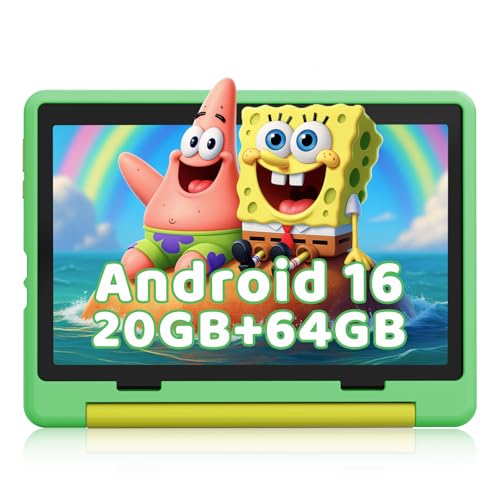
With a powerful 2.0GHz Octa-core processor, this kids tablet offers exceptional performance that’s perfect for your child’s educational needs. Running on the latest Android 15 OS, it guarantees smoother Zoom classes and lag-free gaming. With 20GB of RAM, your child can run multiple educational apps simultaneously without a hitch. The 10.1-inch HD IPS display, combined with low blue light technology, protects their eyes during long use. Plus, the one-touch parental controls allow you to set limits and block apps easily. With 64GB of storage and expandable options, this tablet is ideal for learning and fun.
Best For: This tablet is best for children aged 6-12 who need a reliable device for educational purposes and safe entertainment.
Pros:
- Powerful Performance: Equipped with a 2.0GHz Octa-core processor and 20GB RAM for fast multitasking.
- Eye Protection: The 10.1-inch HD display features low blue light technology to reduce eye strain during extended use.
- Parental Controls: One-touch controls allow parents to easily manage screen time and content access.
Cons:
- Limited Battery Life: With a maximum use of 6 hours, it may require frequent charging during long sessions.
- No Included Expandable Storage: The TF card slot requires an additional purchase for expanded storage.
- Weight: The tablet may be heavier than some other kid-friendly devices, making it less portable for younger children.
Amazon Fire HD 10 Kids Tablet (32 GB, Blue)

The Amazon Fire HD 10 Kids Tablet (32 GB, Blue) stands out as the perfect choice for children aged 3-7, thanks to its vibrant 10.1″ HD screen that brings educational content to life. With 32 GB of storage, expandable to 1 TB, and a powerful 13-hour battery, your kids can enjoy uninterrupted learning and fun. The included 1-year Amazon Kids+ subscription grants access to thousands of ad-free books, games, and videos from trusted brands. Plus, robust parental controls let you manage screen time and content. With a 2-year worry-free guarantee, it’s built to withstand active little hands.
Best For: The Amazon Fire HD 10 Kids Tablet is best for children aged 3-7 who need a safe and engaging device for educational content and entertainment.
Pros:
- Vibrant 10.1″ HD screen enhances the learning experience with bright visuals.
- 1-year Amazon Kids+ subscription provides access to a wide variety of ad-free educational content.
- Robust parental controls ensure a safe and manageable digital environment for kids.
Cons:
- Subscription renews at $5.99/month after the first year, which may add ongoing costs.
- Storage expansion requires additional purchase of a microSD card, which is not included.
- Limited to content available on Amazon Kids+, potentially restricting access to other educational resources.
Amazon Fire HD 8 Kids Pro Tablet (32GB, ages 6-12)

Designed specifically for kids aged 6-12, the Amazon Fire HD 8 Kids Pro Tablet stands out with its robust parental controls and engaging content options. It features an 8″ HD screen and 32GB of storage, all wrapped in a durable Hello Teal case. With a 6-month subscription to Amazon Kids+, your child gains access to a wealth of age-appropriate content. The tablet’s easy-to-use parental controls let you manage activities and block inappropriate sites. Plus, its impressive 13-hour battery life and hexa-core processor guarantee smooth performance. Enjoy peace of mind with the 2-year worry-free guarantee—if it breaks, you get a free replacement.
Best For: The Amazon Fire HD 8 Kids Pro Tablet is best for children ages 6-12 who need a fun and safe digital device for learning and entertainment.
Pros:
- Includes a 6-month subscription to Amazon Kids+ for unlimited access to age-appropriate content.
- Robust parental controls allow for easy management of activities and content filtering.
- Long-lasting 13-hour battery life and smooth performance with a hexa-core processor.
Cons:
- The subscription renews at $5.99/month after the initial 6 months, which may add to costs.
- Limited internal storage of 32GB may require additional purchases for more content.
- The tablet is primarily designed for kids, which may not appeal to older children or teens.
Kids Tablet 7 inch Android 12 with Parental Control
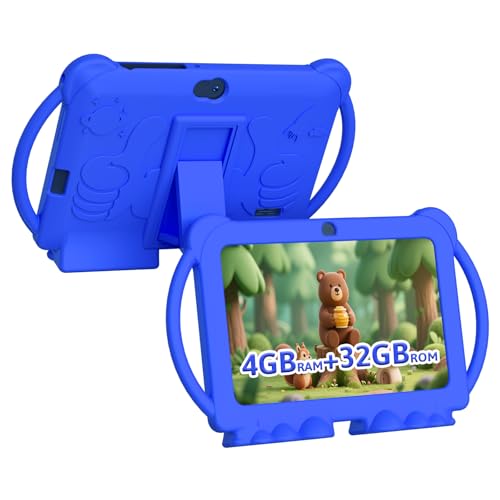
Looking for a kids tablet that combines fun and safety? The 7-inch Kids Tablet with Android 12 is a fantastic choice. It features a high-definition IPS screen, ensuring vibrant colors and wide viewing angles. With parental controls, you can easily customize profiles, manage screen time, and filter content. Plus, the durable, kid-proof silicone case protects against drops. Your child can enjoy educational apps from the Play Store, alongside creative content from the pre-installed iwawa app. With 4GB RAM, expandable storage, and an 8-hour battery life, this tablet supports both learning and play seamlessly. Enjoy peace of mind while they explore!
Best For: Parents looking for a safe and durable tablet for their children that encourages learning and creativity.
Pros:
- High-definition IPS screen offers vibrant colors and wide viewing angles.
- Comprehensive parental controls allow for customized usage and content filtering.
- Durable kid-proof silicone case provides protection against drops and bumps.
Cons:
- Limited internal storage capacity of 32GB may require frequent management for content.
- Battery life of 8 hours may not be sufficient for extended usage without charging.
- Performance may lag with multiple apps running due to the 4-core CPU.
AI Kids Tablet with Parental Control for Educational Study (TalPad T100)

For parents seeking a tablet that combines educational value with robust safety features, the TalPad T100 stands out as a top choice. This AI-powered tablet, equipped with Thinkie, identifies learning gaps in real-time and provides tailored guidance in subjects like math and literacy. With a powerful 2.0GHz Octa-Core CPU and a vivid 11-inch Full HD display, it guarantees seamless performance. The TalPad T100 offers 128GB of storage and an impressive battery life of up to 8 hours. Plus, its parental controls, including screen-time management and daily progress reports, give you peace of mind while your child learns.
Best For: Parents looking for a safe and engaging educational tablet that supports their child’s learning and development.
Pros:
- Offers personalized learning through AI-powered guidance, helping children identify and address learning gaps.
- Features a large, high-resolution display and a powerful processor for smooth multitasking and an immersive educational experience.
- Includes comprehensive parental controls to ensure a safe and age-appropriate learning environment.
Cons:
- The initial price may be higher compared to standard tablets that lack specialized educational features.
- Limited battery life of 8 hours may not be sufficient for all-day use, especially during long trips.
- Some users may find navigating the extensive educational content overwhelming without proper guidance.
2025 Kids Tablet, 10.1 Inch Android 15 Tablet for Kids

The 10.1 Inch Android 15 Tablet for Kids stands out as an excellent choice for parents seeking a device that combines entertainment and education. With its 1280 x 800 IPS HD touchscreen, your child will enjoy vivid colors and wide viewing angles, all while benefiting from eye protection features. The tablet boasts 8GB RAM and 64GB storage, expandable up to 1TB, powered by an octa-core processor. Pre-installed educational apps foster creativity, while parental controls help you manage screen time and content. Plus, the durable design and 5000mAh battery guarantee it withstands rough play and lasts through learning sessions.
Best For: Parents looking for a durable and educational tablet that provides a safe and engaging environment for their children.
Pros:
- Wide viewing angles and vivid colors enhance the visual experience for kids.
- Expandable storage up to 1TB allows for ample space for apps and media.
- Parental control features enable effective management of screen time and content access.
Cons:
- Limited built-in storage (64GB) might require frequent management for larger media files.
- Dependence on WiFi connection may hinder access to content in offline situations.
- Could be less powerful compared to tablets designed for adult use, limiting some advanced functionalities.
2025 Kids Tablet 10 inch Android Tablet for Kids

Discovering the right tablet for your child can make all the difference in their learning and entertainment experience. The 2025 Kids Tablet features a vibrant 10.1-inch HD touchscreen and runs on Android 15 with Gemini AI 2.0, enhancing personalized learning. With 30GB of storage, expandable to 1TB, your child will have plenty of space for apps and media. The pre-installed educational apps and robust parental controls guarantee a safe browsing environment. Plus, its durable design with a shockproof case means it can withstand everyday use. With dual-band WiFi and Bluetooth 5.0, staying connected is easy and reliable.
Best For: Parents looking for a durable and educational tablet that promotes safe and engaging learning experiences for their children.
Pros:
- Educational Focus: Includes pre-installed educational apps and Gemini AI 2.0 for personalized learning.
- Durable Design: Features a shockproof case and safety compliance, making it ideal for kids.
- Expandable Storage: Comes with 30GB of internal storage, expandable up to 1TB to accommodate various apps and media.
Cons:
- Limited Internal Storage: Although expandable, the initial 30GB may be insufficient for extensive app collections.
- Weight: The tablet may be heavier than other devices, which could affect portability for younger children.
- Battery Life: While the 6000mAh battery is decent, heavy usage with multiple apps may reduce its longevity.
Factors to Consider When Choosing Kids Tablets With Parental Controls
When choosing a kids tablet with parental controls, it’s essential to take into account factors like age appropriateness and content filtering options. You’ll also want to look at screen time management features, device durability, and the educational resources included. These elements can make a big difference in ensuring a safe and enriching experience for your child.
Age Appropriateness
How can you guarantee that the tablet you choose for your child is age-appropriate? Start by checking the recommended age range, as many tablets cater specifically to different developmental stages, like 3-7 or 6-12 years old. Age-appropriate tablets often come with curated content that engages your child’s interests while keeping them safe from inappropriate material. Look for devices that offer educational resources aligned with school curriculums, featuring interactive games and activities suitable for their age. Additionally, make sure the tablet includes parental controls that let you customize content access based on age, creating a secure digital environment. Finally, consider a tablet that can grow with your child, adjusting features and content to meet their evolving needs and interests.
Content Filtering Options
What factors should you consider when choosing a tablet with effective content filtering options for your child? First, look for tablets that allow you to block inappropriate websites, apps, and videos, creating a safer online space. Customizable profiles are essential, as they let you tailor content access based on your child’s age and maturity level. Effective filtering systems categorize content, enabling you to restrict specific genres like gaming, social media, and explicit material. Additionally, check if the parental control settings include usage monitoring and activity reports, keeping you informed about your child’s online interactions. Finally, built-in web browsing protections can filter search results and limit access to potentially harmful sites, ensuring a secure digital experience.
Screen Time Management
Effective screen time management is essential for fostering a healthy relationship between your child and technology. When choosing a kid’s tablet, look for features that allow you to set daily usage limits tailored to your family’s needs. Customizable limits help prevent excessive screen time and encourage a balanced lifestyle. Some tablets even let you pause access during specific times, like mealtimes or bedtime, promoting healthy habits and family interactions. Parental dashboards provide activity reports, giving you insights into your child’s usage patterns. This information helps you make informed decisions about screen time. Advanced parental controls also allow you to manage settings remotely, ensuring your child engages with age-appropriate content in a safe digital environment.
Device Durability
When you’re choosing a kids tablet, durability should be a top priority, especially since children can be rough on their devices. Look for models with kid-proof or shockproof cases that can handle drops and bumps. A tablet with a 2-year worry-free guarantee is a great choice, giving you peace of mind through free replacements if it breaks. Opt for tablets made from durable materials, as kids often use devices in active environments. Lightweight designs are essential too; they help little hands manage devices without frequent drops. Finally, consider battery life—longer-lasting batteries mean less charging, which minimizes wear on charging ports. Prioritizing these factors will guarantee your tablet stands the test of time.
Educational Resources Included
After ensuring your kids’ tablet is durable enough to withstand their adventures, it’s time to contemplate the educational resources included. Many tablets provide subscriptions granting access to thousands of age-appropriate, ad-free content like books, videos, and interactive games from trusted brands. Look for tablets that offer specialized STEM content and language-learning apps to enhance your child’s educational experience. Interactive games can make learning enjoyable, promoting engagement through play. Additionally, built-in parental controls allow you to filter content and set screen time limits, ensuring your kids engage with suitable material. Access to extensive educational resources, including practice questions and video lessons, can help your child master subjects and pinpoint learning gaps in real-time, making it a valuable investment for their future.
Subscription Services Available
How do you choose the right subscription service for your kids’ tablet? Start by looking for options like Amazon Kids+, which offer access to thousands of ad-free, age-appropriate books, videos, apps, and games. These subscriptions generally renew monthly or annually at a low cost, often around $5.99 after a free trial. Consider services that feature interactive learning tools, including language-learning apps and STEM resources, to enrich your child’s experience. It’s also essential to check if the service partners with trusted brands like Disney or PBS, ensuring quality content. Finally, look for user-friendly dashboards that let you manage subscriptions easily, allowing you to customize content access based on your child’s age and interests.
Ease of Use
Choosing a kids tablet that’s easy to use makes a world of difference in your child’s digital experience. Look for user-friendly interfaces that let your child navigate apps and features independently. Intuitive parental control settings are essential, allowing you to set restrictions on screen time and content access with ease. One-touch parental controls can help you quickly adjust settings without sifting through complicated menus. A responsive touchscreen and clear visual instructions enhance usability, ensuring your child can engage with educational content confidently. Additionally, consider tablets that offer regular software updates, which can improve usability and introduce new features over time, keeping the device relevant and user-friendly for your family.
Parental Control Features
When selecting a kids tablet, it is vital to prioritize parental control features that enable you to tailor your child’s digital experience. Look for options that allow you to set screen time limits, block specific apps, and filter content, ensuring a safe, age-appropriate environment. Many tablets come with a dedicated Kids Mode, packed with pre-approved educational apps that promote learning while giving you control over usage. Advanced features like remote monitoring let you review activity and adjust settings from your device. Additionally, daily progress reports and usage statistics can help you understand your child’s engagement with educational content. Built-in safeguards are important, as they prevent access to inappropriate websites and provide an extra layer of protection during online exploration.