
When it comes to engaging students in STEM, choosing the right Micro:bit classroom kit can make all the difference. You’ll find various options catering to different skill levels and interests, from beginners to advanced learners. Each kit offers unique components and project ideas that foster creativity and problem-solving. But how do you determine which one is the best fit for your classroom needs? Let’s explore the top contenders.
KEYESTUDIO Microbit Basic Starter Kit for BBC Micro:bit V2
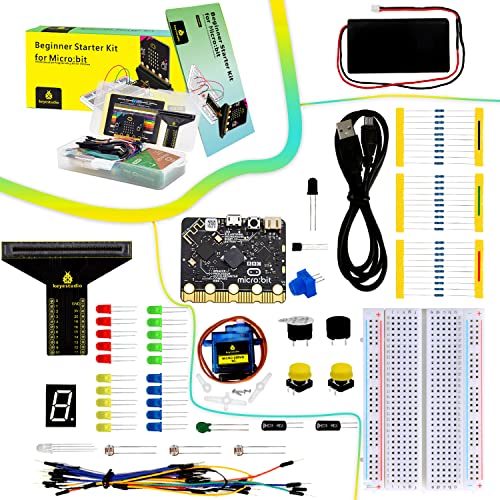
The KEYESTUDIO Microbit Basic Starter Kit for BBC Micro:bit V2 is an excellent choice for teens keen to plunge into programming and electronics. With the Microbit controller V2.21, you’ll explore features like BLE, an accelerometer, and a 5 x 5 LED dot matrix. This kit enables you to tackle at least 18 engaging projects, making learning interactive and fun. You’ll find essential components such as resistors, sensors, and LEDs included, ensuring you have everything needed. Plus, detailed tutorials guide you step-by-step, helping you grasp the concepts easily. Quality assurance means you can focus on creativity without worrying about the tools.
Best For: Teens interested in learning programming and electronics through hands-on projects.
Pros:
- Supports at least 18 engaging projects for interactive learning.
- Includes essential components like resistors, sensors, and LEDs for various experiments.
- Comprehensive tutorials provide step-by-step guidance for beginners.
Cons:
- May require additional tools or materials not included in the kit for some projects.
- Learning curve might be steep for absolute beginners without prior experience.
- Limited to projects that utilize the components provided in the kit.
Freenove Ultimate Starter Kit for BBC micro:bit (V2 Included)

For educators and budding programmers enthusiastic to immerse themselves in the world of coding and electronics, the Freenove Ultimate Starter Kit for BBC micro:bit (V2 Included) stands out as an ideal choice. Packed with 225 components, it supports 44 projects, ranging from simple to complex. You’ll find a thorough 316-page tutorial online, complete with step-by-step guides for coding in both block-based and Python formats. Each project provides clear schematics and wiring diagrams, ensuring a smooth learning curve. With a solid customer rating and responsive support, this kit is perfect for hands-on STEM learning experiences in the classroom.
Best For: Educators and aspiring programmers looking to explore coding and electronics through hands-on projects.
Pros:
- Comprehensive 316-page tutorial with step-by-step guides for both beginners and advanced users.
- Includes 225 components and supports 44 diverse projects, promoting extensive learning opportunities.
- High customer rating of 4.5 out of 5 stars, indicating overall satisfaction and support availability.
Cons:
- No paper version of the tutorial, which may be inconvenient for some users who prefer physical manuals.
- Limited to projects designed specifically for the micro:bit, which may restrict exploration beyond the provided scope.
- Requires a computer or device for coding, which may not be accessible to all users.
ELECFREAKS microbit Starter Kit for Basic Coding Electronics

Designed specifically for beginners aged 10 and up, the ELECFREAKS Micro:bit Starter Kit is an excellent choice for those enthusiastic to explore the world of electronics and coding. It includes 24 essential components like LEDs, buttons, and sensors, allowing you to create exciting projects such as traffic lights. With support for Makecode, JavaScript, and Python, you can experiment with various programming languages, enhancing your coding skills. The kit comes with 14 case studies and a guidance manual to help you grasp electronic principles. Remember, a micro:bit isn’t included, but you can find tutorials online to assist your learning journey.
Best For: Beginners aged 10 and up who are eager to explore electronics and coding.
Pros:
- Supports multiple programming languages including Makecode, JavaScript, and Python, allowing for diverse learning experiences.
- Includes 24 electronic components enabling a wide range of creative projects and experiments.
- Comes with 14 case studies and a guidance manual, providing structured learning and support.
Cons:
- A micro:bit is not included, which is necessary to use the kit effectively.
- May require additional resources or online tutorials for complete beginners to fully understand concepts.
- Some components may be more challenging for younger users to handle without adult supervision.
KEYESTUDIO Micro:bit V2 Go Kit Original Starter Kit

Releasing creativity in young minds, the KEYESTUDIO Micro:bit V2 Go Kit serves as an ideal choice for educators and parents looking to introduce kids to coding and electronics. This kit includes the BBC Microbit V2.2, a battery holder, and a Micro USB cable, providing everything you need for countless projects. With features like a built-in speaker, motion sensor, and Bluetooth, it sparks innovation. Compatible with various coding platforms, the kit offers free tutorials to guide beginners. Rated 4.6 out of 5 stars, it’s a trusted option for effective STEM learning experiences, ensuring your kids have fun while learning!
Best For: Educators and parents looking to introduce kids to coding and electronics in a fun and engaging way.
Pros:
- Versatile Features: Includes built-in speaker, motion sensor, and Bluetooth, allowing for a wide range of project possibilities.
- Beginner-Friendly: Comes with free tutorials and is compatible with multiple coding platforms, making it easy for newcomers to learn.
- High Customer Rating: Maintains a strong rating of 4.6 out of 5 stars from users, indicating satisfaction and trust in the product.
Cons:
- Limited Advanced Features: May not meet the needs of more experienced users looking for advanced functionalities.
- Small Size: The compact dimensions may be challenging for some projects that require larger components or space.
- Return Policy Restrictions: Conditions apply for returns and misrepresentation may incur fees, which could complicate the return process for some customers.
ACEBOTT Smart Robot Car Kit for Kids (Ages 8–12)

The ACEBOTT Smart Robot Car Kit offers an engaging way for kids ages 8 to 12 to immerse themselves in the world of coding, electronics, and robotics. With 16 story-based tutorials, your child can build confidence while learning essential STEM skills. This kit features HD videos and illustrated instructions, making it a fun parent-child DIY project. It’s compatible with BBC Micro:bit V2 and LEGO blocks, encouraging creativity. The robot car can be controlled using infrared remotes or smartphone apps, enhancing the excitement of exploration. Perfect for science fairs or as a thoughtful gift, it’s an inspiring tool for budding innovators.
Best For: The ACEBOTT Smart Robot Car Kit is best for kids ages 8 to 12 who are interested in learning coding, electronics, and robotics through hands-on projects.
Pros:
- Engaging and educational with 16 story-based tutorials that enhance STEM skills.
- Compatible with BBC Micro:bit V2 and LEGO blocks, allowing for creative expansion.
- Offers multiple control options via infrared remote or smartphone apps for interactive play.
Cons:
- AA batteries are not included, requiring an additional purchase.
- May require adult supervision for younger users to ensure proper assembly and safety.
- Limited to ages 8 to 16, which may not appeal to older children or teens.
KEYESTUDIO Micro:bit V2 Robot Starter Kit (without Microbit)

For budding engineers and young coders, the KEYESTUDIO Micro:bit V2 Robot Starter Kit (without Microbit) offers an exciting opportunity to build and program a robot car. This kit is compatible exclusively with Micro:bit V2, so you’ll need to purchase the board and AAA batteries separately. As you assemble the robot, you’ll learn essential coding skills using Makecode and Python. The detailed instructions guide you through the setup, making it easy to understand movement, light, sound, and obstacle detection. Plus, with expansion capabilities, you can customize your robot with additional sensors and actuators, enhancing your learning experience even further.
Best For: Budding engineers and young coders looking to build and program their own robot car.
Pros:
- Hands-on learning experience: Encourages the development of coding skills through practical assembly and programming.
- Customization options: Allows for expansion with additional sensors and actuators for personalized projects.
- Comprehensive guidance: Detailed instructions simplify the setup and coding process for beginners.
Cons:
- Additional purchases required: Micro:bit V2 board and AAA batteries must be bought separately.
- Limited to Micro:bit V2: Compatibility is restricted to only one specific version of the microcontroller.
- May require prior knowledge: New users may need to familiarize themselves with coding concepts before fully utilizing the kit.
ELECFREAKS microbit Ring:bit 6-in-1 Starter Kit for Coding Learning

Looking to spark a passion for coding and engineering in young minds? The ELECFREAKS microbit Ring:bit 6-in-1 Starter Kit is perfect for you! With over 200 building blocks and a simple PCB for micro:bit, this kit lets you create six exciting projects, including traffic lights and temperature-controlled fans. Designed for ages 15 and up, it encourages creativity and problem-solving. You can easily expand your designs thanks to well-structured assembly instructions. Plus, with strong technical support and an extensive wiki tutorial, you won’t be left in the dark. Immerse yourself in coding and release your creativity with this engaging starter kit!
Best For: This product is best for teenagers and young adults aged 15 and up who are interested in coding and engineering.
Pros:
- Encourages creativity and problem-solving through hands-on learning.
- Comes with over 200 building blocks and well-structured assembly instructions for easy project creation.
- Strong technical support and an extensive wiki tutorial are available for user assistance.
Cons:
- No micro:bit is included, which is required to use the kit.
- Recommended age may exclude younger learners who could benefit from coding education.
- Limited to six predefined projects, although additional designs can be created, it may require more advanced creativity.
KEYESTUDIO 45 Sensors Starter Kit with Micro:bit V2.2

Ideal for aspiring young engineers and tech enthusiasts, the KEYESTUDIO 45 Sensors Starter Kit with Micro:bit V2.2 offers a hands-on introduction to the world of electronics and programming. With 45 types of sensors, including LED lights, temperature sensors, and motion sensors, you’ll immerse yourself in exciting projects like distance ranging and music playback. The kit comes with excellent PDF tutorials, complete with circuit diagrams and verified code for each of the 45 projects. Compatible with Micro:bit v2 and v1.5, it’s perfect for beginners aged 14 and older. Plus, it has a solid 4.5-star rating from satisfied users!
Best For: The KEYESTUDIO 45 Sensors Starter Kit with Micro:bit V2.2 is best for aspiring young engineers and tech enthusiasts aged 14 and older who are looking to learn about electronics and programming.
Pros:
- Excellent learning resources including PDF tutorials and verified code for each project.
- Wide variety of 45 sensors, allowing for diverse and engaging projects.
- High customer satisfaction reflected in a solid 4.5-star rating from users.
Cons:
- The kit may be complex for complete beginners without prior experience in electronics.
- Limited to users aged 14 and older, which may not cater to younger aspiring engineers.
- Return policy conditions may be strict for certain situations, potentially causing issues for some customers.
KEYESTUDIO 37 Sensors in 1 Box Starter Kit for BBC Micro:bit

The KEYESTUDIO 37 Sensors in 1 Box Starter Kit for BBC Micro:bit is a fantastic choice for aspiring young engineers and educators enthusiastic to plunge into electronics and programming. This kit features 37 sensor modules like the Digital LED Module, Analog Temperature Sensor, and Ultrasonic Module, perfect for hands-on STEM projects. You can create exciting projects such as a Traffic Light or Temperature Monitor. With detailed tutorials and step-by-step instructions on the wiki, you’ll find it easy to get started. Just remember, you’ll need an external power supply to adjust the backlight brightness for certain components.
Best For: Aspiring young engineers and educators looking to explore electronics programming and hands-on STEM projects.
Pros:
- Offers a wide variety of 37 sensor modules for diverse project possibilities.
- Includes detailed tutorials and step-by-step instructions for easy learning.
- Complies with FCC and CE standards, ensuring quality and safety.
Cons:
- Requires an external power supply for certain components, like backlight brightness.
- Debugging may be necessary before use, which can be a hurdle for beginners.
- Recommended for ages 15 and up, limiting accessibility for younger learners.
ELECFREAKS microbit 32 in 1 Wonder Sensor Kit

Designed for ages 15 and up, the ELECFREAKS microbit 32 in 1 Wonder Sensor Kit stands out as a versatile learning tool for aspiring engineers and tech enthusiasts. This kit includes a variety of sensors, like a line-following and ultrasonic sensor, and features a Wukong breakout board compatible with standard building bricks. You can create interactive projects using graphical programming, bringing your ideas to life. Additionally, access helpful tutorials online to guide you through each build. Weighing just 2.54 pounds, it’s a compact option with strong technical support available. Immerse yourself in hands-on STEM learning and release your creativity!
Best For: The ELECFREAKS microbit 32 in 1 Wonder Sensor Kit is best for aspiring engineers and tech enthusiasts aged 15 and up who want to explore hands-on STEM learning.
Pros:
- Encourages creativity and imagination through building and programming projects.
- Includes a variety of sensors and a versatile breakout board for diverse project possibilities.
- Access to online tutorials supports learning and helps users maximize their building experience.
Cons:
- Recommended for a minimum age of 15, which may limit younger users’ engagement.
- The kit does not include a Micro:bit, which is necessary for full functionality.
- Some users may find the initial learning curve challenging without prior programming experience.
Factors to Consider When Choosing a Microbit Classroom Kit
When you’re selecting a Micro:bit classroom kit, think about several key factors. Consider compatibility with different Micro:bit versions, the variety and complexity of projects, and the quality of included resources. You’ll also want to check the components’ durability and how easy they are to assemble.
Compatibility With Micro:Bit Versions
Choosing the right Micro:bit classroom kit hinges on its compatibility with the specific version of the Micro:bit you’re using. Some kits only work with Micro:bit V2, leaving older versions like V1.5 out in the cold. Be sure to check if the components in the kit are designed to interface with the GPIO pins and features of your Micro:bit version. Look for kits that clearly state compatibility with both V1.5 and V2 for greater flexibility. Also, verify that the programming languages and software tools align with your Micro:bit’s capabilities, as features can differ. Finally, keep in mind that some kits may need additional hardware or accessories specific to your version, which can affect usability.
Project Variety and Complexity
Understanding compatibility sets the stage for evaluating project variety and complexity in a Micro:bit classroom kit. A good kit should offer 18 to 44 diverse project opportunities suited to various skill levels. You’ll want to find projects that range from simple tasks, like blinking LEDs, to more advanced applications, such as interactive robots or sensors. This variety helps you build your skills progressively. Each project should include detailed schematics, wiring diagrams, and complete code examples, making implementation easier. Additionally, the availability of multiple programming languages, like block-based coding and Python, enhances your learning experience. Look for kits that provide thorough tutorials to guide you through both basic and complex projects, ensuring a well-rounded educational journey.
Included Learning Resources
Selecting a Micro:bit classroom kit means considering the included learning resources that can greatly impact your educational experience. Many kits come with extensive tutorials featuring wiring diagrams, circuit schematics, and example projects, which are vital for guiding beginners. You might find downloadable detailed guides, like a 316-page tutorial that covers both basic electronics and programming, catering to various learning styles. Additionally, educational resources often grant access to online platforms offering step-by-step coding examples in languages like block-based coding and Python. Many kits also include a variety of projects, allowing you to progressively develop your skills. Finally, don’t overlook technical support and community resources that can provide assistance and enhance your overall learning journey.
Component Quality and Durability
When it comes to Micro:bit classroom kits, the quality and durability of components play a significant role in your learning experience. High-quality components undergo rigorous testing for function, voltage, and current, guaranteeing reliability during use. You’ll want to choose kits where components are individually packaged in a compartmentalized box. This not only prevents damage but also makes organization easier. Look for kits that comply with safety standards like FCC and CE, as these guarantee adherence to quality and environmental regulations. Pay attention to the soldering quality, too; clean, properly aligned connections reduce failure rates. Components resistant to wear and tear, especially those made from environmentally friendly materials, enhance the kit’s long-term usability, making your STEM projects more enjoyable.
Ease of Assembly
Choosing the right Micro:bit classroom kit can greatly impact your learning experience, especially regarding ease of assembly. Kits like the ELECFREAKS microbit Ring:bit 6-in-1 Starter Kit come with well-designed assembly instructions, making it simple for beginners to engage. Similarly, the KEYESTUDIO Micro:bit V2 Robot Starter Kit provides detailed guidance that streamlines both the assembly and coding phases. Many kits also include schematics and wiring diagrams, which are essential for ensuring proper connections between components. Thorough tutorials often offer step-by-step instructions, clarifying each component’s functionality. Plus, the availability of online resources and community forums can help you troubleshoot and enhance your projects, making the entire assembly process smoother and more enjoyable.
Programming Language Support
Understanding programming language support is essential for making the most of your Micro:bit classroom kit. Many kits offer multiple languages, including block-based visual languages like Makecode, as well as text-based options such as Python and JavaScript. This variety lets you and your students choose the language that best suits your learning styles and skill levels, boosting engagement and understanding. For beginners, block-based programming is often recommended, as it simplifies coding concepts without the need to grasp complex syntax. Meanwhile, advanced learners can plunge into text-based languages like Python to tackle more intricate projects. Plus, extensive tutorials and resources are typically provided to help everyone navigate these programming options effectively.
Age Appropriateness
Selecting a Micro:bit classroom kit that fits your students’ age group is essential for effective learning. Age appropriateness guarantees the kit meets the cognitive and motor skills of your students. For younger learners, aged 8-12, choose kits with simpler projects and graphical programming languages, making it easier for them to grasp concepts. Kits for older students, 15 and up, often include more complex components and coding languages, fostering deeper exploration. Additionally, evaluate the included tutorials and support resources—young learners typically need more guidance, while older students can thrive with self-directed tasks. By aligning the kit with your students’ age and skill level, you’ll create a more engaging and productive STEM learning experience.
Expansion and Customization Options
When considering a Micro:bit classroom kit, it’s essential to look at the expansion and customization options available. Kits with expansion ports let you add sensors, actuators, and other components, enhancing your projects’ potential. Many kits are compatible with building blocks like LEGO, making it easy to integrate with existing toys and spark creativity. Some kits offer detailed assembly instructions and project ideas, encouraging hands-on exploration of various configurations. The availability of multiple programming languages allows you to tailor your coding experience to match your skill level. Finally, kits with modular components support extensive experimentation, fostering innovation and problem-solving skills that are vital for STEM learning. Choose a kit that best fits your classroom’s needs!