
If you’re looking to enhance your creativity and coding skills, exploring Micro:bit project bundles is a great start. These kits offer a mix of sensors and components that cater to various skill levels. Whether you’re a beginner or more advanced, there’s something for everyone. Before you choose the right bundle for your projects, consider what features and resources will best support your learning journey. Let’s take a closer look at some top options available.
Micro:bit V2.21 GO Bundle
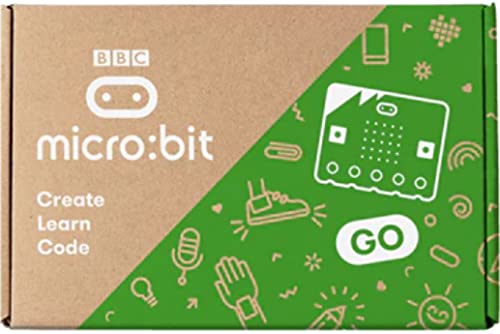
The Micro:bit V2.21 GO Bundle is perfect for budding programmers and young innovators enthusiastic to immerse themselves in the world of coding and electronics. With its Nordic nRF52833 processor and Arm Cortex-M4 architecture, you’ll experience powerful performance. The Bluetooth 5.1 capability allows seamless communication, while the 5×5 LED matrix and push-to-make buttons enhance your interactive projects. You’ll find integrated sensors like the motion and temperature sensors to spark your creativity. Plus, the bundle features an onboard microphone and speaker for audio output. Immerse yourself and explore endless possibilities as you create fun, engaging projects with this versatile toolkit!
Best For: The Micro:bit V2.21 GO Bundle is best for young programmers and innovators eager to explore coding and electronics.
Pros:
- Powerful performance with Nordic nRF52833 processor and Arm Cortex-M4 architecture.
- Interactive features including a 5×5 LED matrix and push-to-make buttons for engaging projects.
- Integrated sensors (motion and temperature) and audio capabilities with a microphone and speaker.
Cons:
- Limited to beginner projects, which may not challenge more advanced users.
- Small LED display may restrict complex visual outputs.
- Dependence on additional resources or components for more advanced projects may be required.
KEYESTUDIO 37 Sensors in 1 Box Starter Kit for BBC Microbit

For aspiring young engineers and educators enthusiastic to immerse themselves in the world of electronics, the KEYESTUDIO 37 Sensors in 1 Box Starter Kit for BBC Microbit is an excellent choice. This kit includes 37 sensor modules, like the Digital LED Module and Ultrasonic Module, perfect for hands-on STEM projects. You can create exciting projects such as a Traffic Light or Temperature Monitor. With detailed tutorials and step-by-step instructions, you’ll have all the guidance you need. Designed for ages 15 and up, just remember to debug and use an external power supply for peak performance. Immerse yourself and start exploring!
Best For: This kit is best for aspiring young engineers and educators looking to explore electronics through hands-on STEM projects.
Pros:
- Comprehensive Kit: Includes 37 sensor modules for a wide variety of projects.
- Educational Resources: Comes with detailed tutorials and step-by-step instructions for easy learning.
- Quality Assurance: All components are tested for functionality and comply with safety standards.
Cons:
- Age Recommendation: Designed for users aged 15 and up, which may limit younger users’ access.
- Debugging Required: Users must debug certain modules before use, which may be challenging for beginners.
- External Power Supply Needed: An external power supply is necessary to adjust backlight brightness, which might not be readily available to all users.
KEYESTUDIO Micro:bit V2 Go Bundle Kit (5 Pack Microbit V2.2 Go Kit)
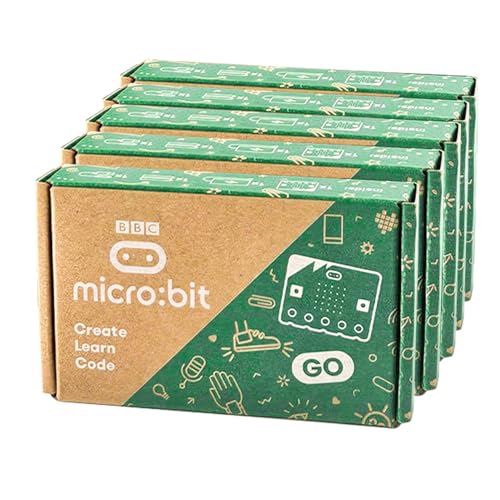
Looking to immerse yourself in coding and electronics? The KEYESTUDIO Micro:bit V2 Go Bundle Kit is perfect for you! This kit includes five Micro:bit V2.2 boards, each packed with features like a speaker sensor, 25 built-in LEDs, and various sensors including temperature and motion. With its drag-and-drop code editor, you’ll find programming a breeze. The bundle comes with micro USB cables, battery holders, AAA batteries, and user guides, making it an all-in-one solution for learning. Ideal for classrooms or personal projects, it’s a fun way to enhance your coding skills and engage with interactive electronics!
Best For: This kit is best for beginners and educators looking to introduce coding and electronics through hands-on projects.
Pros:
- Easy-to-use drag-and-drop code editor simplifies the programming learning curve.
- Includes multiple sensors and features for diverse and interactive projects.
- Comes as a complete package with necessary components for immediate use.
Cons:
- May be overwhelming for absolute beginners without prior exposure to electronics.
- Limited advanced features that may not satisfy experienced users.
- Battery-powered setup might require frequent battery replacement for extended use.
KEYESTUDIO Microbit Basic Starter Kit for BBC Micro:bit V2
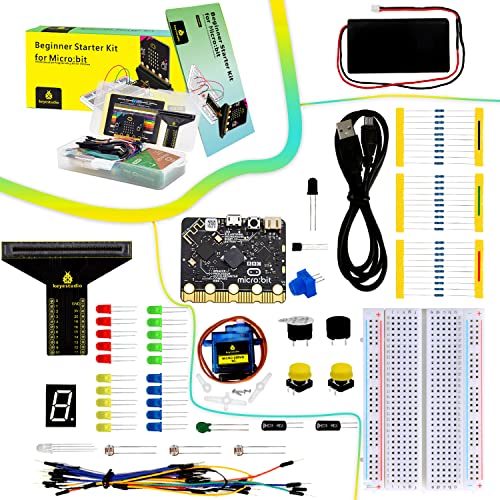
Designed specifically for teens enthusiastic to plunge into programming and electronics, the KEYESTUDIO Microbit Basic Starter Kit for BBC Micro:bit V2 stands out with its extensive set of features. This kit includes the Microbit controller V2.21, complete with BLE, an accelerometer, and a 5 x 5 LED dot matrix. You’ll find opportunities to engage in at least 18 exciting projects, making hands-on learning fun and interactive. Each component, from sensors to LEDs, is individually packaged for quality assurance. Plus, you’ll benefit from detailed tutorials that guide you through wiring diagrams and coding, ensuring a smooth learning experience.
Best For: Teens enthusiastic about programming and electronics looking for a hands-on learning experience.
Pros:
- Comprehensive tutorials and support available for beginners.
- Includes a variety of components for at least 18 engaging projects.
- Quality assurance with individually packaged sensors and thorough testing.
Cons:
- May require additional tools or accessories for more advanced projects.
- Limited to projects suitable for the capabilities of the Microbit controller.
- Some users may find the learning curve steep without prior experience.
ELECFREAKS micro:bit Starter Kit with Accessories

The ELECFREAKS micro:bit Starter Kit with Accessories is perfect for beginners enthusiastic to explore the world of electronics and programming, especially if you’re over 10 years old. This kit includes 24 essential components like LEDs, buttons, and sensors, allowing you to create fun projects like traffic lights and photocell displays. You can plunge into programming with support for Makecode, JavaScript, and Python, making it easy to find your favorite coding style. With 14 case studies and a guidance manual, you’ll grasp electronic principles quickly. Don’t forget, you’ll need to purchase the micro:bit separately, but resources are available to help you learn.
Best For: Beginners over 10 years old who want to learn about electronics and programming.
Pros:
- Supports multiple programming languages, providing flexibility in learning styles.
- Includes 24 electronic components for hands-on experimentation and project creation.
- Comes with a guidance manual and 14 case studies to aid understanding of electronic principles.
Cons:
- Does not include a micro:bit, which must be purchased separately.
- May be overwhelming for complete beginners without prior knowledge of electronics.
- Limited to the age group of 10 years and older, excluding younger users interested in learning.
ELECFREAKS microbit Mini Cutebot Kit for BBC Micro:bit

For educators and young programmers enthusiastic to plunge into the world of robotics, the ELECFREAKS microbit Mini Cutebot Kit for BBC Micro:bit stands out as an excellent choice. This DIY programmable robot car kit is perfect for STEM projects, offering a cute design and rich graphical programming blocks that make learning fun and engaging. With features like distance tracking, obstacle avoidance, and line following, you’ll explore coding in a hands-on way. Plus, it’s compatible with building blocks for creative expansions. Don’t forget to check out tutorials online for guidance and technical support available through the “elecfreaks” Amazon store.
Best For: Educators and young programmers eager to explore robotics and coding through hands-on STEM projects.
Pros:
- Engaging and cute design that appeals to children and beginners.
- Rich graphical programming blocks facilitate a smooth learning curve for new coders.
- Compatibility with building blocks allows for creative customization and experimentation.
Cons:
- Micro:bit and AAA batteries are not included, requiring additional purchases.
- The ultrasonic module must be correctly connected to function, which may pose a challenge for beginners.
- Limited advanced programming features compared to more sophisticated robotics kits.
KEYESTUDIO 45 Sensors Starter Kit with Micro:bit V2.2

With 45 types of sensors included, the KEYESTUDIO 45 Sensors Starter Kit with Micro:bit V2.2 stands out as an ideal choice for beginners aged 14 and older who want to explore the world of coding and electronics. This kit offers LED lights, temperature sensors, and motion detectors, making it perfect for various projects. You’ll find excellent PDF tutorials with detailed guidance and verified code, helping you create everything from distance ranging to music playback. Weighing just 1.4 pounds, it’s easy to handle, and it’s compatible with both Micro:bit v2 and v1.5, ensuring a smooth learning experience.
Best For: Beginners aged 14 and older who want to explore coding and electronics through hands-on projects.
Pros:
- Excellent PDF tutorials with detailed guidance and verified code for each project.
- Wide variety of 45 different sensors, enabling diverse project opportunities.
- Compatible with both Micro:bit v2 and v1.5 for versatile learning experiences.
Cons:
- May be overwhelming for complete beginners due to the number of sensors and projects.
- Requires a basic understanding of electronics and coding to fully utilize the kit.
- Limited warranty and return policy conditions may pose concerns for some customers.
KEYESTUDIO MICROBIT V2.2 GO KIT for Beginners Programming

Designed specifically for beginners, the KEYESTUDIO MICROBIT V2.2 GO KIT offers an engaging way to immerse yourself in programming and electronics. This kit includes an official micro:bit v2.2 board, a micro USB cable, a battery holder, two AAA batteries, and a quick start guide, making it easy to set up. With its LED matrix, sound capabilities, and sensors, the micro:bit v2.2 is perfect for creative projects. Ideal for youth and young adults, it encourages you to explore coding and electronics while fostering imagination. This kit guarantees that learning is both fun and effective, giving you hands-on experience with technology.
Best For: Youth and young adults looking to explore programming and electronics through hands-on projects.
Pros:
- Easy to set up and use, making it accessible for beginners.
- Versatile platform with features like LED matrix, sound capabilities, and sensors for creative projects.
- Provides a fun and engaging way to learn coding and electronics.
Cons:
- Limited advanced features may not satisfy experienced coders.
- Requires batteries which may need to be purchased separately if they run out.
- Some users may find the quick start guide insufficient for more complex projects.
BBC MICRO:BIT Micro:bit v2 Go Club 10-Pack

The BBC micro:bit v2 Go Club 10-Pack is perfect for educators and groups enthusiastic to immerse themselves in the world of programming and electronics. This kit includes 10 micro:bit v2 boards, USB cables, battery holders, and AAA batteries, making it a fantastic choice for hands-on learning. Each micro:bit features 25 programmable LEDs, sensors, and Bluetooth capabilities, allowing you to create fun projects with ease. Its compact size and lightweight design make it portable for any classroom setting. With its excellent customer rating and educational value, this bundle encourages exploration and creativity in young coders. Immerse yourself and start innovating today!
Best For: Educators and groups looking to engage children and young people in learning programming and electronics through hands-on experience.
Pros:
- Encourages creativity and exploration with a range of programmable features and sensors.
- Includes all necessary components (USB cables, battery holders, and batteries) for immediate use in educational settings.
- Compact and portable design, making it easy to transport and use in various classroom environments.
Cons:
- Color selection is not available, limiting customization options for users.
- May require initial setup and learning curve for complete beginners unfamiliar with programming.
- Limited to the features provided, which might restrict advanced projects for experienced coders.
KEYESTUDIO Micro:bit V2 Go Kit Original Starter Kit

If you’re a beginner keen to plunge into the world of coding and electronics, the KEYESTUDIO Micro:bit V2 Go Kit Original Starter Kit is your perfect companion. This kit includes the BBC Microbit V2.2 along with essential accessories like a battery holder and Micro USB cable. With built-in sensors and versatile features, you can explore countless coding projects. It’s compatible with various coding platforms, making it easy to learn JavaScript or Python. Plus, you’ll find free tutorials online to guide you. With a customer rating of 4.6 stars, this kit is a fantastic choice for budding creators.
Best For: Beginners interested in coding and electronics who want a versatile and user-friendly starter kit.
Pros:
- User-friendly: Designed with beginners in mind, featuring clear instructions and tutorials.
- Versatile coding options: Compatible with multiple coding platforms like JavaScript and Python, allowing for varied learning experiences.
- High customer satisfaction: Rated 4.6 out of 5 stars based on customer feedback, indicating strong approval from users.
Cons:
- Limited return policy: Full refunds are only available for “dead on arrival” or damaged products, which may not cover all issues.
- Potential fees: Misrepresentation during returns may incur additional charges, complicating the return process.
- Weight and size: At 2.89 ounces and dimensions of 5.24 x 3.15 x 0.91 inches, it may be less portable for some users.
Factors to Consider When Choosing a Microbit Project Bundle
When choosing a Microbit project bundle, it’s essential to think about your learning objectives and goals. Consider the included components and sensors, as well as the variety of projects you can create. Don’t forget to evaluate the educational resources available and the target audience for your bundle.
Learning Objectives and Goals
Choosing the right Microbit project bundle hinges on defining clear learning objectives and goals. Start by identifying what you want to learn—whether it’s basic programming concepts, electronics, or specific project outcomes. Confirm the bundle aligns with your preferred programming languages and platforms, such as block coding or Python, to make the learning process smoother. Consider the age and skill level of the target audience; the bundle should be appropriately challenging but not overwhelming. Look for a range of included components that match your project goals, allowing you to gain hands-on experience. Finally, evaluate the availability of educational resources like tutorials and project guides, which can greatly enhance your learning experience and help you successfully complete your projects.
Included Components and Sensors
A well-rounded Micro:bit project bundle can greatly enhance your learning experience by offering a variety of components and sensors. When selecting a bundle, consider the range of sensors included, such as temperature, motion, and light sensors, which expand project possibilities. Look for kits that come with essential components like LED modules, buzzers, and potentiometers for versatility. Make sure the bundle includes tutorials and guidance for each component, making it easier for you as a beginner. Compatibility with various coding platforms, including block-based programming, JavaScript, and Python, is also crucial for a broader learning experience. Finally, assess the quality of the components; those that meet safety standards will lead to a more reliable and enjoyable project journey.
Project Diversity and Variety
While exploring options for a Micro:bit project bundle, you’ll want to prioritize diversity and variety to maximize your learning experience. Look for bundles that include multiple sensors like temperature, motion, and light, as these will open the door to a range of exciting projects. Additionally, having access to different programming languages and platforms, such as graphical coding and Python, enhances your ability to experiment and innovate. Kits that come with detailed tutorials and project guides support your journey, ensuring you can tackle each project with confidence. A wide array of electronic components, including LED modules and buzzers, encourages creative experimentation. Finally, access to community resources can greatly enrich your project options and provide valuable support.
Educational Resources and Support
When selecting a Micro:bit project bundle, consider the educational resources and support that come with it. Extensive resources often include detailed tutorials, wiring diagrams, test code, and example projects, which facilitate a structured learning process. Many bundles provide step-by-step instructions on accessible platforms, ensuring you can easily follow along. Look for kits that offer verified code and circuit diagrams for various projects, enhancing your practical learning and experimentation. Additionally, support for different programming languages like block-based coding, JavaScript, and Python allows you to explore methodologies in a user-friendly way. Finally, check for technical support through online forums or customer service, as this can be invaluable for troubleshooting and enriching your learning experience.
Target Audience and Age
Choosing the right Micro:bit project bundle largely depends on the target audience and their age. You’ll find that some kits are perfect for beginners aged 10 and up, while others cater to teens aged 14 and above. Educational kits often focus on specific age groups, offering beginner-friendly tutorials to engage youth and young adults in programming and electronics. The complexity of the included projects also matters; advanced components are better suited for older students with prior electronics knowledge. Many starter kits emphasize hands-on learning for ages 15 and up, making them ideal for high school students and educators. Finally, consider your prior experience with programming, as some kits are designed for complete novices, while others require a foundational understanding.