
As you prepare for your coding journey in 2025, selecting the right Micro:bit starter kit can make all the difference. With a variety of options available, each kit offers unique components and resources to enhance your learning experience. From basic setups to advanced projects, the right choice can help you develop essential skills in electronics and programming. Let’s explore some of the top kits that can kickstart your creative endeavors.
KEYESTUDIO Microbit Basic Starter Kit for BBC Micro:bit V2
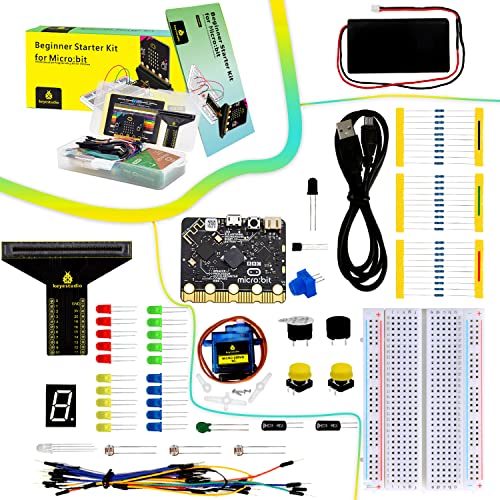
The KEYESTUDIO Microbit Basic Starter Kit for BBC Micro:bit V2 is the ideal choice for teens enthusiastic to plunge into programming and electronics. This kit includes the Microbit V2.21 controller, equipped with BLE, an accelerometer, an electronic compass, three buttons, and a 5 x 5 LED dot matrix. You’ll enjoy exploring at least 18 engaging projects that foster hands-on learning. With essential components like resistors, LEDs, and sensors, you’re set for various experiments. Plus, extensive tutorials guide you through every step, ensuring you gain valuable coding and electronics skills while having fun. Quality assurance means you’ll get reliable components every time.
Best For: Teens eager to learn programming and electronics through hands-on projects.
Pros:
- Comprehensive tutorials guide users step-by-step, making it easy for beginners.
- Includes a variety of essential components for diverse project opportunities.
- Quality assurance ensures reliable components with thorough testing before packaging.
Cons:
- May require additional materials for some advanced projects not included in the kit.
- Could be overwhelming for absolute beginners with no prior knowledge of coding or electronics.
- Limited to projects that utilize the specific components included in the kit.
Freenove Ultimate Starter Kit for BBC micro:bit (V2 Included)

If you’re looking for an engaging way to immerse yourself in coding and electronics, the Freenove Ultimate Starter Kit for BBC micro:bit (V2 Included) is an excellent choice. This kit features a compact micro:bit V2 board and includes 225 items to support 44 diverse projects. With an extensive 316-page downloadable tutorial, you’ll find step-by-step guides and code samples in both block-based and Python formats. Each project offers detailed schematics and wiring diagrams, ensuring you build your skills progressively. Plus, with a solid 4.5-star rating and free technical support, you’re in good hands as you explore the world of coding.
Best For: Beginners and enthusiasts looking to learn coding and electronics through hands-on projects with the BBC micro:bit.
Pros:
- Comprehensive 316-page tutorial with step-by-step guides for easy learning.
- Includes a variety of components and supports 44 different projects to enhance skills progressively.
- High customer satisfaction with a 4.5-star rating and free technical support.
Cons:
- No physical copy of the tutorial, requiring online access for reference.
- The weight of 1.19 pounds might be cumbersome for portability.
- Limited to projects that utilize the specific components included in the kit.
ELECFREAKS microbit Starter Kit with 24 Accessories

Looking for an engaging way to introduce your kids aged 10 and up to the world of electronics and programming? The ELECFREAKS Micro:bit Starter Kit is perfect for beginners, featuring 24 accessories like LEDs, buttons, and sensors. With this kit, your kids can create fun projects, such as traffic lights and photocell displays. It supports multiple programming languages, including Makecode and Python, giving them the freedom to explore. Plus, it comes with 14 case studies and a guidance manual to enhance their learning experience. Just remember, a micro:bit isn’t included, but great tutorials are available online for support.
Best For: Beginners aged 10 and up who are interested in learning about electronics and programming.
Pros:
- Supports multiple programming languages, including Makecode, JavaScript, and Python, allowing for diverse learning experiences.
- Includes 24 electronic components and 14 case studies to facilitate hands-on experimentation and understanding of electronic circuits.
- Comes with a guidance manual and access to online tutorials for additional learning support.
Cons:
- Does not include a micro:bit, which is necessary to use the kit.
- May require adult supervision or assistance for younger users to fully grasp the concepts.
- Some users may find the range of components overwhelming without prior experience in electronics.
KEYESTUDIO 45 Sensors Starter Kit with Micro:bit V2.2

For beginners aged 14 and older, the KEYESTUDIO 45 Sensors Starter Kit with Micro:bit V2.2 offers an impressive range of 45 different sensors, making it an ideal choice for those ready to plunge into the world of coding and electronics. You’ll find everything from LED lights to motion sensors, allowing you to explore various projects like distance ranging and music playback. With excellent PDF tutorials and circuit diagrams for each project, you won’t feel lost. Plus, the Micro:bit V2.2 is included, ensuring compatibility and ease of use. With a customer rating of 4.5 stars, it’s a top pick for budding enthusiasts!
Best For: Beginners aged 14 and older looking to explore coding and electronics through hands-on projects with a variety of sensors.
Pros:
- Excellent PDF tutorials and detailed project guidance make it easy for beginners to follow.
- Includes a wide range of 45 sensors, allowing for diverse project possibilities.
- High customer rating of 4.5 stars indicates strong satisfaction among users.
Cons:
- May be overwhelming for complete beginners due to the number of sensors and projects available.
- Warranty and return policy could involve fees for certain conditions, which may be a concern for some buyers.
- Item weight of 1.4 pounds may be bulky for younger users to handle easily.
KEYESTUDIO 37 Sensors in 1 Box Starter Kit for BBC Micro:bit

The KEYESTUDIO 37 Sensors in 1 Box Starter Kit for BBC Micro:bit stands out as an excellent choice for aspiring coders aged 15 and up who want to explore hands-on STEM projects. This kit includes 37 sensor modules, like the Analog Temperature Sensor and Ultrasonic Module, allowing you to create diverse projects such as a Traffic Light or Temperature Monitor. You’ll benefit from detailed tutorials that guide you through wiring diagrams and example projects. All components are rigorously tested for quality, and the kit complies with FCC and CE standards, ensuring you get a reliable and environmentally friendly learning experience.
Best For: Aspiring coders aged 15 and up who want to explore hands-on STEM projects.
Pros:
- Comprehensive kit with 37 sensor modules for diverse project creation.
- Detailed tutorials and instructions make learning electronics programming accessible.
- High-quality components that comply with FCC and CE standards for reliability.
Cons:
- Requires debugging before use, which may be challenging for beginners.
- External power supply needed to adjust backlight brightness.
- Microbit board not included, necessitating an additional purchase.
KEYESTUDIO Micro:bit V2 Go Kit Starter Kit

Equipped with a built-in speaker and an array of sensors, the KEYESTUDIO Micro:bit V2 Go Kit Starter Kit stands out as an exceptional choice for beginners enthusiastic to plunge into coding. This kit includes the BBC Microbit V2.2, a battery holder, and a Micro USB cable, making setup a breeze. With features like 25 LEDs, motion and light sensors, and Bluetooth capabilities, you can explore various coding projects seamlessly. It’s compatible with popular platforms like JavaScript and Python, and you’ll find free tutorials online to guide your learning journey. Plus, it boasts a solid 4.6-star rating from satisfied users.
Best For: Beginners eager to learn coding through hands-on projects with a versatile electronic board.
Pros:
- Easy setup with included battery holder and Micro USB cable.
- Compatible with multiple coding platforms, including JavaScript and Python.
- Comprehensive free tutorials available online for guided learning.
Cons:
- Limited processing power due to single processor design.
- May require additional components for more advanced projects.
- Battery life may vary depending on usage of features like Bluetooth and sensors.
KEYESTUDIO 37 in 1 Box Starter Kit with BBC Microbit V2.2 Board

Looking to immerse yourself in coding and electronics? The KEYESTUDIO 37 in 1 Box Starter Kit with BBC Microbit V2.2 Board is perfect for you! It includes the microbit board, a keyestudio sensor shield, and 37 sensor modules, facilitating hands-on STEM projects. You’ll find common sensors like the temperature and photocell sensors, allowing you to create engaging projects like Traffic Lights and temperature displays. With detailed tutorials and a solid build that meets FCC and CE standards, you can confidently plunge into programming. Plus, it has a strong customer rating, ensuring you’re making a reliable choice for your coding journey.
Best For: This product is best for beginners and enthusiasts looking to learn coding and electronics through hands-on projects.
Pros:
- Contains a wide variety of 37 sensor modules for diverse project possibilities.
- Detailed tutorials aid in understanding and executing projects effectively.
- High customer rating (4.4 out of 5 stars) indicates user satisfaction and reliability.
Cons:
- Some users may find the initial setup and coding challenging without prior experience.
- Limited to the functionality of the included sensors and components.
- The product may not be suitable for advanced users seeking more complex projects.
Micro:bit V2.21 GO Bundle
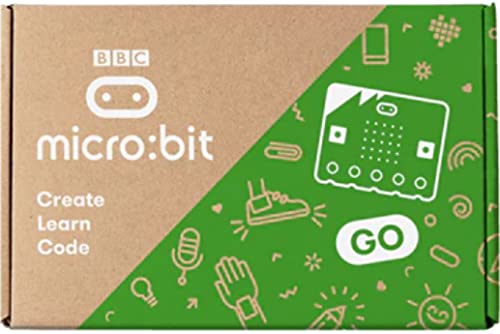
For anyone enthusiastic to immerse themselves in coding and electronics, the Micro:bit V2.21 GO Bundle stands out as an ideal choice. Featuring a powerful Nordic nRF52833 processor and Arm Cortex-M4, this bundle guarantees smooth performance for your projects. You’ll appreciate the Bluetooth 5.1 for seamless connectivity and a variety of sensors like the motion and temperature sensors for interactive experiences. With two push-to-make buttons and a 5×5 LED matrix display, you can easily create engaging applications. Plus, the built-in microphone and magnetic speaker enhance audio output, making your creations even more dynamic. Immerse yourself in coding with this versatile kit!
Best For: The Micro:bit V2.21 GO Bundle is best for beginners and enthusiasts looking to explore coding and electronics through interactive projects.
Pros:
- Powerful processor ensures smooth performance for various applications.
- Integrated sensors such as motion and temperature provide enhanced interactivity.
- Built-in audio features with a microphone and speaker create dynamic sound experiences.
Cons:
- Limited processing power compared to more advanced microcontrollers for complex tasks.
- Small LED matrix display may not be sufficient for more detailed visual outputs.
- Requires additional accessories for certain projects, which may increase overall cost.
KEYESTUDIO Micro:bit V2 Robot Starter Kit (without Microbit)

The KEYESTUDIO Micro:bit V2 Robot Starter Kit (without Microbit) stands out as an excellent choice for anyone enthusiastic to immerse themselves in robotics and coding. This kit lets you build and program a robot car, enhancing your skills in Makecode and Python. You’ll need to purchase a Micro:bit V2 board and AAA batteries separately. With detailed instructions, you’ll easily navigate assembly and coding. You’ll explore movement, light, sound, and obstacle detection, plus line following and control via IR remote or app. Its expansion capabilities invite you to customize and learn even more with additional sensors and actuators.
Best For: Individuals eager to learn robotics and programming, particularly using Micro:bit V2.
Pros:
- Detailed assembly and coding instructions facilitate a smooth learning experience.
- Offers hands-on exploration of various concepts like movement, light, sound, and obstacle avoidance.
- Expansion capabilities allow for customization with additional sensors and actuators.
Cons:
- Requires separate purchase of a Micro:bit V2 board and AAA batteries.
- Limited to compatibility with Micro:bit V2 only, restricting options for other boards.
- May require prior knowledge of coding for more advanced projects.
ELECFREAKS BBC Official Micro:bit V2.2 Board for Coding and Programming
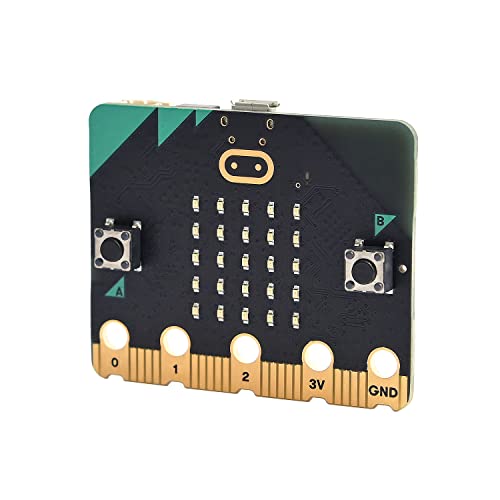
Ideal for beginners and educators, the ELECFREAKS BBC Official Micro:bit V2.2 Board simplifies coding and programming with its user-friendly design. This tiny programmable computer makes learning fun and engaging. You’ll love its 25 individually-programmable LEDs and the addition of a speaker and microphone, which enhance your creative projects. With two programmable buttons and various sensors—like light, temperature, and motion—you can easily explore different coding concepts. Plus, it supports wireless communication via Radio and Bluetooth, opening up endless possibilities. Just remember, it doesn’t come with a Micro USB cable or battery holder, so you’ll need to grab those separately!
Best For: The ELECFREAKS BBC Official Micro:bit V2.2 Board is best for beginners and educators looking to make coding and programming fun and interactive.
Pros:
- User-friendly design makes it easy for beginners to learn coding concepts.
- Includes various sensors and programmable features, enhancing creative project possibilities.
- Supports wireless communication via Radio and Bluetooth for versatile applications.
Cons:
- Does not include Micro USB cable and battery holder, which need to be purchased separately.
- Limited to basic functionalities compared to more advanced programming boards.
- May require additional resources for more complex projects.
Factors to Consider When Choosing a Microbit Starter Kit
When choosing a Micro:bit starter kit, you’ll want to take into account several important factors. Think about the variety of projects you can create, the quality of included learning resources, and how well the components meet your needs. Don’t forget to check the programming language support and make sure the kit is age-appropriate for the user.
Project Variety Offered
Choosing a Microbit starter kit means considering the variety of projects it offers, as this can greatly enhance your learning experience. Some kits support as few as 18 projects, while others boast up to 44, providing a broader scope for exploration. Look for kits that include diverse project types, like those involving sensors, LED matrices, and interactive applications, so you can plunge into different aspects of electronics and programming. Kits with a wider range of components, including various sensors and modules, encourage creativity and deeper engagement. Finally, prioritize kits that offer detailed project schematics and step-by-step guides, which are essential for building your skills and confidence in coding and electronics gradually.
Included Learning Resources
Having access to quality learning resources can make a significant difference in your Micro:bit journey. Many starter kits offer extensive tutorials, including wiring diagrams, test codes, and example projects that guide you step-by-step. Some even provide downloadable PDF guides to help you grasp basic electronics and programming concepts. You’ll find a variety of projects ranging from simple to complex, allowing you to build your skills as you experiment. Additionally, these kits support multiple programming languages, including block-based visual programming and Python, giving you the flexibility to learn in your preferred style. Don’t underestimate the value of online tutorials and community forums, as they can be invaluable for troubleshooting and expanding your knowledge as you tackle new challenges.
Component Quality Assurance
To guarantee a successful Micro:bit experience, it is vital to take into account the quality of the components in your starter kit. High-quality microcontroller kits undergo rigorous function, voltage, and current testing to confirm reliability. Look for kits where each sensor is individually packaged, as this enhances organization and prevents damage during shipping. Compliance with safety standards like FCC and CE is significant, as it indicates that the components meet specific quality regulations. It’s also important to check for clear and clean soldering practices, which guarantee proper connections and durability. Quality assurance processes, such as alignment checks and visual inspections, help prevent faults and make assembly user-friendly, enhancing your overall experience with the kit.
Programming Language Support
When selecting a Micro:bit starter kit, one of the most important factors to evaluate is programming language support. Many kits offer multiple languages, including block-based visual programming, JavaScript, and Python, so you can choose what suits you best. Check if the kit includes tutorials and resources; some provide extensive guides for both beginners and advanced users in various languages. If you’re new to coding, look for kits that emphasize graphical programming, like Makecode, which makes learning easier. For those wanting to level up their skills, text-based options like Python are also available. Always verify the specific programming language support, as some kits may limit options or focus solely on one language.
Age Appropriateness and Suitability
Choosing the right Micro:bit starter kit goes beyond just programming language support; age appropriateness plays a significant role in guaranteeing a positive learning experience. It’s essential to select a kit that matches the user’s age. Some kits cater to younger beginners, while others are designed for teens and adults tackling complex projects. Many kits recommend age groups, helping you choose wisely for children aged 10 and up. Kits for older beginners (ages 14 and up) often feature advanced components, so a solid understanding of electronics is necessary. Additionally, consider the learning objectives; younger users thrive with simpler projects and visual programming languages. Finally, verify the tutorials and resources align with the user’s age and skill level for maximum support.
Expansion and Customization Options
While exploring various Micro:bit starter kits, it’s important to take into account the expansion and customization options they offer. Look for kits that include additional electronic interfaces and mounting holes, making it easy to integrate extra sensors and modules. Many kits come with a variety of components—like sensors, actuators, and displays—that allow you to expand your projects as your skills improve. Check if the kit provides tutorials and project guides, as these can inspire you to innovate beyond the basics. Also, consider kits compatible with various programming languages, giving you flexibility in your coding experience. Finally, the modular nature of many kits enables you to swap and upgrade components, keeping your projects fresh and engaging.
Technical Support Availability
Expanding your Micro:bit projects often requires reliable technical support, which can greatly impact your learning experience. Look for starter kits that offer extensive tutorials and step-by-step guides to help you navigate your first projects. Some kits provide free technical assistance, making it easier to troubleshoot any issues you encounter. A well-documented return policy for defective items adds peace of mind, ensuring you can get replacements or refunds when needed. Additionally, access to an online community or forum can offer valuable support, allowing you to share experiences and solutions with fellow users. Finally, downloadable resources like coding guides and wiring diagrams will further enhance your learning and improve your project outcomes.
Price and Value Comparison
When evaluating Micro:bit starter kits, it’s essential to weigh the price against the value they offer. Start by comparing the number of components; some kits include as few as 24, while others boast up to 225 items, considerably influencing overall value. Look for kits that come with thorough tutorials and project guides, as these enhance your learning and can justify a higher price. Additionally, consider the range of supported projects; some kits allow for just 14, while others offer up to 44, providing more hands-on experience. Age appropriateness matters too—some kits cater to beginners aged 10 and up, while others suit older teens. Finally, don’t overlook customer ratings and reviews for insights into quality and satisfaction.