
Programmable robot arm kits are one of the most engaging ways to learn coding, mechanics, and control systems in one project. They combine hands-on building with real motion, making them popular for classrooms, STEM labs, and home hobby setups.
Below, you’ll find 10 options that vary in degree of freedom, programming support, materials, and beginner-friendliness so you can choose the right kit for your goals.
Best 10 Programmable Robot Arm Kits Picks for 2026
Editor’s Choice
LeArm Open Source 6DOF Robot Arm Kit
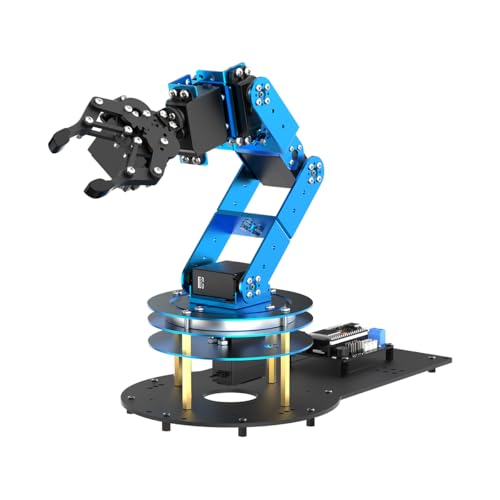
- ESP32-based and Arduino compatible
- 6 smart servos with inverse kinematics
- App, PC, and wireless control
Best For: Learners who want an expandable open-source arm
Budget Pick
Adeept 5DOF Arduino Robot Arm Kit
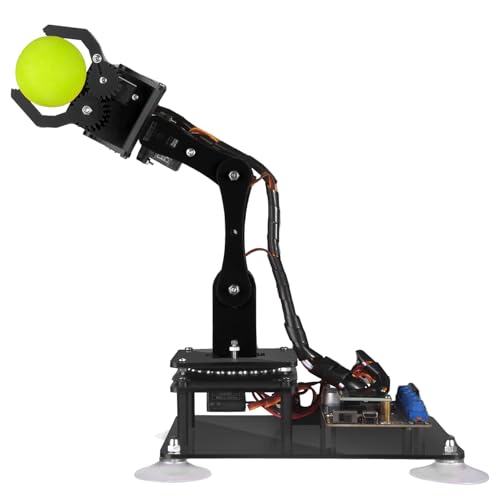
- Arduino IDE compatible for coding practice
- Manual and PC control options
- Includes PDF tutorials and code routines
Best For: Beginners learning robotics with guided Arduino projects
Premium Build
LewanSoul LeArm 6DOF Desktop Robot Arm

- Metal desktop build with stable bearings
- Anti-stall protection for the servos
- PC, app, mouse, and handle control
Best For: Users who want a sturdier desktop robotics kit
Family STEM Pick
VANLINNY 2-in-1 Robot Car and Arm Kit

- Combines a robot car with a 4DOF arm
- Remote control plus programming support
- Includes battery, tools, and charging cable
Best For: Kids and families wanting a dual-function STEM build
Open-Source STEM Pick
LewanSoul MaxArm open-source robotic arm kit

- Python and Arduino support
- ESP32 with WiFi/Bluetooth
- Sensor ports for expansion
Best For: learners who want an expandable coding-focused arm
High-Torque 6-Axis Choice
Hiwonder xArm1S 6-axis robotic arm kit
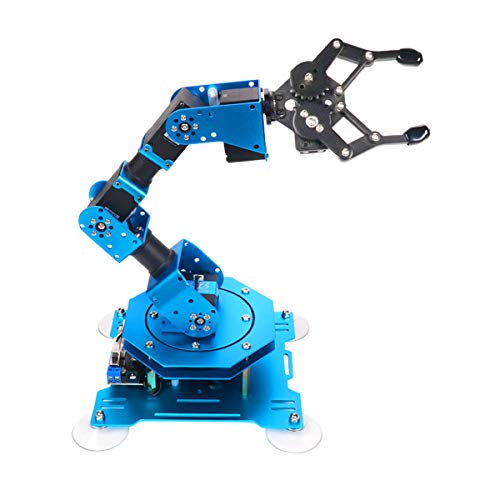
- 6-axis metal structure
- Grasps objects up to 500g
- PC, app, mouse, and controller support
Best For: users who want a sturdy, feature-rich desktop arm
Beginner Memory Bot
4-axis robot arm kit with action memory

- Step-by-step build and coding tutorials
- Records up to 170 actions
- Joystick control for hands-on learning
Best For: beginners who want an approachable coding kit
Modular STEM Pick

- 4-in-1 modular build with arm and tank options
- 5DOF arm with ESP32, Arduino, and Scratch support
- 16 tutorials plus app and IR remote control
Best For: teens who want a flexible robotics kit
Beginner-Friendly Arm
4DOF Electronic Programming Robot Arm

- 4DOF arm with grabbing and multi-angle movement
- Simple programming for beginner robotics learning
- Durable metal structure with remote control included
Best For: kids 8+ starting with robotics
Open-Source Builder
miniArm Arduino AI Smart Robot Arm

- Open-source Arduino-compatible robot arm
- Supports app control and knob-based editing
- Expansion ports for sensors and secondary development
Best For: adult makers and Arduino learners
Editor’s Choice – LeArm Open Source 6DOF Robot Arm Kit
If you want programmable robot arm kits that are built for learning and expansion, this LeArm Open Source model is a strong all-around option. It combines ESP32 control, Arduino compatibility, multiple control methods, and broad sensor support, so it can grow from a basic arm into a more advanced STEM project.
Best For: Students, makers, and hobbyists who want an open-source arm with room to expand into AI and sensor-based projects.
Pros:
- ESP32 controller with Arduino compatibility for coding and secondary development
- 6 smart PWM servos with inverse kinematics for smoother path planning
- Multiple control options: app, PC software, and wireless controller
- Supports sensor expansion such as vision, voice, ultrasonic, and acceleration modules
Cons:
- Requires assembly and a willingness to work through a fuller kit
- Best suited to users comfortable with programming or guided tutorials
The included tutorials, sample experiments, open-source code, and schematics make this a practical choice for hands-on robotics learning. It stands out for users who want a flexible robot arm that can start simple and scale into more ambitious builds.
Budget Pick – Adeept 5DOF Arduino Robot Arm Kit
This Adeept model is one of the more approachable programmable robot arm kits for beginners who want to learn Arduino-based robotics. With a 5-DOF design, detailed manuals, and multiple control methods, it focuses on hands-on coding and straightforward experimentation.
Best For: Beginners and youth learners who want an accessible Arduino-compatible robot arm with guided tutorials.
Pros:
- Compatible with Arduino IDE for programming practice
- Includes a detailed PDF manual and code routines
- Supports manual knob control and PC-based graphical control
- Covers learning activities like self-learning, drawing, and imitating
Cons:
- 5-DOF design offers less movement flexibility than 6DOF kits
- More compact and simpler than higher-end open-source arm systems
If you want a starter-friendly robot arm that emphasizes coding practice over advanced expansion, this kit fits well. The included guides and support make it easier to get moving without a steep learning curve.
Premium Build – LewanSoul LeArm 6DOF Desktop Robot Arm
Among programmable robot arm kits, this LewanSoul LeArm version leans toward a more robust desktop build with metal construction and multiple control options. It is aimed at users who want a stable arm for creative projects, simple programming, and robotics learning.
Best For: Students, engineers, and robotics hobbyists who want a sturdy desktop arm with broad control options.
Pros:
- 6DOF desktop arm for grasping, transporting, and custom actions
- Metal bracket construction with high-torque servos and industrial-grade bearings
- Anti-stall protection with anti-blocking servos and gear clutches
- Works with PC, app, mouse, and wireless handle control
Cons:
- Assembly is required
- Uses a power adapter rather than battery operation
This kit is a good fit if durability and stability matter as much as programming features. The included tutorials and simple software make it practical for educational use while still offering a more substantial hardware feel.
Family STEM Pick – VANLINNY 2-in-1 Robot Car and Arm Kit
This VANLINNY kit stands out from typical programmable robot arm kits because it combines a robot car with a robotic arm in one STEM set. It is designed for younger builders who want an interactive project with assembly, remote control, and simple programming exploration.
Best For: Kids ages 8-14 and family STEM projects that want both a robot car and a robotic arm in one set.
Pros:
- 2-in-1 design combines a robotic car and a 4DOF arm
- Supports remote control and programming control
- Includes built-in battery, USB charging cable, tools, and remote
- ABS and aluminum alloy build with smooth edges for safer play
Cons:
- Not as advanced as larger Arduino-focused arm kits
- Assembly takes about 2 hours
For a giftable entry-level STEM build, this set offers more variety than a standalone arm. The combination of movement, grabbing, sound effects, and programming makes it especially appealing for hands-on play and classroom use.
Open-Source STEM Pick – LewanSoul MaxArm open-source robotic arm kit
If you’re comparing programmable robot arm kits for coding practice and STEM learning, the LewanSoul MaxArm stands out for its open-source ESP32-based design and broad control options. It supports Python and Arduino, and it can also be driven by apps, PC, wireless controllers, and a mouse, which makes it easy to move from beginner practice to more advanced experimentation.
Best For: learners who want a flexible, open-source arm with WiFi/Bluetooth control and expansion potential.
Pros:
- Supports Python and Arduino programming for cross-platform learning.
- Offers app, PC, wireless controller, and mouse control options.
- Includes ESP32 open-source controller with WiFi and Bluetooth support.
- Uses smart bus servos and inverse kinematics for accurate movement along x, y, and z axes.
Cons:
- Starter kit focus means you’ll be building on its learning-oriented feature set.
- Assembly and coding depth may be more than casual users need.
MaxArm is a strong fit if you want a programming platform with real expansion room. The extra sensor ports and onboard electronic components make it especially appealing for secondary development and AI-style projects.
High-Torque 6-Axis Choice – Hiwonder xArm1S 6-axis robotic arm kit
For buyers looking at programmable robot arm kits with a more capable desktop build, the Hiwonder xArm1S brings a 6-axis metal design, intelligent bus servos, and multiple control methods. It supports PC, phone app, mouse, and a wireless PS2 controller, making it a practical platform for graphical programming, custom actions, and hands-on STEM projects.
Best For: users who want a sturdy 6-axis arm with strong grasping ability and flexible control options.
Pros:
- 6 high-precision intelligent serial bus servos provide position, voltage, and temperature feedback.
- Can grasp objects up to 500g, according to the product notes.
- Aluminum alloy structure and industrial-grade bearings add stability.
- Supports PC, app, mouse, and wireless controller control plus action editing.
Cons:
- Assembly is required.
- It needs an AC adapter for power.
xArm1S is the more heavy-duty option here if you want a kit that feels built for repeatable motion and project work. Its combination of 6-axis control and action-editing tools makes it a solid learning platform for coding experiments.
Beginner Memory Bot – 4-axis robot arm kit with action memory
If you want programmable robot arm kits that are easier to approach as a beginner, this 4-axis smart robot building kit keeps things straightforward while still teaching electronics and coding basics. It includes step-by-step build guidance and programming tutorials, plus joystick control and a memory function that can record and repeat up to 170 actions.
Best For: beginners, teens, and adults who want a simpler build with repeat-action learning features.
Pros:
- Provides step-by-step assembly and programming tutorials.
- Can record up to 170 actions and repeat them once.
- 4-axis design can grab objects in different directions.
- Joystick control adds a hands-on way to learn motion basics.
Cons:
- You need to prepare two batteries.
- Smaller acrylic build is less robust than metal-framed alternatives.
This kit makes sense if your priority is learning by doing rather than maximizing hardware complexity. The repeat-and-playback feature adds a useful programming lesson without making the project overly intimidating.
Modular STEM Pick – 5DOF Smart Arm + Tank Car
If you want programmable robot arm kits that do more than one build, this ACEBOTT set stands out with a 5DOF robotic arm plus tank-car expansion parts. It blends assembly, coding, and remote control in a single STEM kit, and the included tutorials make it easier for beginners to get started with Arduino and Scratch.
Best For: Teens who want a modular robotics kit with both arm-building and vehicle play.
Pros:
- 4-in-1 modular design supports multiple robot styles, including a robotic arm car and tank robot.
- 5DOF programmable arm uses an ESP32 controller for hands-on coding and object handling.
- Includes 16 guided tutorials plus HD assembly videos for step-by-step learning.
- Works with Arduino and Scratch, and adds app plus IR remote control options.
Cons:
- Assembly is required, so it is better suited to kids comfortable with a building project.
- Designed for ages 12+, which may be too advanced for younger children.
Overall, this is a strong pick if you want programmable robot arm kits that combine coding practice with flexible build options and off-road vehicle features. The modular format and guided lessons give it broad educational value for home learning or classroom use.
Beginner-Friendly Arm – 4DOF Electronic Programming Robot Arm
This robot arm kit is a straightforward choice for families looking for programmable robot arm kits with an accessible entry point. The VANLINNY 4DOF design focuses on hands-on building, simple programming, and basic motion functions, while the metal structure adds a more durable feel than many plastic toys.
Best For: Kids age 8+ who want an introductory robotic arm with simple programming.
Pros:
- Simple programming and hands-on assembly make it approachable for beginners.
- 4DOF arm can move at multiple angles and includes grabbing functions.
- Durable metal structure is built for repeated use.
- Includes remote control and simulation sound effects for added play value.
Cons:
- Only offers 4 degrees of freedom, so it is less advanced than 5DOF kits.
- Requires assembly, which may need adult help for younger kids.
As an educational science project, this kit leans more toward beginner-friendly learning than advanced robotics. It is a practical option if you want a durable, simple robotic arm that teaches core STEM ideas without overwhelming younger builders.
Open-Source Builder – miniArm Arduino AI Smart Robot Arm
For hobbyists and older builders comparing programmable robot arm kits, the miniArm is the most development-focused option here. It is based on an Atmega328 platform, supports Arduino programming, and offers open-source code plus expansion ports for sensor add-ons and secondary development.
Best For: Adult learners and makers who want an open-source Arduino robotics platform.
Pros:
- Open-source programs and Arduino compatibility support learning and customization.
- Includes high-performance hardware such as a Bluetooth module and digital servos.
- Offers multiple control methods, including app control and knob potentiometers.
- Expansion ports support sensors like ESP32 Cam, accelerometer, and ultrasonic modules.
Cons:
- Targeted at adults, so it is not aimed at younger kids.
- Assembly is required and the platform is more technical than toy-style kits.
This is a strong choice if your priority is experimentation, coding, and add-on development rather than simple play. The open-source approach and sensor support make it especially appealing for users who want a robot arm starter kit they can keep expanding.
How We Picked These Programmable Robot Arm Kits
We focused on the features that matter most to buyers: ease of assembly, programming support, motion range, build quality, and the quality of the learning experience. Since these kits range from simple entry-level models to more advanced open-source builds, the best choice depends on whether you want a classroom-ready starter, a coding platform, or a more capable arm for experimentation.
We also looked at compatibility with common tools such as Arduino, Scratch, Python, and PC/app control, because software support can matter as much as the hardware itself.
Quick Comparison: What Matters Most
A simple way to compare Programmable Robot Arm Kits is by matching the kit to your intended use. Entry-level 4DOF and 5DOF models are usually easier to assemble and better for younger learners or first-time builders. 6DOF arms typically offer more realistic movement and better task flexibility, but they can be more complex to set up and program.
Also consider whether you want a kit that focuses on teaching basics, a model with repeatable motion and memorization, or an open-source platform with expansion potential. Servo type, included software, and whether the kit supports suction, claws, or smart controls can also affect value.
Key Buying Factors for Programmable Robot Arm Kits
Degree of Freedom
More axes usually mean more movement options. For simple learning and confidence-building, 4DOF or 5DOF is often enough. If you want more lifelike positioning or advanced tasks, 6DOF is the better target.
Programming and Compatibility
Check whether the kit supports Arduino, Scratch, Python, or app-based control. Beginner-friendly software can shorten the learning curve, while open-source support is better for users who want to grow into custom projects.
Build Complexity and Age Fit
Some kits are designed for kids and classrooms, while others are aimed at teens, adults, and hobbyists comfortable with wiring and code. Make sure the assembly time and required skills match the user.
Materials, Servos, and Stability
Metal arms, better servo quality, and sturdier joints usually improve precision and durability. Lightweight plastic kits can still be great for learning, but they may be less suitable for heavier use.
Learning Value and Features
Look for tutorials, repeat-motion modes, inverse kinematics support, and extras like suction cups or claws. These features can make a kit more useful for both education and experimentation.
Who Should Buy Which Programmable Robot Arm Kits?
If you’re buying for younger learners or first-time builders, a simpler STEM-focused kit is often the safest choice. If you want classroom use or structured coding practice, choose a model with clear tutorials and broad software support. For hobbyists and advanced users, open-source Programmable Robot Arm Kits with more DOF, stronger components, and flexible control options usually offer the best long-term value.
In short, pick the kit that best matches the user’s skill level, programming goals, and interest in future expansion rather than focusing on specs alone.