
If you’re diving into the world of robotics, finding the right robot arm can be a game changer. With options under $200, you can explore various kits that cater to different skill levels and project needs. From programmable features to educational value, these arms offer a range of possibilities. Curious about which kits stand out and how they can elevate your DIY projects? Let’s explore the top contenders that might inspire your next robotics venture.
Robotic Arm Kit 6DOF with PC Software Control
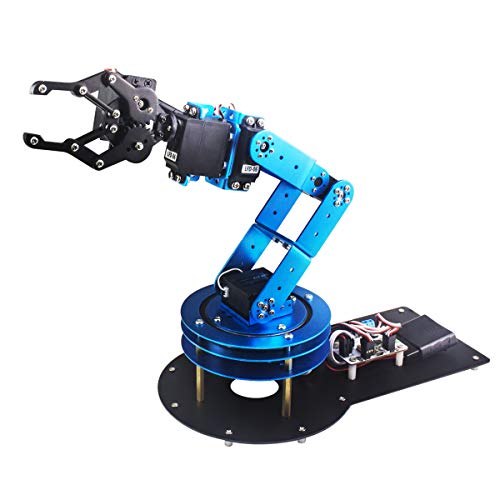
If you’re a student or a robotics enthusiast looking to immerse yourself in the world of bionic robotics, the Robotic Arm Kit 6DOF with PC Software Control is an excellent choice. This kit features six high-quality servos and a mechanical claw, making it perfect for creative projects. You can use various control methods, including PC software and wireless handles, which simplifies operation. With its sturdy metal brackets and industrial-grade bearings, it promises stability and durability. Plus, the included tutorials and programming software make learning a breeze, allowing you to grasp essential robotics concepts while having fun building and programming your arm.
Best For: Students, engineers, university courses, and robotics enthusiasts looking to explore and learn about bionic robotics.
Pros:
- High-quality digital servos provide reliable performance and longevity.
- Multiple control options (PC, app, mouse, and wireless handle) enhance user convenience.
- Includes tutorials and programming software, making it accessible for beginners.
Cons:
- May require some technical knowledge for assembly and programming.
- Limited to the functionalities of the included software for advanced customizations.
- Potentially steep learning curve for complete beginners without prior robotics experience.
ACEBOTT Smart Robot Arm Car Kit for Kids Ages 8-12

The ACEBOTT Smart Robot Arm Car Kit is perfect for kids ages 8-12, making it an excellent choice for young aspiring engineers. This 5DOF programmable robotic arm, powered by an ESP32 controller, enables kids to build a robot that grabs, lifts, and places objects. With 16 guided tutorials and HD assembly videos, learning is seamless. The kit promotes STEM education, fostering creativity and problem-solving skills. You can control the robot via an IR remote or mobile app, enhancing interactive play. Plus, the robot’s advanced movement capabilities boost spatial awareness, making this kit a fantastic gift for budding inventors.
Best For: The ACEBOTT Smart Robot Arm Car Kit is best for kids ages 8-12 who are interested in robotics and STEM education.
Pros:
- Encourages hands-on learning with 16 guided tutorials and HD assembly videos.
- Supports modular add-ons for continued exploration and advanced concepts.
- Offers multiple control options via IR remote or mobile app for enhanced playability.
Cons:
- Some advanced features may require additional purchases for add-ons.
- Initial assembly may be challenging for some beginners without adult assistance.
- Limited to a specific age range, which may not cater to older teens or adults.
Hiwonder-xArm1S 6DOF Robotic Arm Kit for Arduino
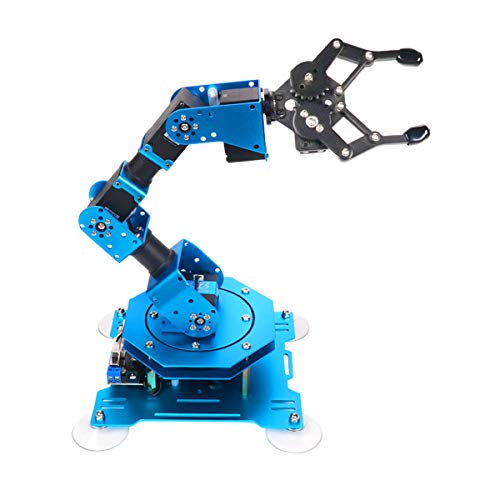
For anyone diving into the world of robotics, the Hiwonder-xArm1S 6DOF Robotic Arm Kit is a standout choice. This versatile kit features a full metal construction and six high-precision servos, allowing you to grasp up to 500g. You can control it wirelessly via a PC, app, mouse, or PS2 controller, making it perfect for STEM education and creative projects. Its dimensions of 6.1 x 5.5 x 9.68 inches and weight of 2.42 pounds make it manageable for various setups. With a solid 4.0-star rating, you’ll find it user-friendly and an excellent tool for learning bionic robotics.
Best For: The Hiwonder-xArm1S is best for students and hobbyists looking to explore robotics through hands-on learning and programming.
Pros:
- Versatile Control Options: Can be controlled using a PC, mobile app, mouse, or PS2 controller for ease of use.
- Robust Construction: Full metal structure and high-torque servos ensure durability and stability during operation.
- Educational Value: Ideal for STEM education, fostering skills in coding, programming, and robotics.
Cons:
- Weight Limitations: Grasping capacity is limited to 500g, which may restrict some project possibilities.
- Learning Curve: Beginners may require time to fully understand programming and control methods.
- Size Constraints: Its compact size might not be suitable for larger or more complex robotic tasks.
Robotic Arm for Arduino Coding Programming (6DOF STEM Educational Kit)
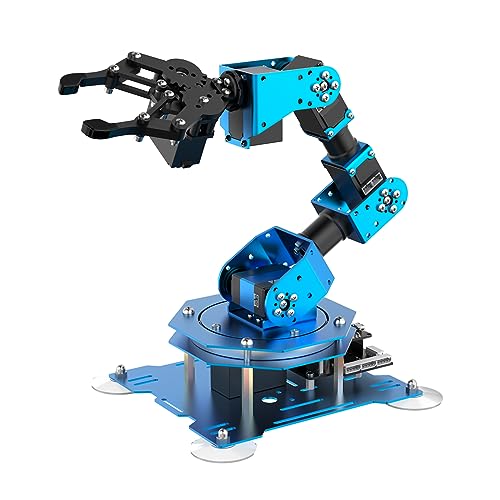
Designed specifically for educational enthusiasts and budding engineers, the Hiwonder-xArm1S robotic arm kit stands out as an excellent choice for those keen to immerse themselves in Arduino coding and programming. With its 6 degrees of freedom, you can control the arm for grasping, transporting objects, and executing custom actions. The robust aluminum alloy structure and high-torque servos guarantee stability and can handle weights up to 500g. You’ll appreciate the multiple control methods, including PC and mobile app options, making your programming experience engaging. Plus, the simple action editing interface allows for endless creative possibilities in your projects.
Best For: Educational enthusiasts and budding engineers interested in Arduino coding and programming.
Pros:
- High precision with 6 degrees of freedom allows for versatile movements and applications.
- Multiple control methods (PC, mobile app, mouse, and PS2 wireless control) enhance user engagement.
- Durable aluminum alloy structure and high-torque servos provide stability and the ability to handle objects up to 500g.
Cons:
- Potentially complex for complete beginners without prior programming experience.
- The need for assembly may deter some users looking for a plug-and-play solution.
- Limited weight capacity (500g) may restrict the types of objects that can be manipulated.
MaxArm Robotic Arm Kit for Arduino and Python Programming

MaxArm Robotic Arm Kit stands out for those enthusiastic to immerse themselves in robotics and programming without breaking the bank. This kit’s link mechanism design allows for precise control along the x, y, and z axes, making it perfect for hands-on learning. You can program it using Arduino or Python, and its compatibility with various devices offers flexible control options. With multiple sensor ports, you can easily expand functionality for AI projects. Plus, its high-performance components, including precision smart servos, guarantee that it can handle heavy payloads while executing programmed paths accurately. Immerse yourself in creativity and exploration with MaxArm!
Best For: MaxArm is best for robotics enthusiasts and beginners looking to explore programming and hands-on learning in STEM education.
Pros:
- Versatile Control: Supports programming in both Arduino and Python, offering flexibility in control methods.
- Expandable Functionality: Multiple sensor ports allow for easy integration of additional sensors for AI applications.
- High Precision: Equipped with precision smart servos, providing accurate movements and the ability to handle heavy payloads.
Cons:
- Learning Curve: Users may face a learning curve if they are new to programming or robotics.
- Limited Documentation: Some users may find the provided documentation lacking in detail for advanced projects.
- Dependency on External Power: Requires an external power source for optimal performance, limiting portability.
Thames & Kosmos Bionic Robotic Arm STEM Experiment Kit

If you’re seeking a hands-on educational experience, the Thames & Kosmos Bionic Robotic Arm STEM Experiment Kit is an excellent choice for young aspiring engineers. With nearly 300 pieces, you’ll assemble a fully functional robotic arm without needing motors or electricity. Instead, you’ll control it using intuitive joysticks that maneuver nylon cables for precise movements. The kit, a Toy of the Year Finalist in 2025, comes with a colorful manual that guides you through assembly and teaches you about robotic arms and biomimicry. Designed for ages 10 and up, it’s perfect for engaging STEM challenges that spark creativity and problem-solving skills.
Best For: The Thames & Kosmos Bionic Robotic Arm STEM Experiment Kit is best for young aspiring engineers aged 10 and up who are interested in hands-on learning and robotics.
Pros:
- Engaging and educational, providing a hands-on STEM challenge.
- No motors or electricity required, making it safe and easy to assemble.
- Intuitive joystick controls allow for precise and fun manipulation of the robotic arm.
Cons:
- Requires adult assistance for younger users (ages 10-13).
- Complexity may be challenging for some, even with the manual.
- Limited to specific functions, which may not satisfy advanced users seeking more features.
Robotic Arm with Arduino 5DOF/Axis Educational STEM Kit

The Robotic Arm with Arduino 5DOF/Axis Educational STEM Kit is perfect for budding engineers and tech enthusiasts enthusiastic to plunge into robotics. Built on the Atmega328 platform, it’s fully compatible with Arduino, offering open-source programming and handy tutorials. You’ll appreciate the 6-channel knob controller, Bluetooth module, and high-precision digital servos, which make control intuitive. Plus, the multiple expansion ports let you integrate sensors like an ESP32 Cam or ultrasonic sensor. Whether you’re using app control or knob potentiometers, you can easily edit actions offline. This kit opens up endless possibilities for your projects in robotics and engineering!
Best For: This kit is best for students, educators, and hobbyists interested in learning and experimenting with robotics and programming.
Pros:
- Open-source compatibility with Arduino allows for easy programming and customization.
- Multiple control options (app and knob control) provide versatility in operation.
- Expansion ports enable integration of various sensors, enhancing project possibilities.
Cons:
- Limited advanced features may not satisfy experienced users looking for high-end robotics capabilities.
- Learning curve for beginners unfamiliar with programming and robotics concepts.
- Potential assembly complexity that may require additional guidance or support for novice users.
Waveshare Robotic Arm Kit, Desktop Robot Kit Based on ESP32

For hobbyists and educators looking to explore robotics without breaking the bank, the Waveshare Robotic Arm Kit stands out as a top choice. This 4-DOF kit, based on the ESP32, features high-torque serial bus servos and supports flexible expansion for innovative projects. With onboard wireless control capabilities, you can easily connect to various host computers, making it compatible with ROS2. The included graphic tutorials and user-friendly WEB application simplify learning and operation. Plus, the expansion plate lets you customize the End of Arm Tooling (EoAT) to fit your needs, providing endless possibilities for creativity and experimentation.
Best For: Hobbyists and educators seeking an affordable and versatile robotic arm for learning and experimentation.
Pros:
- High-torque serial bus servos provide excellent performance and precision.
- Compatible with ROS2 and various host computers, supporting both wireless and wired communication.
- User-friendly resources, including graphic tutorials and a WEB application, make learning easy.
Cons:
- Limited payload capacity of 0.5kg may restrict the use of heavier tools or attachments.
- Some users may find the open-source development challenging without prior programming experience.
- Lightweight design may require careful handling to avoid damage during operation.
Robot Kit, STEM Toys for Kids Age 8-12

Looking for an engaging way to introduce kids aged 8-12 to the world of robotics? The VANLINNY 4DOF Robot Arm is an excellent choice! This educational science kit blends fun with learning, helping kids grasp robotics, engineering, and science concepts. Crafted from high-quality metal, it’s durable for long-lasting use. With simple programming features, children can creatively explore robotics by building their own robotic arm. They’ll love making it move, grab objects, and even produce sound effects. Plus, VANLINNY offers reliable customer service, ensuring satisfaction for any issues within the first 18 months. It’s a perfect STEM toy for young innovators!
Best For: Kids aged 8-12 who are interested in robotics and STEM education.
Pros:
- Educational Value: Helps children learn about engineering and robotics through hands-on experience.
- Durable Construction: Made from high-quality metal, ensuring longevity and reliable performance.
- Interactive Features: Simple programming and interactive capabilities allow for creative exploration and engagement.
Cons:
- Age Limitation: Specifically designed for kids aged 8-12, which may not suit older children.
- Complexity for Beginners: Some children may find the programming aspect challenging without prior knowledge.
- Limited Functionality: While fun, the robotic arm may have limitations in advanced robotics compared to more sophisticated kits.
Robotic Arm Kit, STEM Toys for Kids Age 8-12

Designed specifically for kids aged 8-12, the Robotic Arm Kit offers an exciting blend of education and fun, making it an ideal choice for young aspiring engineers. Combining smart robotic cars with a versatile robotic arm, this kit delivers multiple movement angles for lifting, lowering, and grabbing objects. It even includes programming features and simulation sound effects that enhance interactive play. With accessories like a battery, USB charging cable, and remote control for long-distance operation, it guarantees hands-on learning. Constructed from safe ABS materials and aluminum alloy, it’s built to last, backed by VANLINNY’s 18-month customer support guarantee.
Best For: Kids aged 8-12 who are interested in STEM learning and robotics.
Pros:
- Engaging Learning Experience: Combines fun and education, fostering interest in engineering and programming.
- Versatile Features: Multiple movement angles and programming capabilities enhance the interactive play.
- Durable Construction: Made from safe ABS materials and aluminum alloy, ensuring longevity and safety for young users.
Cons:
- Age Limitation: Primarily designed for children aged 8-12, which may limit use for older kids.
- Assembly Required: Some parents may find the assembly process challenging or time-consuming.
- Remote Control Range: The effective operation distance (30-50 meters) may not be sufficient for larger play areas.
Factors to Consider When Choosing Robot Arms Under 200
When choosing a robot arm under $200, you should consider several key factors. Think about the build quality and materials, as well as the programming options and control methods available. Don’t forget to evaluate the age appropriateness and educational value to guarantee it meets your needs and interests.
Build Quality and Materials
Build quality and materials play an essential role in your experience with robot arms under $200, as they often dictate durability and performance. Look for constructions using aluminum alloy and high-quality plastics, which enhance structural integrity while keeping the arm lightweight. Lightweight designs improve mobility and ease of handling, making your projects more enjoyable. Crucial components like high-torque servos and industrial-grade bearings contribute to stability and performance under load. A well-constructed robotic arm should feature anti-blocking servos with gear clutches, preventing mechanical failure and extending its lifespan. Finally, pay attention to assembly quality; precise fitting of components can greatly impact functionality and your overall user experience during operation. Choose wisely for the best results!
Programming Options Available
Choosing a robotic arm under $200 means considering the programming options available, as they can greatly impact your project’s flexibility and ease of use. Many kits offer compatibility with popular languages like Arduino and Python, letting you choose what you’re comfortable with. If you prefer mobile programming, some models provide app-based control for iOS and Android, making it super convenient. Plus, offline action editing allows you to create and modify movements without needing a computer connection. For beginners, educational kits often come with guided tutorials and videos to simplify learning. Finally, certain models support modular expansions, letting you add sensors and components to further enhance your programming capabilities and explore advanced robotics concepts.
Control Methods Offered
Several control methods are available for robotic arms under $200, making it easier for you to find one that suits your needs. Many models offer multiple control options, such as PC, mobile app, and wireless controllers, enhancing your interaction and flexibility. If you’re a beginner, look for kits with intuitive controls like joystick manipulation or graphical programming interfaces to simplify your learning. Remote control capabilities, typically through infrared or Bluetooth, let you operate the arm from a distance, adding to the fun. Wireless connectivity allows you to connect your robotic arm to smartphones or computers for advanced programming. Plus, offline action editing features enable you to pre-program movements, promoting independent learning without needing constant connectivity.
Age Appropriateness
Understanding the age appropriateness of robotic arm kits is key to ensuring a rewarding experience. When you choose a kit, check the recommended age range; it signals the complexity and safety features suited for that group. For children ages 8-12, look for kits with guided tutorials and simpler programming to promote creativity without frustration. If you’re shopping for older teens or adults, consider kits with advanced features that dive deeper into programming and engineering concepts, enhancing STEM education. Always keep safety in mind—durable materials should minimize risks for younger users. Finally, older users may enjoy kits that allow for expansion and modification, offering more complex projects to challenge their growing skills in robotics.
Educational Value Provided
When exploring robot arms under $200, consider the educational value they bring to the table. These kits often include programming capabilities, allowing you to learn coding and fundamental robotics principles through hands-on experience. Many come with guided tutorials and assembly videos, making it easier for beginners to grasp mechanical concepts and problem-solving skills. Features like modular add-ons and sensor integration encourage you to explore advanced topics, keeping you engaged as you tackle more complex engineering challenges. Controlling robot arms via mobile apps or remote controls enhances interaction and promotes innovative programming studies. Overall, working with these robotic arms can boost your critical thinking, spatial awareness, and creativity—ideal for educational activities aimed at children and young adults.
Expansion Capabilities
While exploring the educational benefits of robot arms, it’s also important to contemplate their expansion capabilities. Look for kits that support modular add-ons, making it easy to integrate components like sensors or cameras. This allows you to enhance functionality as your projects evolve. Choose robotic arms compatible with various programming languages, such as Arduino or Python, to facilitate customization and development. It’s beneficial to select models with multiple expansion ports, which enable effortless connection of additional devices. Also, seek user-friendly interfaces for action editing and programming; they simplify the process of expanding your arm’s features. Finally, assess the availability of tutorials and resources that guide you in maximizing the arm’s potential for further exploration and development.
Technical Support Availability
Technical support availability plays an essential role in your experience with robot arms, especially if you’re a beginner who might need help during assembly or programming. Look for kits that provide extensive online resources, like video tutorials and user manuals, as these can enhance your learning and help you avoid potential issues. Access to responsive customer service is vital for timely troubleshooting and operational questions, ensuring a smoother experience with your robotic arm. Additionally, some kits offer community forums or support groups where you can connect with other enthusiasts, enriching your support network. Finally, consider the presence of warranty options and manufacturer support, as these can provide reassurance about the durability and reliability of your robotic arm kit.
Price and Value
Choosing a robotic arm kit under $200 involves striking the right balance between price and features. First, evaluate the number of degrees of freedom (DOF) and control options available; these can considerably impact your project’s versatility. Next, consider the materials used in construction; durable materials enhance longevity and performance, offering better value in the long run. Don’t overlook the educational resources included, like tutorials and programming support, as they enrich your learning experience without extra costs. Also, check the payload capacity; a higher limit usually means better performance for various tasks. Finally, look for expandable options and compatibility with accessories or sensors, ensuring your kit remains useful as your projects evolve.