
As technology continues to evolve, the world of robotics for young innovators has expanded considerably. You’ll find a variety of robot kits with app control that not only entertain but also educate. From coding to engineering, these kits are designed for ages 8-16, fostering creativity and problem-solving skills. Curious about which options stand out in 2026? Let’s explore the top contenders that promise to engage and inspire.
ACEBOTT Robotics Kit for Kids (Ages 8-16)
The ACEBOTT Robotics Kit is the perfect choice for kids ages 8-16 who are enthusiastic to immerse themselves in the world of coding and robotics. This smart robot car kit lets you explore hands-on STEM learning with compatibility for Arduino and Scratch. You’ll enjoy a fun learning experience as you plunge into coding, electronics, and robotics, supported by three programming languages: Scratch for beginners and Arduino or Python for the more advanced. With 16 story-based tutorials, you’ll build real-world skills while programming on computers, tablets, or even smartphones. Plus, the assembly process is beginner-friendly and encourages creativity and confidence!
Best For: Kids ages 8-16 who are eager to learn about coding and robotics through hands-on STEM activities.
Pros:
- Supports multiple programming languages, catering to both beginners and advanced learners.
- Interactive learning experience with app and remote control features for engaging coding practice.
- Beginner-friendly assembly process with clear instructions and no soldering required.
Cons:
- May require adult supervision for younger users during assembly and programming.
- Some users may find the tutorials challenging without prior experience in coding.
- Limited to robot car design, which may not appeal to all kids interested in different types of robotics.
Opmind 5 in 1 STEM RC Robot Building Kit for Kids

For kids aged 6 to 14 who love hands-on learning, the Opmind 5 in 1 STEM RC Robot Building Kit stands out as an ideal choice. With 408 pieces, you can create five exciting models, including a robot and racing tank. The simple remote control lets you maneuver in all directions and even perform 360-degree rotations from over 20 meters away. Plus, the Bluetooth app control offers four modes—Driving, Path, Gravity Sensor, and Programming—encouraging creativity and problem-solving. This kit promotes STEM skills while keeping kids engaged in active play, making it a perfect gift for birthdays or holidays!
Best For: Kids aged 6 to 14 who enjoy hands-on learning and building creative models.
Pros:
- Encourages STEM learning by teaching construction, enhancing problem-solving skills, and promoting creativity.
- Offers multiple control options, including remote control and Bluetooth app with various modes for dynamic play.
- Keeps children engaged in active play, reducing screen time while fostering imaginative exploration.
Cons:
- May require adult supervision for younger children during assembly and operation.
- Battery life may vary, potentially requiring frequent replacements or recharging.
- Some pieces may be small and pose a choking hazard for younger kids.
ELEGOO UNO R3 Smart Robot Car Kit for Arduino Robotics

Designed specifically for kids aged 8 to 16, the ELEGOO UNO R3 Smart Robot Car Kit offers an exciting gateway into the world of robotics and coding. This educational STEM kit includes 24 module parts, allowing you to explore obstacle avoidance, line tracing, and remote control features. You can easily control the car using your phone or tablet. With HD rendering instructions, even beginners can successfully assemble and program the kit. Rated 4.6 stars by over 4,000 users, it’s a favorite for those enthusiastic to learn engineering and coding. Plus, you get a half-year warranty for peace of mind!
Best For: Kids aged 8 to 16 who are interested in exploring robotics and coding through hands-on learning.
Pros:
- Hands-on learning: Provides practical experience in programming, electronics, and robotics.
- User-friendly assembly: Modified ports make assembly easier and reduce the chances of errors.
- High customer satisfaction: Rated 4.6 out of 5 stars by over 4,000 users, indicating strong approval.
Cons:
- Basic electronic knowledge required: Beginners may need guidance to fully understand the concepts.
- Limited age range: Primarily designed for children aged 8 to 16, which may not appeal to older teens or adults.
- Weight and size: At 1.23 kg and dimensions of 8 x 7 x 6 inches, it may not be the most portable option for all users.
Sillbird Robot Building Kit with Remote Control for Kids
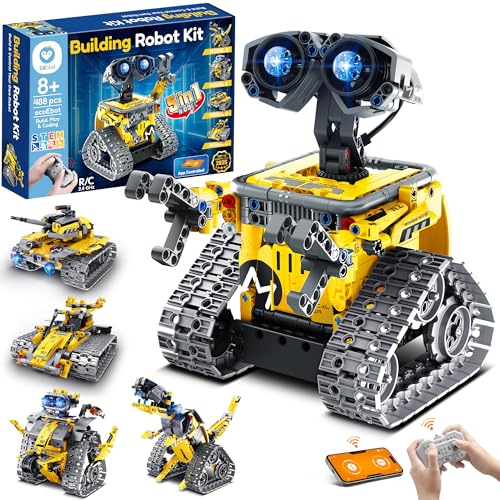
Looking for a perfect gift that combines fun and learning for kids aged 8 and up? The Sillbird Robot Building Kit with Remote Control is an ideal choice! With 488 pieces, this 5-in-1 programmable robot set lets kids build a robot, dinosaur, car, tank, and more. It encourages creativity and problem-solving while developing hand-eye coordination. The kit features dual control modes via Bluetooth app or remote, making playtime interactive and enjoyable. Plus, with up to 40 minutes of playtime on a single charge, your child can explore endless possibilities. This engaging kit is a fantastic way to spark their interest in STEM!
Best For: Kids aged 8 and up who enjoy hands-on learning and building activities that combine fun with STEM education.
Pros:
- Encourages creativity and problem-solving skills through interactive play.
- Offers multiple buildable models and dual control modes for varied experiences.
- Rechargeable battery allows for up to 40 minutes of playtime on a single charge.
Cons:
- May require adult supervision during assembly for younger children.
- Some models may be complex, potentially leading to frustration for beginners.
- Limited playtime compared to some other electronic toys without rechargeable features.
Robot Toys for Kids with APP or Remote Control STEM Building Block Kit
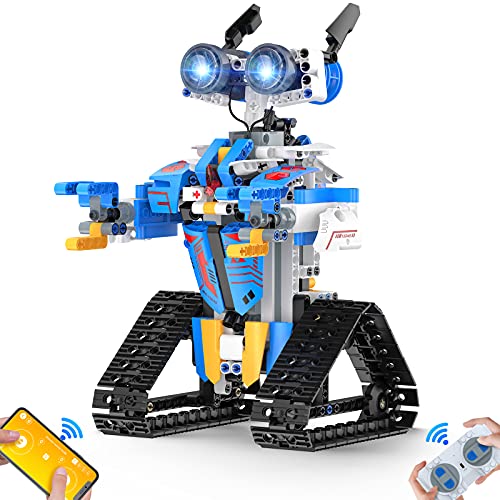
If you’re seeking an engaging and educational gift for kids aged 8 to 16, the Robot Toys with APP or Remote Control STEM Building Block Kit stands out as a top choice. With over 468 pieces, including fun stickers, this kit promotes hand-eye coordination and creativity. It allows kids to build a robot that moves in all directions and features multiple control modes, including Bluetooth APP and voice control. Safety is prioritized with sturdy, non-toxic materials, ensuring a safe play experience. With a 4.6-star rating and easy assembly instructions, it’s an exciting way to reduce screen time while encouraging innovative thinking.
Best For: Kids aged 8 to 16 who enjoy building and programming robots in a fun, educational way.
Pros:
- Promotes creativity, imagination, and hands-on learning through building experiences.
- Offers multiple control modes including Bluetooth APP and voice control for interactive play.
- Made from durable, non-toxic materials ensuring safety during play.
Cons:
- Assembly may be complex for younger kids without adult supervision.
- Requires batteries for remote control functionality, which are not included.
- Some users may find the 468 pieces overwhelming during the initial setup.
STEM RC Robot Building Kit for Kids Ages 8-12
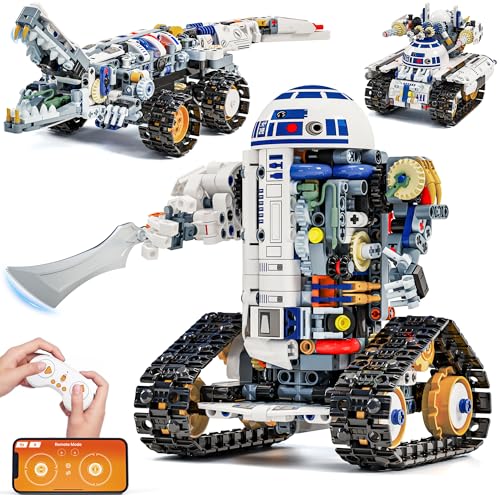
The Glikid STEM RC Robot Building Kit is perfect for kids ages 8-12 who are enthusiastic to explore the world of robotics. With 776 pieces, you can build three different models, including an Automotive Robot and a Mechanical Tank. Control your creation using a 2.4GHz remote or a Bluetooth app with four modes, which enhances your coding skills. You’ll enjoy up to 45 minutes of playtime on a full charge, and the clear instructions make assembly easy. This kit not only fosters fine motor skills but also ignites creativity, making it an ideal gift for any occasion.
Best For: Kids ages 8-12 who are interested in robotics and enjoy hands-on building experiences.
Pros:
- Engaging 3-in-1 design allows for building multiple models, enhancing creativity.
- Control options via remote or app provide a versatile learning experience in coding and robotics.
- Develops essential skills like hand-eye coordination and logical thinking through interactive play.
Cons:
- Requires 2 AAA batteries for the remote, which are not included.
- Limited playtime of 45 minutes on a full charge may require frequent recharging.
- Suitable for a specific age range, potentially limiting use for younger or older children.
Sillbird STEM Robot Building Kit for Kids
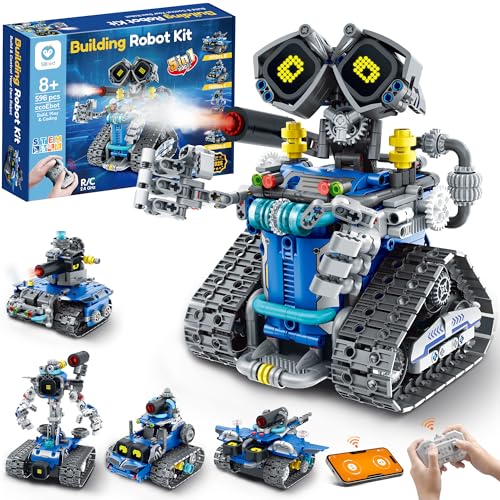
Designed for boys and girls ages 8-14, the Sillbird STEM Robot Building Kit stands out as a fantastic choice for young innovators enthusiastic to plunge into the world of robotics. With 596 pieces, you can build five different models, including a robot, tank, and car. The colorful manual provides clear, step-by-step instructions that cater to varying skill levels. You’ll enjoy interactive features like digital LED eyes and playful sound effects, all manageable through a remote control or Bluetooth app. Plus, the rechargeable battery offers up to 40 minutes of playtime, ensuring hours of fun while enhancing your creative and problem-solving skills.
Best For: The Sillbird STEM Robot Building Kit is best for children ages 8-14 who are interested in hands-on learning and robotics.
Pros:
- Engages kids in STEM learning through interactive building and programming.
- Offers multiple build options and varying difficulty levels to cater to different skill sets.
- Features fun interactive elements like digital LED eyes and sound effects for enhanced play.
Cons:
- Some users may find the assembly process challenging due to the number of pieces involved.
- Playtime is limited to 40 minutes per charge, which may require frequent recharging.
- The mist-spray feature requires water, which may not be convenient for all play environments.
Thames & Kosmos Code+Control Robo Dozr Engineering & Robotics Kit

For kids aged 8 to 14, the Thames & Kosmos Code+Control Robo Dozr Engineering & Robotics Kit offers an engaging way to explore robotics and coding. You’ll build a robotic bulldozer using over 100 durable pieces, including motors, tracks, and a hefty blade. With a wireless controller, you can command your robot in real-time or through saved sequences. The manual provides clear assembly instructions and insights into basic coding and electrical components. As you experiment, you’ll develop skills in mechanical engineering, problem-solving, and design thinking. Just remember, you’ll need six AA batteries (not included) to power your creation!
Best For: Kids aged 8 to 14 who are interested in robotics and coding.
Pros:
- Engaging hands-on experience that promotes STEM learning and skills development.
- Real-time control with a wireless controller enhances interactive play.
- Comprehensive manual provides clear assembly instructions and coding insights.
Cons:
- Requires six AA batteries that are not included in the kit.
- Customer ratings indicate mixed satisfaction with only 3.4 out of 5 stars.
- Best sellers rank suggests it may not be as popular as other educational kits.
Thames & Kosmos Robotics Smart Machines: Rovers & Vehicles STEM Kit

Looking to inspire your budding engineer? The Thames & Kosmos Robotics Smart Machines: Rovers & Vehicles STEM Kit is perfect for kids aged 8 and up. With 233 building pieces, you can create eight motorized robots, including a Shy Turtle and a Dancing Robot. The full-color manual guides you through assembly and programming using a visual app on your tablet or smartphone. This kit not only introduces robotics concepts but also fosters creativity and problem-solving skills. Plus, it’s backed by a one-year warranty and a 30-day return policy. Get ready for hours of educational fun!
Best For: This STEM kit is best for kids aged 8 and up who are interested in robotics and programming.
Pros:
- Encourages hands-on learning and creativity through building and customizing robots.
- Includes a visual programming app that makes coding accessible and fun.
- Comes with a variety of robot models, promoting diverse learning experiences.
Cons:
- Requires a tablet or smartphone for programming, which may not be available to all users.
- Assembly can be time-consuming and may require adult supervision for younger children.
- Batteries are not included, which could be an additional expense.
Thames & Kosmos Kai: The Artificial Intelligence Robot

Thames & Kosmos Kai: The Artificial Intelligence Robot is perfect for kids ages 10 and up who have a curiosity for technology and a knack for building. With this educational STEM kit, you’ll construct a six-legged robot that responds to your gestures and sounds. It features machine learning capabilities, letting it adapt to your inputs. The included app allows you to program movements and even create an AI model to recognize patterns. Plus, the 64-page manual provides engaging instructions. Awarded the 2023 Specialty Toy of the Year, Kai is a fantastic choice for young innovators enthusiastic to explore robotics and AI.
Best For: Kids ages 10 and up who are curious about technology and enjoy hands-on building experiences.
Pros:
- Engaging and educational, introducing concepts of AI and robotics through interactive activities.
- Features machine learning capabilities, allowing the robot to adapt to user inputs and enhance learning.
- Includes a comprehensive app for programming and remote control, making it versatile for creative play.
Cons:
- Requires adult assistance for children under 12, which may limit independent play for younger users.
- The need for 4 AAA batteries may be an additional cost for some buyers.
- The assembly process may be complex for some users, potentially leading to frustration without proper guidance.
Factors to Consider When Choosing Robot Kits With App Control
When you’re choosing a robot kit with app control, consider your child’s age and skill level to guarantee it’s appropriate. Think about the educational value it offers and how complex the assembly process is, as these factors can greatly impact their learning experience. Also, check the control options and programming languages supported to match your child’s interests and capabilities.
Age Appropriateness
Choosing the right robot kit with app control involves considering several key factors, especially age appropriateness. Start by checking the recommended age range, as many kits target kids between 6 and 16. For younger children (ages 6-8), look for simpler designs and controls that nurture basic skills. Kits for older kids (ages 10-16) often feature advanced programming and complex assembly, engaging them more deeply. Manufacturers usually provide clear age recommendations, aligning with developmental milestones. Selecting an age-appropriate kit is essential; it directly influences your child’s interest and success in STEM learning. By matching the kit to your child’s cognitive and motor skill levels, you set them up for a fulfilling and educational experience.
Educational Value
Finding the right robot kit for your child doesn’t just hinge on age; it’s also about the educational value these kits provide. Look for kits that promote STEM learning by incorporating coding, electronics, and robotics. They offer hands-on experiences that foster critical thinking and problem-solving skills. Many kits come with instructional manuals and guided tutorials, making programming accessible for various skill levels, from Scratch to Python. Consider options that encourage creativity through customizable builds, enhancing fine motor skills while exploring engineering principles. Interactive app control features also provide immediate feedback, reinforcing learning through playful trial and error. Finally, choose kits with multiple build options and complexity levels to support your child’s progressive learning journey.
Assembly Complexity
Understanding assembly complexity is essential, especially since it can greatly influence your child’s experience with a robot kit. Different kits offer varying levels of complexity, so you’ll want to choose one that matches your child’s skill level. Look for kits that provide step-by-step illustrated instructions or video tutorials, which can make the building process easier for beginners. Modular components are also a great feature, allowing for simpler assembly and disassembly, reducing errors along the way. Kits that require no soldering are particularly accessible for younger users. Additionally, consider those with detailed manuals and digital resources to support your child as they navigate the assembly process, helping them build confidence and skills as they progress.
Control Options
When evaluating robot kits, consider the control options available, as they can greatly enhance your child’s interaction and learning experience. Many kits offer dual control options, like Bluetooth app control and remote control, providing flexibility during play. App-controlled robots often feature multiple modes, including driving, programming, and sensor-based control, introducing varied learning experiences. Some kits even allow users to create custom commands and programming sequences through their apps, which promotes deeper engagement with coding concepts. Additionally, app-based robots typically have a control distance exceeding 20 meters, allowing for remote exploration. Look for apps that provide real-time feedback and visual programming interfaces, as these tools make it easier for kids to grasp coding logic and understand robot behavior.
Programming Languages Supported
Choosing a robot kit with app control involves considering the programming languages it supports, as this can greatly influence your child’s learning journey. Many kits offer multiple languages, allowing beginners to start with simpler options like Scratch and gradually move on to more complex ones such as Arduino and Python. This variety caters to different skill levels, making robotics accessible for all. Look for kits that include guided tutorials, as they provide structured learning and help build real-world coding skills. Mobile-friendly programming options allow coding on smartphones or tablets, enhancing convenience. Plus, immediate feedback on robot behavior reinforces coding logic, helping your child understand the impact of their programming choices in real-time.
Interactive Features
Interactive features greatly enhance the experience of using robot kits with app control, making the learning process both fun and engaging. Bluetooth app control allows you to command your robot directly, offering real-time feedback on its actions. Look for kits that provide multiple control modes, like path mode, voice control, and gravity sensors, to diversify your play. Some kits even include programming capabilities, enabling you to create sequences of commands that boost your coding skills and logical thinking. Colorful, step-by-step assembly manuals simplify the building process, helping you grasp the mechanics easily. Plus, rechargeable batteries and extended playtimes mean you can enjoy longer, uninterrupted sessions, maximizing your interactive experience with the robot.
Battery Life
Battery life plays an essential role in the enjoyment and utility of robot kits with app control. You’ll want to evaluate how long the robot can run before needing a recharge or battery replacement. Many kits come with rechargeable batteries, offering playtime from 30 minutes to over an hour on a full charge. This allows for extended, uninterrupted use. Some kits may require AA or Lithium Ion batteries, so be sure to check if they’re included or need to be bought separately. Additionally, charging times can vary; some models recharge quickly, while others may take several hours. Understanding these battery specifications helps you plan play sessions, ensuring your robot is ready when inspiration strikes.
Safety Standards
When you’re exploring robot kits with app control, it’s important to take into account safety standards to guarantee a secure play experience for your child. Look for kits made from non-toxic materials free from harmful chemicals. Many reputable kits undergo rigorous testing to meet safety regulations like ASTM and EN71, which check for hazards such as choking, sharp edges, and electrical safety. Confirm the kit includes clear labeling regarding age appropriateness and safety warnings. Opt for designs that minimize small detachable parts to reduce choking risks. Additionally, check if the manufacturer offers a warranty and return policy, which shows their commitment to safety and gives you peace of mind in case of defective or unsafe products.