
If you’re looking to inspire the next generation of technologists, you’ve come to the right place. Robotics kits with AI features can spark creativity and encourage hands-on learning for kids and teens alike. From building smart robot cars to programming advanced robotic arms, there’s a kit for every budding innovator. So, what are the top options that can truly make a difference in their learning journey? Let’s explore.
ACEBOTT Smart Robot Car Kit for Kids (Ages 8–12)

The ACEBOTT Smart Robot Car Kit is perfect for kids ages 8 to 12, offering an exciting blend of fun and education. With a built-in 3MP camera, you can stream real-time video to your smartphone, exploring your surroundings while enhancing your spatial awareness. You’ll love assembling and coding the robot using the ESP32 controller, guided by 16 easy tutorials. As your skills grow, you can expand with additional modules like a robotic arm or solar panel. Experience 360° movement with the high-quality mecanum wheels, controlled via IR remote or smartphone app, promoting independent exploration and problem-solving.
Best For: The ACEBOTT Smart Robot Car Kit is best for kids aged 8 to 12 who are interested in robotics and coding.
Pros:
- Engaging STEM learning experience that enhances spatial awareness and problem-solving skills.
- Includes 16 guided tutorials for easy assembly and coding, making it accessible for beginners.
- Offers modular expansion options to keep kids engaged as they advance their skills.
Cons:
- Some additional modules, like the robotic arm and solar panel, are sold separately, increasing total cost.
- May require adult supervision for younger kids during assembly and coding.
- The complexity of the coding tutorials might be challenging for some kids without prior experience.
SunFounder AI Robot Kit with Raspberry Pi Zero 2 W

For tech enthusiasts and educators looking to explore the world of robotics, the SunFounder AI Robot Kit with Raspberry Pi Zero 2 W stands out with its impressive AI capabilities. This kit features voice command, video recognition, and app control, allowing you to interact seamlessly. With 12 servos, it can perform 32 actions, from walking to head shaking. The ChatGPT-4o integration enhances conversations and even solves math problems. Weighing just 2.12 pounds and powered by rechargeable batteries, it’s portable and user-friendly. Plus, you’ll benefit from extensive online resources and a supportive community to help you on your robotics journey.
Best For: Tech enthusiasts and educators interested in exploring robotics with advanced AI features.
Pros:
- Versatile functionality: Can perform 32 different actions thanks to 12 servos.
- Advanced AI integration: ChatGPT-4o enables natural conversations and math problem-solving through visual recognition.
- Comprehensive support: Access to detailed documentation, video tutorials, and an active community for assistance.
Cons:
- Weight: At 2.12 pounds, it may be less portable compared to lighter robotic kits.
- Limited compatibility: Only compatible with specific Raspberry Pi models, which may restrict some users.
- Learning curve: The complexity of features may require a significant time investment for beginners to fully utilize the kit.
Makeblock mBot2 Coding Robot for Kids

Designed specifically for kids ages 8-12, the Makeblock mBot2 Coding Robot transforms learning into an engaging adventure. With over 8 modes like Drive, Draw and Run, and Voice Control, it keeps your creativity flowing. The robot’s 10+ advanced sensors help it navigate obstacles and recognize colors. You can control it via Bluetooth, USB, or WiFi, providing flexibility. It’s 100% programmable, offering 4 project cards to ease you into coding without prior experience. Plus, with lifelong free programming software, you’ll join millions on a fun STEM journey. Assembly takes just 30 minutes, making it a perfect gift for any occasion!
Best For: Kids ages 8-12 who are interested in coding and robotics.
Pros:
- Engaging hands-on learning experience that promotes creativity and problem-solving skills.
- Offers multiple modes and advanced sensors, allowing for diverse activities and interactions.
- Easy assembly in approximately 30 minutes, making it suitable for various gifting occasions.
Cons:
- May require adult supervision during assembly and initial setup for younger children.
- Some features may be complex for children new to coding without additional guidance.
- Limited advanced programming options compared to more sophisticated robotics kits.
SunFounder PiDog AI Robot Dog Kit for Raspberry Pi
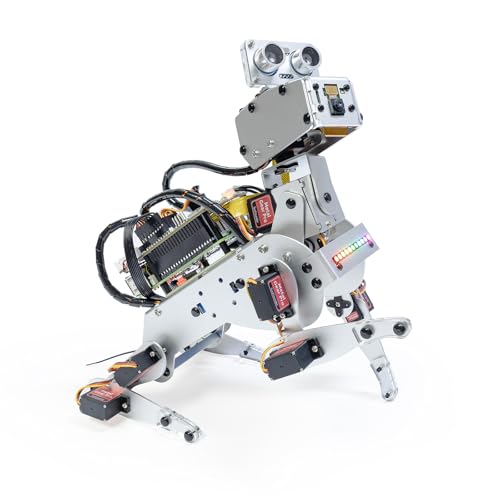
Looking to enhance your robotics skills? The SunFounder PiDog AI Robot Dog Kit for Raspberry Pi is a perfect choice. This interactive AI robot dog features 12 servos, enabling 32 realistic dog-like actions, from walking to playful tricks. Equipped with a camera, gyroscope, and various sensors, it supports OpenCV and MediaPipe for advanced functionality. You can control it via an app, enjoying real-time FPV, and program it using Python. With voice, vision, and gesture recognition, it responds naturally to commands. Plus, you’ll find great online resources and community support to guide you through your creative journey!
Best For: Students, educators, and engineers aged 15 and above who are looking to enhance their robotics skills through interactive programming.
Pros:
- Offers 32 realistic dog-like actions, providing an engaging and lifelike experience.
- Equipped with advanced sensors and AI capabilities for interactive learning and experimentation.
- Includes comprehensive online resources and active community support for troubleshooting and guidance.
Cons:
- Requires familiarity with programming, particularly Python, which may be challenging for beginners.
- The complexity of the kit may be overwhelming for younger users or those new to robotics.
- Limited compatibility with older Raspberry Pi models, restricting access to newer technologies.
ELEGOO UNO R3 Smart Robot Car Kit for Arduino Robotics

The ELEGOO UNO R3 Smart Robot Car Kit is perfect for young tech enthusiasts aged 8 to 16 who want to explore the world of robotics and programming. This STEM kit includes 24 modules, such as obstacle avoidance and line tracing, giving you hands-on experience in electronics and coding. Weighing just 2.7 pounds and measuring 8 x 7 x 6 inches, it’s designed for easy assembly, even for beginners. You can control it with your smartphone and follow HD tutorials for guidance. With a 4.6-star rating from thousands of users, it’s a fantastic choice to spark creativity and innovation!
Best For: Young tech enthusiasts aged 8 to 16 who want to explore robotics and programming.
Pros:
- Easy assembly designed for beginners, making it accessible for kids.
- Includes 24 modules for diverse learning experiences in programming and electronics.
- High customer satisfaction with a 4.6-star rating from over 4,000 users.
Cons:
- Basic electronic knowledge is recommended, which may require guidance for inexperienced users.
- Some components may be challenging for younger children without adult supervision.
- Limited to the features included in the kit, which may not satisfy advanced users.
Robotic Arm AI Vision Voice Control for Arduino STEM Project
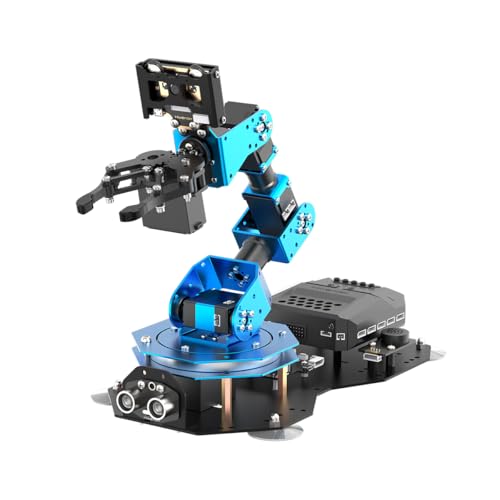
For students and beginners enthusiastic to immerse themselves in the world of robotics, the Robotic Arm AI Vision Voice Control for Arduino STEM Project stands out with its engaging features. This smart robot arm supports Arduino, Scratch, and Python, allowing you to develop essential AI and programming skills. Equipped with the WonderCam for color and facial recognition, and the WonderEcho for voice interaction, this kit enhances your learning experience. Its intelligent servos guarantee precise movements, while the CoreX Controller provides ample development resources. Engage with this innovative project, and release your creativity as you bring your robotic arm to life!
Best For: This product is best for students and beginners eager to explore robotics and develop programming skills.
Pros:
- Supports multiple programming methods (Arduino, Scratch, Python) for versatile learning.
- Equipped with advanced AI features like color recognition and voice control for interactive experiences.
- Provides extensive development resources and tutorials, fostering creativity and innovation.
Cons:
- May require a steep learning curve for complete beginners with no prior programming experience.
- Limited to the capabilities of the included sensors and modules, which may restrict advanced projects.
- Assembly and setup might be time-consuming for users unfamiliar with robotics kits.
Thames & Kosmos Kai: The Artificial Intelligence Robot for Kids

Designed specifically for kids ages 10 and up, Thames & Kosmos Kai: The Artificial Intelligence Robot offers an exciting introduction to the world of AI. This six-legged robot reacts to your gestures and sounds, making playtime interactive and engaging. With an app for iOS and Android, you can customize its movements, like walking and turning. The kit includes a 64-page manual filled with a comic-book story that not only explains its mechanics but also dives into AI’s history and future. Recognized as a top gift, Kai sparks curiosity and creativity in young learners enthusiastic to explore technology and engineering.
Best For: Kids ages 10 and up who are interested in exploring AI concepts through interactive play.
Pros:
- Combines hands-on and digital learning experiences.
- Engaging comic-book style manual that enhances understanding of AI.
- Encourages creativity and curiosity in technology and engineering.
Cons:
- Requires adult assistance for younger users (ages 10-11).
- May have a learning curve for some users unfamiliar with technology.
- Limited functionality compared to more advanced robotics kits.
Makeblock mBot Ranger 3 in 1 Robotics for Kids

A perfect choice for kids ages 8-12, the Makeblock mBot Ranger 3 in 1 Robotics kit offers an exciting way to immerse oneself in the world of robotics and coding. With three designs—Land Raider, Nervous Bird, and Dashing Raptor—you’ll engage in hands-on STEM learning through 16 coding projects. The kit enhances your skills in creativity, problem-solving, and logical thinking while ensuring straightforward assembly with clear instructions. You can program using Scratch or Arduino, progressing from beginner to expert. Built with sturdy materials, it’s perfect for indoor and outdoor adventures, making it an ideal gift for any occasion.
Best For: Kids ages 8-12 who are interested in robotics, coding, and STEM learning.
Pros:
- Engages children with three different robot designs for varied learning experiences.
- Supports both Scratch and Arduino programming languages, catering to different skill levels.
- Durable construction allows for indoor and outdoor play on various terrains.
Cons:
- Requires additional batteries (not included) for operation.
- May need adult supervision for assembly and initial programming.
- Complexity of some projects might be challenging for younger or inexperienced users.
Robotic Arm with Arduino 5DOF/Axis STEM Educational Kit

The Robotic Arm with Arduino 5DOF/Axis STEM Educational Kit is perfect for aspiring engineers and tech enthusiasts who want to immerse themselves in the world of robotics. Built on the Atmega328 platform, this kit is compatible with Arduino programming and offers open-source resources for easier development. With features like a 6-channel knob controller, Bluetooth module, and high-precision servos, you can control your robotic arm through apps or real-time knob adjustments. Plus, multiple expansion ports let you integrate various sensors, revealing endless project possibilities. Engage in coding, engineering, and creativity with this versatile educational tool!
Best For: Aspiring engineers and tech enthusiasts looking to explore robotics and programming through hands-on experience.
Pros:
- Open-source: Provides access to tutorials and development examples for easy learning and customization.
- Versatile control options: Supports both app control and real-time knob adjustments for flexible operation.
- Expandable: Multiple ports for sensor integration allow for innovative project development.
Cons:
- Complexity for beginners: May be challenging for those with no prior experience in robotics or programming.
- Limited pre-built projects: Requires users to design their own projects, which may be daunting for some.
- Dependency on additional components: To fully utilize its capabilities, users may need to purchase additional sensors and modules.
LeRobot SO-ARM101 Pro AI Robotic Arm Kit

For AI robotics enthusiasts and developers seeking a hands-on experience, the LeRobot SO-ARM101 Pro AI Robotic Arm Kit stands out with its advanced features and low-cost design. This 6-DOF, open-source arm is optimized for projects involving NVIDIA Jetson and supports both imitation and reinforcement learning. Enhanced wiring prevents disconnections, while optimized gear ratio motors guarantee smooth operation. With real-time tracking, the leader arm can follow the follower arm, making training easier. Thorough guides are included, covering assembly, calibration, and AI training, empowering you to explore robotics applications effectively. It’s the perfect DIY solution for your innovative robotics journey.
Best For: AI robotics enthusiasts, developers, and researchers looking for a low-cost, DIY-friendly solution to explore advanced robotics applications.
Pros:
- Open-source design allows for extensive customization and adaptability.
- Enhanced wiring and optimized motors improve performance and reliability.
- Comprehensive learning resources support users from assembly to AI training.
Cons:
- Lacks 3D printed parts, which may be a drawback for some users.
- Compatibility limited to specific Nvidia Jetson devices.
- May require a learning curve for those new to robotics and AI development.
Factors to Consider When Choosing Robotics Kits With AI Features
When you’re choosing a robotics kit with AI features, several factors come into play. Consider the age appropriateness, as it can greatly influence how well the kit suits your needs. You’ll also want to look at the available learning resources, programming language support, and options for expansion and customization to guarantee an engaging experience.
Age Appropriateness
How do you choose the right robotics kit with AI features for your child? Start by considering the target age group, as many kits are tailored for kids aged 8 to 16, ensuring they match your child’s development stage. Look for kits that offer simplified assembly instructions and coding tutorials, perfect for beginners. Younger children will benefit from kits focusing on basic concepts and hands-on learning, while older kids might enjoy more advanced programming languages. Evaluate the educational value, as age-appropriate kits often align with STEM objectives suited to their cognitive abilities. Finally, engaging features like voice control and AI interactions can hold the attention of older children, so choose wisely to match their interests and capabilities.
Learning Resources Available
Selecting a robotics kit with AI features requires careful consideration of the available learning resources, as these can greatly enhance your child’s experience. Look for kits that provide thorough online documentation, video tutorials, and community forums to help you navigate the technology effectively. Many kits offer story-based tutorials and project cards, making it easier for beginners to learn coding and assembly without prior experience. Access to educational materials, such as manuals and interactive guides, supports skill mastery in programming languages like Scratch and Python. Additionally, active online communities foster collaborative learning, allowing users to share experiences and seek assistance. Kits with programming software offering lifelong free access guarantee ongoing exploration and skill development in robotics and AI.
Programming Language Support
Choosing a robotics kit with AI features means paying close attention to the programming language support, as it can considerably impact your learning experience. Look for kits that support popular languages like Python, Scratch, or Arduino, which can ease your learning curve. Many kits offer various programming options, allowing you to start with visual programming and gradually tackle more complex code as your skills grow. Open-source support increases flexibility, enabling you to customize projects to fit your needs. Additionally, consider the available learning resources and tutorials for different programming languages, as they can enhance your understanding of robotics concepts. Finally, think about the complexity of the language and materials to guarantee the kit suits your age and skill level.
Expansion and Customization Options
When considering robotics kits with AI features, you’ll want to pay attention to the expansion and customization options they offer. Many kits support modular expansion, allowing you to add components like robotic arms, sensors, and solar panels to enhance functionality. Customization is key; look for kits that support programming languages such as Python or Scratch, letting you tailor projects to your skill level. Some kits come with coding tutorials and project cards, guiding you through assembly and programming while sparking creativity. Additionally, certain robotics kits allow real-time interaction through smartphone apps, promoting independent exploration. The ability to integrate extra sensors and modules can greatly boost your kit’s capabilities and keep you engaged in advanced STEM learning as you progress.
Interactivity and Engagement
Expanding on the customization options, interactivity plays a significant role in elevating your experience with robotics kits featuring AI. With voice commands, gesture recognition, and real-time feedback, you’ll find yourself more engaged and actively learning. The AI capabilities, including visual recognition and natural language processing, allow your robot to respond dynamically to your inputs, making interactions feel immersive. Look for kits that support app control and programmable actions, so you can tailor your robot’s responses and foster your creativity. Sensors for touch, sound, and movement enhance responsiveness, turning playtime into a more educational experience. Plus, interactive tutorials and project-based resources encourage hands-on exploration, solidifying your understanding of robotics concepts through practical application.
Assembly Complexity
Understanding assembly complexity is essential for selecting the right robotics kit with AI features, as it directly impacts your experience and learning. Assembly complexity varies widely; some kits can be put together in about 30 minutes, while others require more time and technical know-how. Kits aimed at younger users usually have simpler assembly processes and clear, step-by-step instructions, making them great for beginners. In contrast, advanced kits might involve modular components and intricate wiring, enhancing your learning but potentially challenging less experienced users. Additionally, online tutorials and community support can help you overcome assembly hurdles. Always evaluate the assembly complexity based on your age and experience level to guarantee a rewarding and educational experience.
Technical Support Access
After considering assembly complexity, you should think about the technical support access that comes with robotics kits featuring AI. Detailed online documentation is essential; it’ll help you understand the product’s functionalities and setup processes. Look for kits that offer video tutorials, as these can make assembly and programming much easier, especially for beginners. A responsive technical support team is crucial for resolving any issues you encounter during your project. Additionally, community forums or active user groups can provide peer support, allowing you to share experiences and troubleshoot problems collaboratively. Finally, thorough learning resources, including diverse programming methods and project ideas, will greatly enhance your educational experience, ensuring you fully leverage the kit’s AI capabilities.