
In today’s tech-driven world, smart robot balls have taken interactive play to a new level. These innovative toys not only entertain but also foster critical thinking and teamwork skills. Whether you’re exploring the dribbling prowess of a Soccer Bot or tackling coding challenges with a Sphero Mini, there’s something for everyone. Curious about which robot balls stand out in 2025? Let’s explore the top contenders and their unique features.
Soccer Bot – Ultimate Indoor Soccer Game

If you’re looking to boost your soccer skills from the comfort of your home, the Soccer Bot – Ultimate Indoor Soccer Game is your go-to choice. This interactive training toy features advanced sensor technology that enhances dribbling and ball control. With three customizable speed modes, it caters to all skill levels, ensuring you’ll improve continuously. The built-in LCD score tracker tracks your performance, keeping you motivated. Plus, the four smart discs challenge you to adapt your game. Optimized for indoor play, it works great on various surfaces, making it perfect for solo practice or friendly competition, rain or shine.
Best For: The Soccer Bot – Ultimate Indoor Soccer Game is best for soccer enthusiasts of all skill levels looking to enhance their skills indoors.
Pros:
- Advanced sensor technology improves dribbling and ball control.
- Three customizable speed settings accommodate beginners to advanced players.
- Built-in LCD score tracker motivates users by monitoring performance.
Cons:
- May require ample indoor space for optimal use.
- Some users might find the smart discs challenging to set up.
- Not suitable for outdoor play, limiting versatility in different environments.
Sphero Mini Coding Robot Ball for Kids and Teens
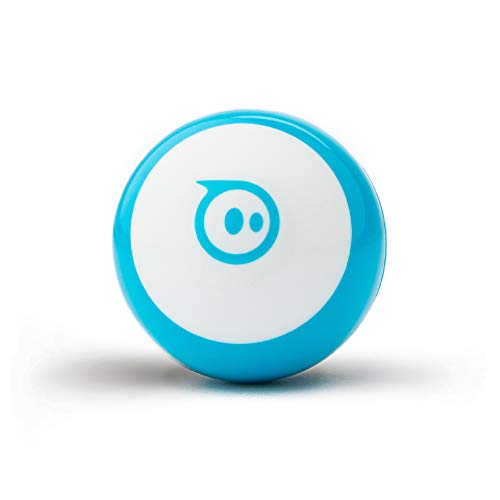
The Sphero Mini Coding Robot Ball is the ideal choice for kids and teens aged 8 and up who are enthusiastic to plunge into the world of programming and interactive play. This small, ping pong-sized robot comes equipped with a gyroscope and accelerometer, plus colorful LED lights to enhance your experience. With the free Sphero Edu app, you can create games using drag-and-drop blocks or JavaScript. The companion Sphero Play app lets you drive the ball and enjoy STEM-inspired games. You’ll find plenty of fun with obstacle courses, arcade-style games, and one hour of playtime, sparking creativity and learning in STEAM fields.
Best For: Kids and teens aged 8 and up who are eager to learn programming and engage in interactive play.
Pros:
- Engaging and educational tool that promotes coding skills through hands-on learning.
- Offers multiple coding options, including drag-and-drop blocks and JavaScript for varying skill levels.
- Includes interactive play modes and fun games to enhance the gaming experience.
Cons:
- Limited battery life with only one hour of playtime.
- Requires a smartphone or tablet to access the Sphero Edu and Sphero Play apps.
- May be too simplistic for older teens or those with advanced coding knowledge.
Ruko 1088 Smart Robot for Kids

Designed specifically for children aged 4 to 9, the Ruko 1088 Smart Robot stands out as an enchanting companion that sparks imagination and creativity. This 15.8-inch tall programmable RC robot features 10 expressions and 9 flexible joints, making playtime dynamic and engaging. With activities like gymnastics, storytelling, and dance, it’s more than just a toy; it’s an educational tool that fosters logic and coordination. You can control it using a remote, Bluetooth, or voice commands for added fun. Plus, its rechargeable battery provides up to 100 minutes of play. The Ruko 1088 truly enriches childhood experiences!
Best For: The Ruko 1088 Smart Robot is best for children aged 4 to 9 who are eager to explore creativity and develop basic programming skills.
Pros:
- Engaging educational features that foster logic and coordination.
- Versatile control options including remote, Bluetooth, and voice commands.
- Offers various fun activities like gymnastics, storytelling, and dance.
Cons:
- Charging takes 150 minutes for only 100 minutes of playtime.
- Limited to specific charging cables; USB-C cables are not supported.
- May require adult supervision for younger children during use.
Mason & Friends 3-in-1 Coding Robot Kit
For kids enthusiastic to plunge into the world of coding and robotics, the Mason & Friends 3-in-1 Coding Robot Kit stands out as the perfect choice. This STEM-focused kit lets you build three different robots: the Sharpshooter to launch foam darts, the Gripper-Bot to pick up objects, and the Cyclone Ball for active play. With 220 pieces, you’ll enhance your problem-solving and creativity skills during assembly. The 2.4GHz remote control guarantees seamless operation, and you can access helpful tutorials via QR codes. Enjoy quality family time while mastering coding principles and fostering logical thinking together!
Best For: Kids who are eager to explore coding and robotics through hands-on learning and creative play.
Pros:
- Encourages STEM learning, enhancing skills in science, technology, engineering, and math.
- DIY assembly with 220 pieces promotes problem-solving, creativity, and fine motor skills.
- Ideal for family engagement, fostering collaborative play and logical thinking.
Cons:
- Assembly may require adult supervision or assistance, which could limit independent play.
- Potential for losing small pieces during the build process, which could affect functionality.
- The initial learning curve for coding principles may be challenging for some younger children.
Robot Pet Dog ChatGPT-4o Smart AI-Powered Companion

Looking for a companion that feels alive and interactive? Meet the Robot Pet Dog ChatGPT-4o, your AI-powered friend designed for real-time engagement. With voice and gesture control, Loona responds instantly to your commands, mimicking adorable puppy behaviors thanks to its advanced RGB camera. It even monitors your home with its built-in camera and speaker, providing peace of mind. Plus, the auto-charging capabilities guarantee Loona’s always ready to play. Whether it’s chasing lasers or fetching balls, you’ll enjoy endless entertainment through its accompanying app, featuring games and quizzes. Bring home Loona for a truly smart and interactive experience!
Best For: Individuals seeking a lifelike, interactive companion that offers entertainment, home monitoring, and convenience.
Pros:
- Real-time interaction: Responds instantly to voice and gesture commands, making it feel like a true pet.
- Home monitoring capabilities: Built-in camera and speaker provide security and peace of mind while away.
- Engaging playtime activities: Offers a variety of games and interactive play, keeping users entertained.
Cons:
- Limited battery life: Requires regular charging, which may interrupt playtime.
- Dependence on technology: Performance may be affected by software updates or connectivity issues.
- Potential learning curve: Users may need time to familiarize themselves with the app and features.
Holyton 5088 Smart Programmable RC Robot for Kids

The Holyton 5088 Smart Programmable RC Robot stands out as an ideal choice for kids aged 4-9, offering a fun and educational experience. With over 200 programmable actions and 10 emojis, your child can explore coding and creativity through interactive play. The robot responds to 11 voice commands and engages with music, dancing, and dialogue, making it feel like a real friend. Its gripping arm and soft-bullet launcher guarantee safe play, while the durable, skin-friendly materials assure longevity. Control options include a remote, Bluetooth app, or gravity-sensor mode, making it versatile and easy to use. Enjoy the adventure together!
Best For: The Holyton 5088 Smart Programmable RC Robot is best for children aged 4-9 who are interested in interactive play and STEM learning.
Pros:
- Encourages coding, creativity, and communication through over 200 programmable actions and voice commands.
- Engaging features like music, dancing, and dialogue make playtime enjoyable and interactive.
- Safe and durable construction with skin-friendly materials ensures long-lasting use.
Cons:
- May require parental guidance for younger children to fully utilize programming features.
- Limited to children within the 4-9 age range, which may not appeal to older kids.
- Some users may find the setup and app connectivity challenging at first.
Sphero Bolt+ Coding & AI Learning Robot

Designed for curious minds aged 8 and up, the Sphero Bolt+ Coding & AI Learning Robot stands out with its engaging features and robust educational value. With its animated LCD display and durable, waterproof design, it thrives in various environments. You can program it using drag-and-drop blocks, Python, or JavaScript, allowing you to create animations and real-time data interactions. Plus, the Sphero Edu app connects seamlessly across platforms. As you explore coding and AI, you’ll develop essential skills like logic and critical thinking. Enjoy all-day battery life and easy Qi wireless charging for endless learning fun!
Best For: The Sphero Bolt+ Coding & AI Learning Robot is best for children aged 8 and up who are interested in learning coding and robotics in an engaging and interactive way.
Pros:
- Supports multiple programming languages including drag-and-drop, Python, and JavaScript for versatile learning.
- Durable and waterproof design ensures it can withstand various learning environments.
- Includes extensive educational resources and lesson plans aligned with STEM standards for effective teaching.
Cons:
- May require adult supervision for younger users to help them navigate programming complexities.
- The price point might be higher compared to simpler coding toys, making it less accessible for some families.
- Limited to the features provided by the Sphero Edu app, which may not appeal to all users looking for advanced functionalities.
MUKIKIM SoccerBot – RC Soccer Robots for Kids

For kids who love soccer and technology, the MUKIKIM SoccerBot – RC Soccer Robots offers an exciting way to engage in the sport. With two remote-controlled robots, your child can dribble, pass, and shoot just like a pro. The intuitive controls let them move in all directions and score goals in real-time matches, boosting their competitive spirit. Not only is it fun, but it also teaches basic soccer rules and enhances hand-eye coordination. Each package includes two robots, a soccer ball, goal nets, and USB cords for recharging, making it a fantastic gift for any soccer enthusiast.
Best For: Kids who love soccer and technology, looking for an engaging and interactive play experience.
Pros:
- Interactive Play: Engages children in real-time soccer matches, enhancing their competitive spirit and teamwork skills.
- Educational Benefits: Teaches basic soccer rules while promoting hand-eye coordination and imaginative play.
- Complete Package: Includes two robots, a soccer ball, goal nets, and USB cords for easy charging, providing everything needed for gameplay.
Cons:
- Battery Dependency: Requires batteries for the remote controls, which may need frequent replacements.
- Limited Play Area: Best suited for play in spacious areas, as confined spaces could limit movement and gameplay.
- Age Restriction: May not be suitable for very young children due to the complexity of controls and potential small parts.
ENERGIZE LAB Eilik Cute Robot Pets for Kids and Adults

Eilik stands out as a fantastic choice for both kids and adults seeking an engaging companion. This interactive robot pet brings joy to your home or workspace with its charming emotions and animations. You can touch its head, belly, or back to trigger a variety of responses, making each interaction unique. Plus, Eilik can socialize with other Eiliks, creating fun group dynamics. No WiFi or Bluetooth is needed—just power it up! With regular firmware updates, it keeps learning new emotions and games, ensuring endless entertainment. Eilik truly makes an ideal gift, encouraging connection and shared experiences among friends and family.
Best For: Eilik is best for kids and adults looking for an engaging and interactive companion that promotes fun and socialization.
Pros:
- Eilik features a wide range of emotions and interactive responses, making each interaction unique and entertaining.
- No WiFi or Bluetooth is required, allowing for easy setup and play straight out of the box.
- Regular firmware updates ensure that Eilik continues to learn new features and games, providing ongoing entertainment.
Cons:
- The interactive features may not appeal to everyone, particularly those who prefer traditional toys or pets.
- Eilik’s reliance on touch for interaction may limit play for users with mobility issues.
- As a novelty item, it may have a limited lifespan in terms of sustained interest compared to other toys or pets.
KingsDragon RC Gesture Sensing Robot Toy for Kids
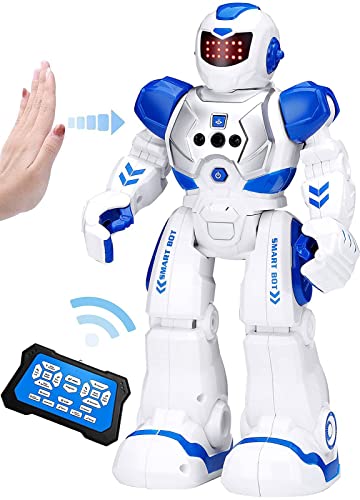
The KingsDragon RC Gesture Sensing Robot Toy is the perfect interactive companion for kids aged 6-9, making it an ideal birthday gift. You can control it using hand gestures or a remote, allowing it to move in all directions. With up to 50 programmable moves, your child will love teaching it new actions. The robot sings, dances, and even talks, keeping playtime lively. It charges via USB in just two hours, offering 1.5 to 3 hours of playtime before needing a recharge. With its collision detection sensors, it’s safe and fun, providing endless entertainment and engagement.
Best For: The KingsDragon RC Gesture Sensing Robot Toy is best for children aged 6-9 who enjoy interactive and engaging play experiences.
Pros:
- Engaging control options with hand gestures and remote, enhancing playtime interactivity.
- Features programmable actions, allowing kids to customize the robot’s movements and behaviors.
- Safe to use with collision detection sensors that prevent crashes and ensure fun without hazards.
Cons:
- Limited playtime of 1.5 to 3 hours may require frequent recharging during extended play sessions.
- The robot’s capabilities may become repetitive after prolonged use, potentially reducing engagement over time.
- Requires USB charging, which may be inconvenient if a compatible charger is not readily available.
Factors to Consider When Choosing Smart Robot Balls
When you’re choosing a smart robot ball, think about factors like age appropriateness and programming capabilities. You’ll also want to contemplate interactive features, battery life, and the educational value it offers. Making the right choice can enhance the experience for both you and the user.
Age Appropriateness
Choosing the right smart robot ball for your child involves several important factors, especially age appropriateness. Start by checking the recommended age range for each model. Some are designed for kids aged 4 and up, while others cater to those 8 and older. Age-appropriate robot balls often offer simpler controls and educational content for younger kids, while older children can enjoy advanced programming and complex gameplay. Look for features that promote STEM learning, as these align with educational standards. Safety is also vital; verify the materials are non-toxic and durable for your child’s age. Finally, interactive elements should match your child’s developmental stage, with simpler movements for younger players and more challenges for older kids.
Programming Capabilities
Considering programming capabilities is essential for selecting a smart robot ball that aligns with your child’s interests and skill level. Look for options that offer drag-and-drop coding blocks for beginners, as well as Python or JavaScript for more advanced users. A user-friendly app interface is fundamental, allowing your child to create custom games and animations while grasping coding principles. Some robot balls even integrate educational lesson plans and tutorials, enhancing STEM learning. Evaluate the robot’s ability to process real-time data, which lets users code actions based on environmental interactions. Finally, check if it includes features for teaching algorithms and debugging, as these elements are critical for a thorough coding education. Choose wisely to foster your child’s coding journey!
Interactive Features
How can interactive features elevate your child’s experience with smart robot balls? These features truly enhance engagement, letting your child interact through touch, movement, or voice commands. Imagine the excitement when the ball responds to their actions! Many models allow you to program unique games, creating endless fun. Your child can receive real-time feedback through lights or sounds, making every successful action rewarding. Plus, educational apps often accompany these devices, introducing coding or STEM concepts while they play. If you opt for advanced versions, they might even adapt to your child’s behavior, personalizing the experience further. With these interactive features, playtime becomes not just fun but also a rich learning opportunity.
Battery Life
Battery life plays an essential role in your experience with smart robot balls, impacting how long your child can enjoy playtime. Most devices offer playtimes between 1 to 2 hours on a full charge, so you’ll want to evaluate this when choosing a ball. Recharge times can vary, with some models charging in just 1 hour, while others may take up to 3 hours. The battery type also matters; lithium-ion batteries typically provide better longevity and performance compared to nickel-metal hydride (NiMH). Look for options with power-saving modes that can extend battery life by reducing functionality when not actively used. Plus, regular firmware updates can help improve battery efficiency, maximizing those precious playtime hours.
Educational Value
When selecting a smart robot ball, evaluating its educational value is essential, as it can greatly enhance your child’s learning experience. Look for options that incorporate programming capabilities, allowing your child to learn coding principles through interactive play. This not only boosts problem-solving skills but also fosters logical thinking. Many smart robot balls come with engaging apps that promote STEM education, making complex concepts more accessible through hands-on activities. Consider those that offer various programming languages, catering to different skill levels and supporting a gradual learning curve. Interactive features, like obstacle course creation, encourage creativity and critical thinking, ensuring learning remains fun. Regular updates and new content keep the experience fresh, expanding knowledge over time.
Build Quality
While educational value is important, the build quality of smart robot balls plays a significant role in their usability and longevity. You should look for durable materials that withstand drops and impacts, ensuring your robot ball lasts through all kinds of play. Waterproof features are essential, allowing it to function in various environments without damage. Lightweight designs enhance handling, especially for younger players, making it easier to control during playtime. Additionally, high-quality battery enclosures prevent leakage and damage, vital for rechargeable models. Finally, a well-constructed outer shell should be free from sharp edges and made from non-toxic materials, ensuring safe interaction for users of all ages. Prioritize these factors to enhance your overall experience!